


Turn every policy into automated workflows with built-in enforcement and audit-ready proof.



10 Best Typeform Alternatives & Competitors in 2026

Typeform alternatives are worth comparing when the form experience is only one part of the job. Typeform is strong at conversational forms, surveys, quizzes, AI-assisted form creation, and branded respondent experiences. If that is the whole requirement, staying with Typeform can be the right call.
The search for an alternative usually starts when the work around the form changes. A lead form needs routing. An onboarding form needs owners. A vendor questionnaire needs evidence. A policy attestation needs approval. A customer survey needs analysis. A high-volume intake flow needs a free or lower-friction response model.
This comparison is neutral by design. The right tool depends on whether you need a better public-facing form, a more generous free plan, a Google or Microsoft-native collection surface, advanced survey analysis, document and signature workflows, or a process system that turns responses into controlled recurring execution.
The evaluation criteria are practical: form-building experience, workflow capability after submission, free plan usefulness, pricing model clarity, integrations, governance, and fit for recurring operations. Process Street ranks first for teams whose core need is enforceable, trackable, recurring SOP and approval workflows. For pure form design, survey research, or basic free data collection, a specialist may be the cleaner choice.
In this article, we are going to cover:
- Typeform alternatives at a glance
- How to choose Typeform alternatives
- Best Typeform alternatives and competitors
- Which Typeform alternative fits your use case
- Typeform alternatives FAQs
Typeform alternatives at a glance
The table below gives the short version before the deep dives. It does not claim that one product is universally better than every other product. It ranks tools by fit for teams comparing Typeform against alternatives for forms, surveys, intake, approvals, and recurring business workflows.
| Tool | Best for | Standout feature | Free plan | Starting price |
|---|---|---|---|---|
| Process Street | recurring intake, SOP, approval, and compliance workflows | workflow runs with required fields, approvals, conditional logic, evidence, and audit history | 14-day Pro trial | See pricing page |
| Jotform | template-rich forms, payments, registrations, and broad form collection | drag-and-drop form builder with payments, app integrations, and a free Starter plan | Yes | Free Starter plan |
| Google Forms | simple free forms inside Google accounts and Google Workspace | forms and surveys with response summaries and Google Sheets-friendly analysis | Yes | Free with a Google account |
| Microsoft Forms | Microsoft 365 surveys, polls, quizzes, and internal forms | Microsoft survey, poll, quiz, and questionnaire builder for web use | Yes | Free Microsoft form tool |
| SurveyMonkey | survey programs that need analysis, exports, logic, and reporting | survey, form, and quiz plans with Basic, Standard, Advantage, and Premier options | Yes | Basic plan is free |
| Tally | generous free forms with a document-style editor | unlimited forms and submissions on the free plan within fair usage guidelines | Yes | Free plan available |
| Fillout | modern forms, surveys, quizzes, embeds, and database-connected intake | forms, surveys, quizzes, embeds, and response storage across free and paid plans | Yes | Free plan available |
| Paperform | branded form pages, order forms, payments, and SMB intake | page-style form builder with free and paid plan paths | Yes | Free plan available |
| Qualtrics | enterprise research, customer experience, and experience management programs | experience management suites with flexible pricing and a free survey account path | Yes | Contact sales or use free account |
| Formstack | secure business forms plus documents, signatures, and Salesforce-centered workflows | Forms, Suite, Salesforce, and Enterprise plan tracks with a Forms trial | Free trial | See pricing page |
How to choose Typeform alternatives
Start by deciding whether your real problem is the respondent experience, the response volume, or the process after the response. If you only need a quick survey, Google Forms or Microsoft Forms may be enough. If you need a more generous free form builder, Tally or Fillout may be stronger. If the response needs to trigger a recurring controlled workflow, compare workflow automation platforms and workflow management software instead of only comparing form builders.
Teams often outgrow a form tool when responses need owners, due dates, required evidence, exception handling, and approval records. In those cases, the form is intake. The operating system is the workflow. That is where a workflow management system or process platform becomes more relevant than a standalone form editor.
- Choose a conversational form builder when completion rate, design, and public respondent experience are the main risk.
- Choose a free form builder when response limits, budget, and speed matter more than workflow governance.
- Choose a survey platform when research design, analysis, exports, and respondent management are the main job.
- Choose a suite tool when the form data must stay inside Google, Microsoft, Salesforce, or a broader business system.
- Choose a workflow platform when each submission must become assigned, tracked, approved, and auditable work.
A practical stack can include more than one product. A team might keep a polished public form, then route important responses into workflow automation tools or a controlled form organizer workflow. Teams also compare Jotform alternatives when the buying question is still centered on form-building depth rather than process execution.
Best Typeform alternatives and competitors
1. Process Street
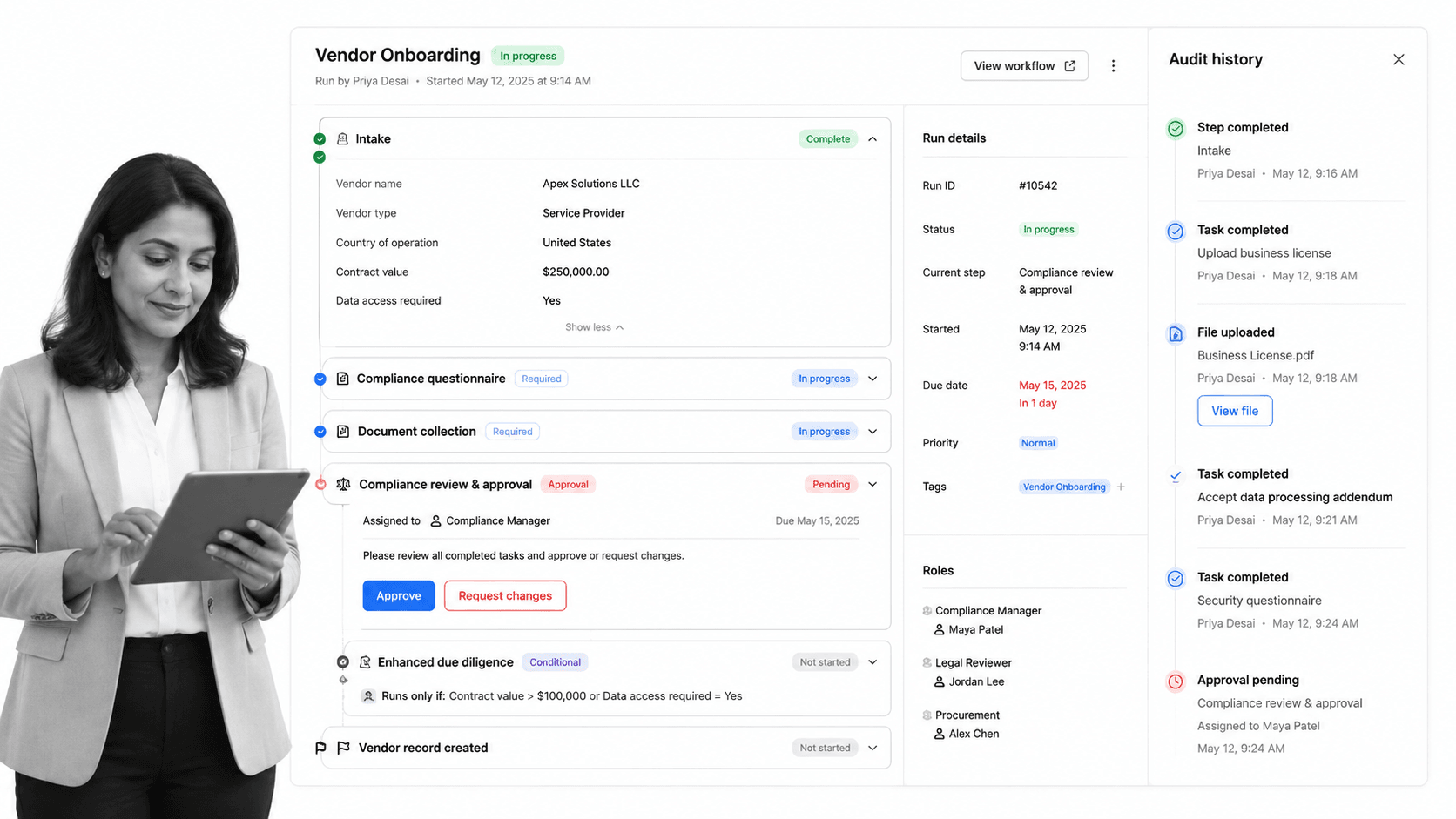
Best for: recurring intake, SOP, approval, and compliance workflows.
Process Street is the best Typeform alternative when a form response needs to become accountable internal work. It is the strongest fit for teams that need intake to become assigned, enforceable, repeatable work with owners, required steps, approvals, conditional logic, evidence collection, and a run history.
That distinction matters for HR onboarding, client intake, vendor reviews, incident reports, compliance attestations, finance approvals, internal requests, and quality checks. A conversational form can collect clean answers. Process Street turns those answers into a workflow people have to complete correctly.
Process Street is not trying to be the prettiest public survey builder, a pure research suite, or a simple free questionnaire tool. It is a Compliance Operations Platform for operators who need to enforce what happens after the request arrives. If your form creates accountable internal work, that execution layer is the buyer requirement.
Use Process Street pricing for current plan details. The public pricing page shows Startup, Pro, and Enterprise plan tracks and a 14-day Pro trial. For teams evaluating implementation, the useful question is not only monthly price. It is whether missed steps, incomplete approvals, or scattered evidence cost more than a controlled workflow.
Process Street key features:
- Structured workflow runs with owners, due dates, required fields, and conditional logic.
- approval tasks that keep review inside the workflow instead of a separate inbox.
- File collection, comments, task history, and audit trails for operational proof.
- Recurring schedules and automations that keep repeatable intake workflows moving.
- Template-ready processes such as an employee onboarding checklist, client onboarding checklist, content approval workflow, and incident report template.
Process Street pros:
- Excellent fit when a form response must trigger human accountability.
- Readable enough for operations, HR, compliance, finance, customer, and IT teams to own.
- Keeps intake, tasks, approvals, evidence, and history in one workflow record.
- Better for recurring SOPs than a spreadsheet of responses.
- Strong fit for teams standardizing work across departments.
Process Street cons:
- Not the simplest choice when all you need is a lightweight public survey.
- Not a dedicated survey analytics platform for advanced research programs.
For current package details, see the vendor pricing page. If the only job is a polished public survey, Typeform, Tally, Fillout, Paperform, SurveyMonkey, or Google Forms may be simpler.
2. Jotform
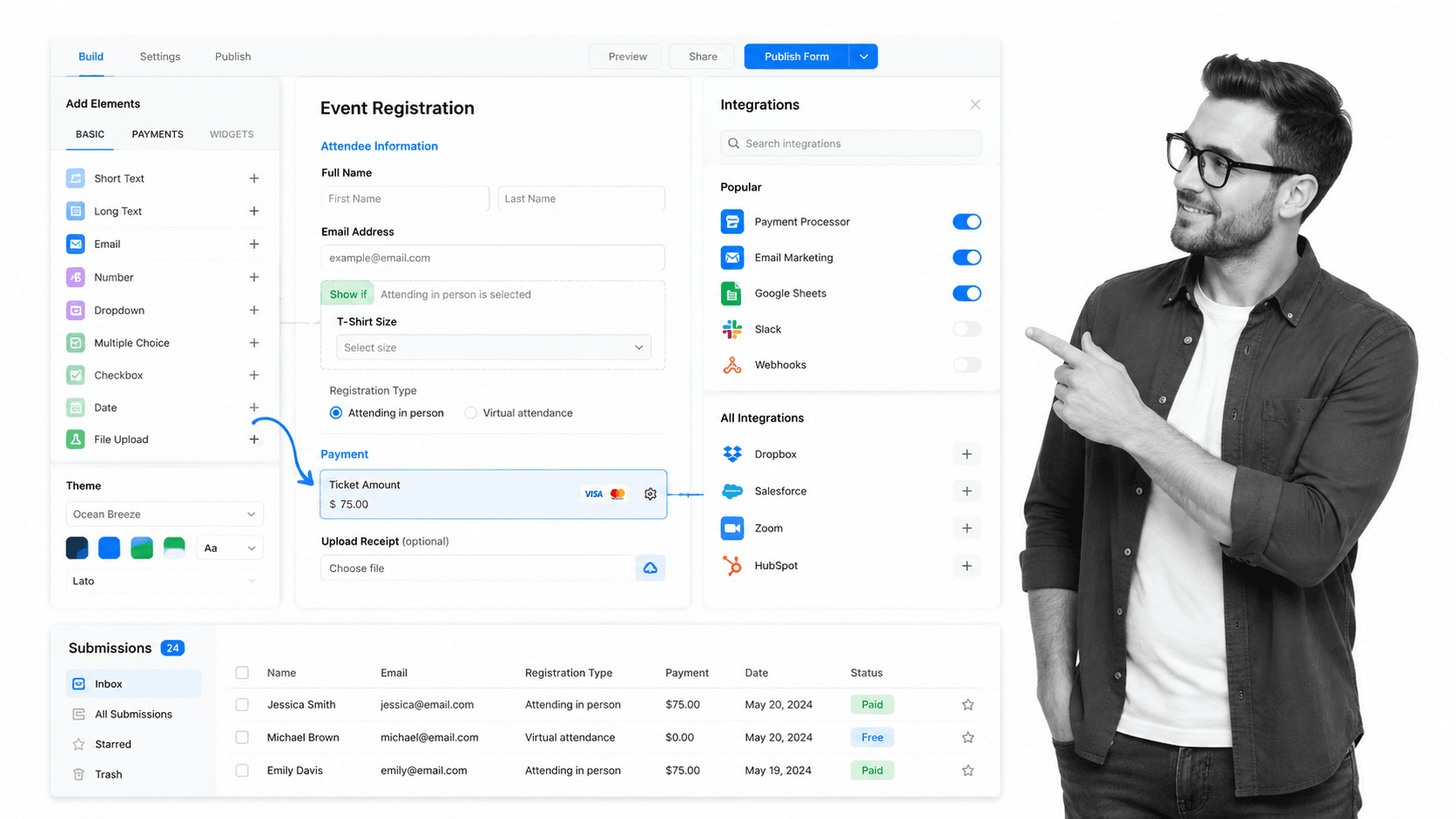
Best for: template-rich forms, payments, registrations, and broad form collection.
Jotform is a broad online form builder for teams that want templates, registrations, applications, payments, and standalone data collection. Its own pricing page lists a free Starter plan and paid plan paths.
It beats Process Street when the form itself is the product: a public registration page, payment form, application, or simple data collection surface. It is weaker when the submission needs to become a recurring internal workflow with required approvals and proof.
Jotform key features:
- Drag-and-drop form builder.
- Templates for common collection use cases.
- Payment collection and form app integrations.
- Free Starter plan and paid upgrade paths.
Jotform pros:
- Broad form-building coverage.
- Good fit for payments and registrations.
- Useful template starting point for non-technical teams.
Jotform cons:
- Standalone submissions can still require manual follow-up.
- Not focused on SOP enforcement after intake.
For current package details, see Jotform pricing. Jotform is a better fit when the team needs a broad template library, payments, and standalone form collection more than workflow enforcement.
3. Google Forms

Best for: simple free forms inside Google accounts and Google Workspace.
Google Forms is the simplest option for teams already using a Google account or Google Workspace. Google’s product page frames it around creating forms and surveys, gathering data, and analyzing responses from anywhere.
It beats Process Street when the team needs a quick free form, a classroom survey, an internal questionnaire, or data flowing into Google Sheets. It is weaker when request handling needs approvals, owners, due dates, and an auditable workflow record.
Google Forms key features:
- Simple form and survey creation.
- Real-time response summaries.
- Collaboration with Google account users.
- Google Sheets response workflows.
Google Forms pros:
- Fast and familiar.
- Strong no-cost starting point.
- Works naturally with Google Sheets.
Google Forms cons:
- Limited workflow enforcement after submission.
- Less suited to compliance-heavy internal process control.
For current package details, see Google Forms pricing. Google Forms is a better fit when speed, cost, and Google Sheets handoff matter more than respondent polish or workflow control.
4. Microsoft Forms
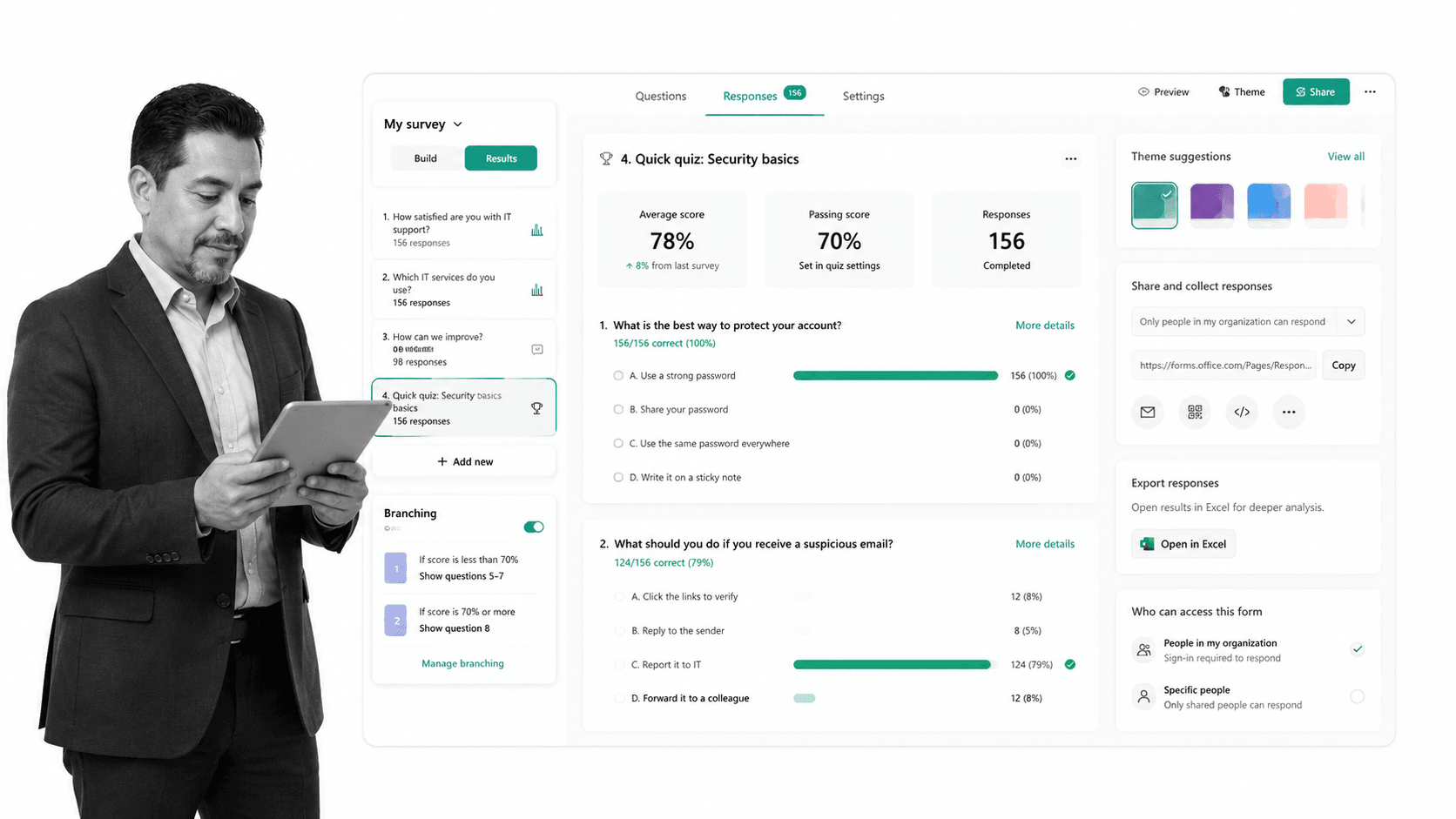
Best for: Microsoft 365 surveys, polls, quizzes, and internal forms.
Microsoft Forms gives Microsoft teams a built-in surface for surveys, polls, quizzes, and questionnaires. Microsoft’s forms site describes it as a free survey tool, while Microsoft service documentation lists availability across business, enterprise, education, frontline, and OneDrive for Business plan families.
It beats Process Street when forms should remain inside Microsoft accounts and Microsoft 365 administration. It is weaker when the process after a response needs a guided workflow, evidence collection, or cross-department SOP history.
Microsoft Forms key features:
- Surveys, polls, quizzes, and questionnaires.
- Availability through Microsoft account and Microsoft 365 plans.
- Response insights and Excel-oriented analysis.
- Simple Microsoft sharing patterns.
Microsoft Forms pros:
- Natural fit for Microsoft-first organizations.
- Low additional procurement burden when Microsoft 365 is already deployed.
- Good for internal questionnaires and training checks.
Microsoft Forms cons:
- Not a full process execution platform.
- Less flexible for complex public form design than specialist form builders.
For current package details, see Microsoft Forms pricing. Microsoft Forms is a better fit when IT wants data collection to stay inside Microsoft accounts and Microsoft 365 administration.
5. SurveyMonkey

Best for: survey programs that need analysis, exports, logic, and reporting.
SurveyMonkey is a survey platform for teams that care about survey design, collection, exports, logic, and reporting. Its pricing pages show a Basic free plan and paid individual and team plan paths.
It beats Process Street when the job is research, customer feedback, market surveys, or response analysis. It is weaker when each response must become a controlled sequence of assigned tasks and approvals.
SurveyMonkey key features:
- Survey, form, and quiz creation.
- Basic free plan path.
- Paid plan options for more logic and reporting.
- Exports, custom reports, and integrations on paid plans.
SurveyMonkey pros:
- Strong survey-specific fit.
- Good for feedback programs and research teams.
- Clearer analysis orientation than general form builders.
SurveyMonkey cons:
- Not built as an SOP execution layer.
- Advanced survey features may require paid plans.
For current package details, see SurveyMonkey pricing. SurveyMonkey is a better fit when research-style surveys and response analysis are more important than turning each response into assigned workflow execution.
6. Tally

Best for: generous free forms with a document-style editor.
Tally is a lightweight form builder with a document-style editing experience. Its pricing page emphasizes unlimited forms and submissions on the free plan within fair usage guidelines.
It beats Process Street when the team wants a simple, generous free form builder and does not need a full operations platform. It is weaker when the response needs to trigger approvals, evidence collection, and recurring workflow records.
Tally key features:
- Document-style form editor.
- Unlimited forms and submissions within fair usage guidelines.
- Conditional logic, calculations, payments, file uploads, and signatures listed on the pricing page.
- Paid upgrade paths for business needs.
Tally pros:
- Generous free plan positioning.
- Fast for simple form creation.
- Good fit for startups and creators.
Tally cons:
- Not designed as a governed workflow execution layer.
- Less suited to complex internal approval processes.
For current package details, see Tally pricing. Tally is a better fit when the team wants a lightweight free form builder and does not need a full internal workflow layer.
7. Fillout

Best for: modern forms, surveys, quizzes, embeds, and database-connected intake.
Fillout is a modern form builder for forms, surveys, quizzes, embeds, and response storage. Its pricing page presents free, pro, business, and enterprise plan paths.
It beats Process Street when the team wants flexible modern forms, website embeds, response routing, and a lighter form-first experience. It is weaker when the response needs formal workflow execution and audit history.
Fillout key features:
- Forms, surveys, and quizzes.
- Website embeds and pop-up style placement.
- Response storage and routing workflows.
- Free and paid plan paths.
Fillout pros:
- Modern form-building feel.
- Useful for embedded website forms.
- Good fit for product, marketing, and internal intake.
Fillout cons:
- Workflow depth is form-centered.
- Not a full SOP control layer.
For current package details, see Fillout pricing. Fillout is a better fit when the team wants flexible modern form design, embeds, and response routing without a heavier operations platform.
8. Paperform
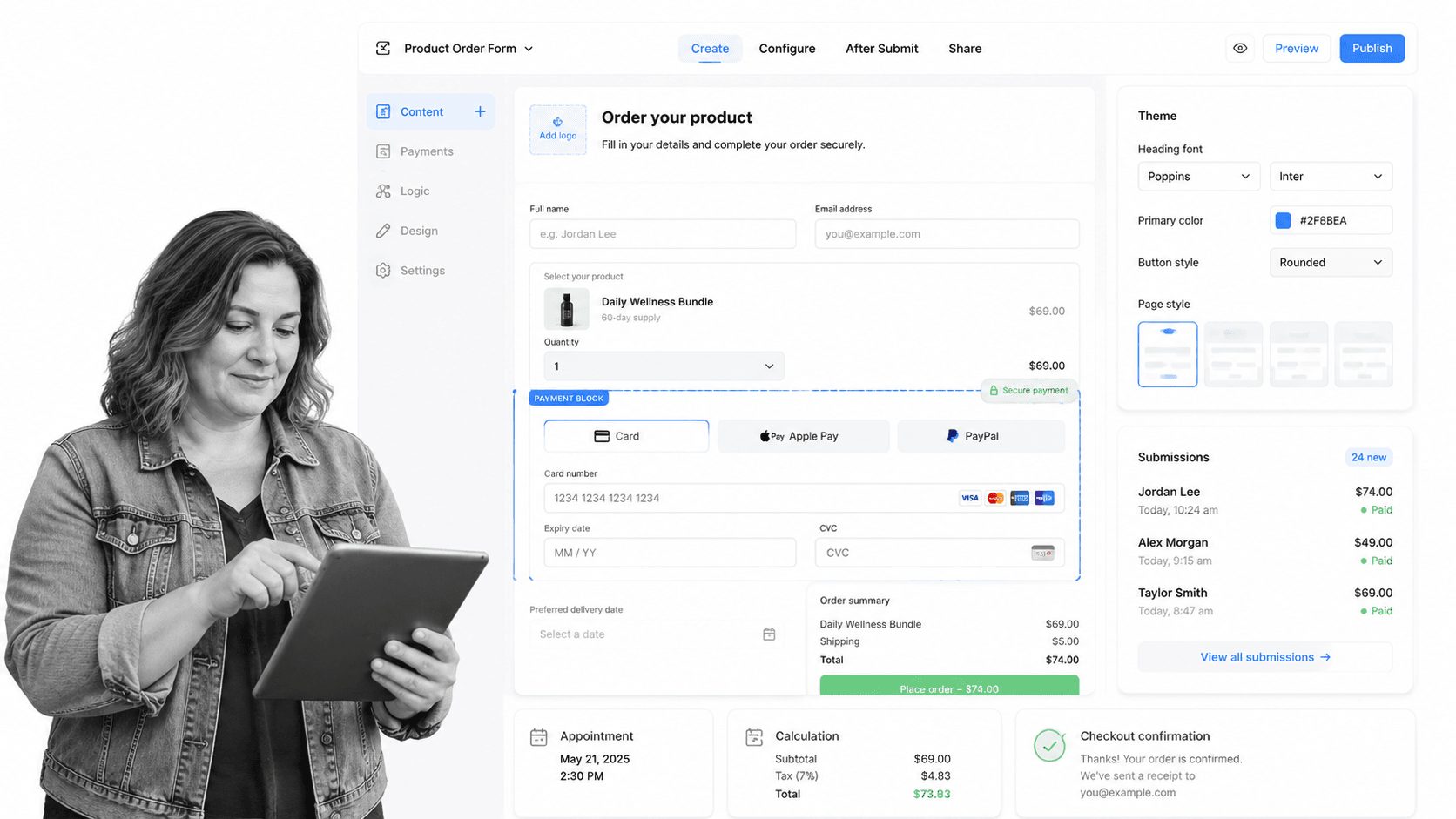
Best for: branded form pages, order forms, payments, and SMB intake.
Paperform positions itself around forms that can feel like pages, order forms, and lightweight workflows. Its pricing page shows a free plan and paid Essentials, Pro, Business, and Enterprise paths.
It beats Process Street when form design, page-style presentation, payment collection, and small-business friendliness matter most. It is weaker when an internal operations team needs a full approval and audit workflow after each submission.
Paperform key features:
- Page-style form builder.
- Free and paid plan paths.
- Payments, submissions, and design controls.
- Business and Enterprise upgrade paths.
Paperform pros:
- Strong branded form experience.
- Good for SMBs and form pages that need to look polished.
- Useful for order forms and lightweight commerce flows.
Paperform cons:
- Not primarily an SOP enforcement platform.
- Less suitable for complex internal accountability workflows.
For current package details, see Paperform pricing. Paperform is a better fit when the form needs to feel like a branded landing page, lightweight order page, or payment form.
9. Qualtrics

Best for: enterprise research, customer experience, and experience management programs.
Qualtrics is an experience management and research platform rather than a simple form builder. Its pricing page describes flexible pricing across experience management suites, and its free account page describes a free survey account path.
It beats Process Street when the job is enterprise research, customer experience, employee experience, or advanced survey programs. It is weaker when the buying need is a lightweight intake workflow with approvals and task ownership.
Qualtrics key features:
- Experience management suites.
- Survey and research account paths.
- Program dashboards and analysis surfaces.
- Flexible enterprise pricing model.
Qualtrics pros:
- Strong fit for enterprise research and insights teams.
- More appropriate for experience management programs than simple forms.
- Built for sophisticated survey operations.
Qualtrics cons:
- Likely more than needed for simple intake forms.
- Not designed primarily around recurring SOP execution.
For current package details, see Qualtrics pricing. Qualtrics is a better fit when advanced research operations and experience management are the primary need.
10. Formstack
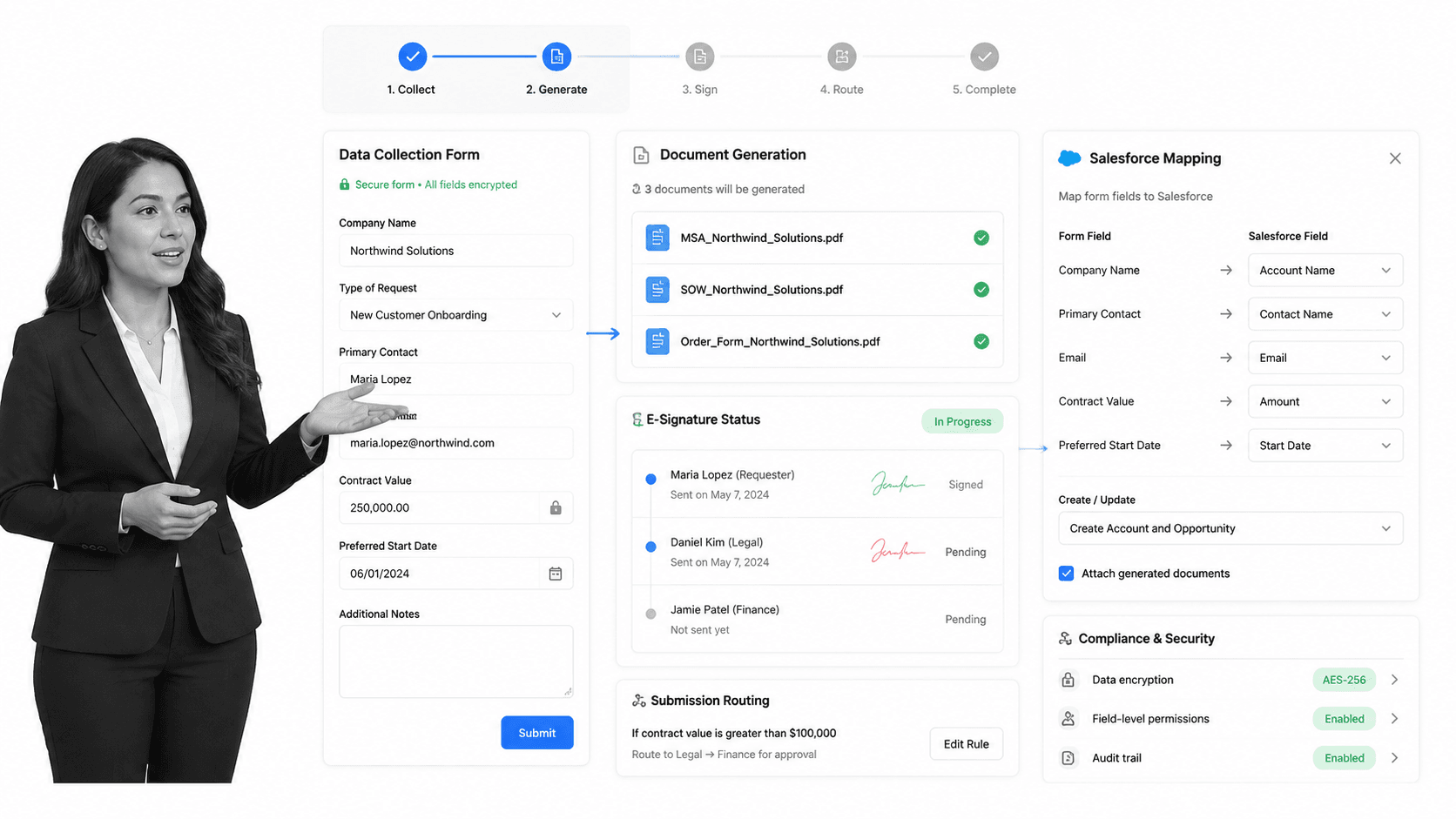
Best for: secure business forms plus documents, signatures, and Salesforce-centered workflows.
Formstack is broader than a simple form builder. Its pricing page separates Forms, Suite, Salesforce, and Enterprise plan tracks, with Suite combining forms, documents, and e-signatures.
It beats Process Street when the buying need is specifically forms plus document generation, signatures, Salesforce workflows, or enterprise form infrastructure. It is weaker when non-technical teams primarily need simple recurring SOP execution.
Formstack key features:
- Online forms and data collection.
- Suite option for Forms, Documents, and Sign.
- Salesforce and Enterprise plan tracks.
- Business workflow and security-oriented form capabilities.
Formstack pros:
- Good fit for document-heavy form workflows.
- Strong Salesforce-oriented option.
- Clearer fit for teams standardizing forms, documents, and e-signature together.
Formstack cons:
- Can be more platform than small teams need.
- Pricing may be high if the team only needs simple intake plus task follow-up.
For current package details, see the vendor pricing page. Formstack is a better fit when forms, generated documents, signatures, and Salesforce workflows need to be packaged together.
Which Typeform alternative fits your use case
A good Typeform replacement decision starts with the work pattern, not the vendor name.
- Choose Process Street when responses must become assigned workflows with approvals, due dates, required evidence, and audit history.
- Choose Jotform when templates, payment collection, and broad standalone form coverage matter most.
- Choose Google Forms when the team needs fast free forms tied to Google Sheets and Google accounts.
- Choose Microsoft Forms when the form should stay inside Microsoft accounts and Microsoft 365 administration.
- Choose SurveyMonkey or Qualtrics when research design, survey analysis, and experience programs are the core job.
- Choose Tally or Fillout when a generous free plan or modern lightweight form-building experience matters most.
- Choose Paperform when the form should feel like a branded landing page or order flow.
- Choose Formstack when forms, documents, signatures, and Salesforce handoffs need to work together.
If you are replacing Typeform because responses create messy follow-up, do not stop at form features. Map the path from response to owner, approval, evidence, and final status. That path can be built as a checklist builder workflow, a request workflow, or a recurring SOP, depending on how much control the process needs.
The cleanest architecture is often intake plus execution. The intake surface collects information. The execution layer enforces the work. That keeps the form simple while making the process accountable.
Typeform alternatives FAQs
What is the best Typeform alternative?
The best Typeform alternative depends on what happens after the response. Process Street is best when responses need to become recurring workflows with owners, approvals, evidence, and audit history. Jotform, Google Forms, Microsoft Forms, SurveyMonkey, Tally, Fillout, Paperform, Qualtrics, and Formstack may fit better for pure form or survey use cases.
Is there a free Typeform alternative?
Yes. Google Forms, Microsoft Forms, SurveyMonkey, Tally, Fillout, Paperform, Qualtrics, and Jotform all publish a free plan, free account path, or free form-building option. Always check each vendor’s pricing page because limits on responses, forms, users, branding, storage, and exports change.
Why is Process Street ranked first?
Process Street is ranked first for teams whose Typeform responses create accountable recurring work. It is not ranked first for every form-building use case. If your priority is only a public survey, conversational design, or a free questionnaire, another tool may be the better fit.
What is the closest alternative to Typeform?
For conversational form design, Jotform, Tally, Fillout, and Paperform are closer to Typeform than Process Street. For internal intake and approval workflows, Process Street is closer to the operational job a team usually tries to accomplish after the form is submitted.
Which Typeform alternative is best for small teams?
Small teams usually shortlist Tally, Fillout, Google Forms, Microsoft Forms, Jotform, Paperform, and Process Street. If the team needs only a form, start with the simpler form builder. If the team needs follow-up tasks, approvals, and recurring SOPs, start with Process Street.
Which Typeform alternative is best for enterprise teams?
Enterprise teams should compare Process Street, Microsoft Forms, Google Forms through Workspace, SurveyMonkey, Qualtrics, Formstack, and Jotform based on governance requirements. Process Street fits recurring internal workflows, while Qualtrics and SurveyMonkey fit advanced survey programs.
Can I migrate from Typeform to Process Street?
Yes, but treat the migration as a workflow design exercise rather than a direct form clone. Map each form to the process it triggers: requester, required fields, owner, approval, exception path, evidence, integration, and final record. Process Street is strongest when the migrated work needs accountability and proof.
If Typeform is collecting requests your team still has to chase manually, start with Process Street. Build the workflow that should happen after submission, then connect the intake surface around it.
Comparing something else? The full directory of software alternatives and competitor comparisons covers AI agents, workflow and BPM platforms, integration tools, and more.
