


Turn every policy into automated workflows with built-in enforcement and audit-ready proof.



Enterprise Quality Management Software
Enterprise quality management software (EQMS) is a system that manages quality processes across an entire organization in one connected place. It brings document control, corrective and preventive action, audits, nonconformance handling, supplier quality, training records, and quality risk together so every team follows the same standards and can prove it.
Spreadsheets, shared drives, and email can track quality for a small team. At enterprise scale, that approach breaks. Documents fall out of date, corrective actions stall, audit evidence is scattered, and no one has a live view of whether the organization is actually operating within its own standards. Enterprise quality management software closes that gap by turning quality requirements into governed, trackable work.
This guide explains what enterprise quality management software includes, how it works day to day, where it helps, which industries and standards depend on it, how to choose a platform, and the mistakes that quietly undermine a rollout. The goal is a practical understanding of the category, not a sales pitch for any single tool.
In this article, we are going to cover everything you need to know about enterprise quality management software, including:
- What is enterprise quality management software?
- Core capabilities of enterprise quality management software
- How enterprise quality management software works in practice
- Benefits of enterprise quality management software
- Industries and standards that rely on EQMS
- How to choose enterprise quality management software
- Common implementation mistakes to avoid
- Where Process Street fits
- FAQs
What is enterprise quality management software?
Quality management is the discipline of making sure products, services, and processes consistently meet defined requirements. Enterprise quality management software is the platform that operationalizes that discipline across departments, sites, and suppliers. It is the system of record for quality documents and the workflow layer that drives quality work to completion.
The ASQ overview of quality management systems describes a quality management system as the documented processes, responsibilities, and records an organization uses to direct and control quality. An EQMS is the software that makes that system usable at scale, so quality is not a binder on a shelf but a living set of controlled documents and enforced workflows.
The system is not the same as the software
A useful distinction is that the software is not the quality program. The platform can store controlled documents, route approvals, collect evidence, and report status. It cannot define your quality policy, set acceptance criteria, or make leaders care about quality culture. When the underlying program is unclear, software only makes the confusion more visible.
The strongest implementations start with the quality manual, the standards that apply, the processes that carry the most risk, and the people who own them. Only then does configuration begin. That is why enterprise quality management software works best when it is treated as an execution layer for a defined program, not a replacement for one.
What sets the enterprise version apart
Plenty of tools call themselves quality software. The enterprise version is distinguished by scale and governance: multiple sites and business units, granular roles and permissions, controlled document versioning, electronic signatures, validated audit trails, and reporting that rolls up to leadership. It also has to connect to the systems where the rest of the business already works, from manufacturing management software to the tools that hold customer and supplier records.
Core capabilities of enterprise quality management software
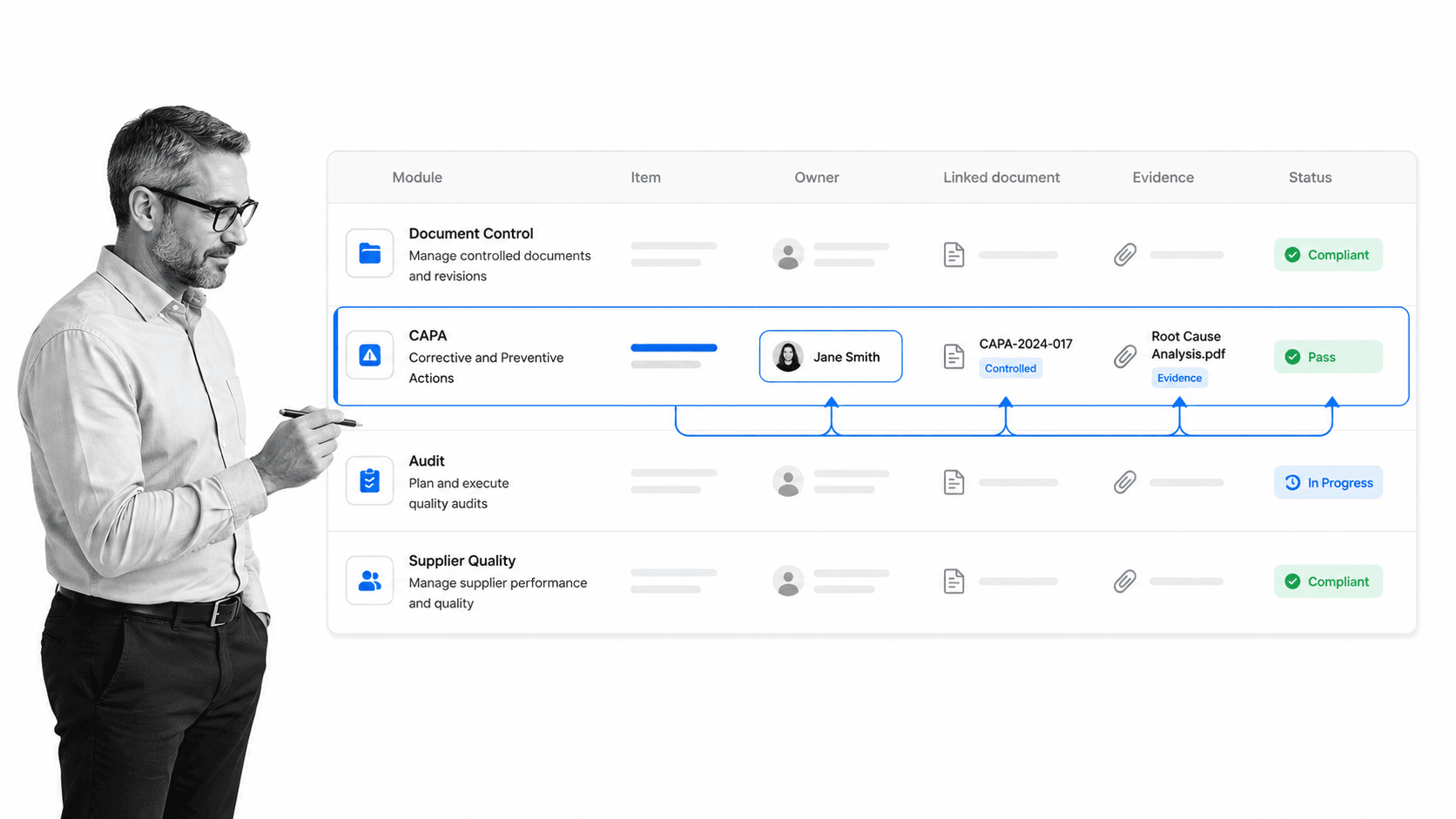
Vendors package features differently, but most enterprise quality management software is built from the same core modules. Each one manages a distinct part of quality, and the value comes from how tightly they connect.
Document and change control
Document control keeps the quality manual, standard operating procedures, work instructions, and forms current and governed. A strong system supports ownership, review cycles, approvals, version history, controlled release, and change control. Teams formalizing this can start from document control best practices or a document control template before moving the whole library into a controlled repository.
Corrective and preventive action (CAPA)
CAPA is the engine of continuous improvement. It captures a problem, investigates root cause, assigns corrective and preventive actions, and verifies that the fix actually worked. Good CAPA handling turns a recurring defect into a closed, documented loop rather than a repeated firefight. A corrective action report template is a practical way to standardize how issues are logged and resolved.
Audit management
Audit management schedules internal and external audits, builds checklists from the applicable standard, records findings, and tracks each finding to closure. Instead of preparing for an audit as a last-minute scramble, the evidence is already attached to the work. An internal audit checklist template helps teams run consistent internal audits between formal certification cycles.
Nonconformance and complaint handling
Nonconformance management records when a product, process, or material fails to meet a requirement, then routes it for disposition and, where needed, into CAPA. Customer complaints feed the same machinery, so signals from the field become structured quality data instead of lost emails.
Supplier quality management
Most enterprises depend on suppliers, so supplier quality is a core module. It covers supplier qualification, incoming inspection, scorecards, corrective actions raised against suppliers, and periodic re-evaluation. A supplier audit template gives procurement and quality teams a shared, repeatable way to hold vendors to the same standard as internal processes.
Training and competency records
Quality depends on people doing work correctly, so training management ties procedures to the people who must be trained on them. When a controlled document changes, the system can require re-training and record acknowledgment, which is exactly what an auditor expects to see.
Risk management and reporting
Quality risk management assesses where failures would hurt most and prioritizes controls accordingly, an approach that overlaps with operational risk management. Reporting then rolls everything up: open CAPAs, overdue actions, audit findings, supplier performance, and training gaps, so quality leaders and executives see the true state of the system at a glance.
How enterprise quality management software works in practice
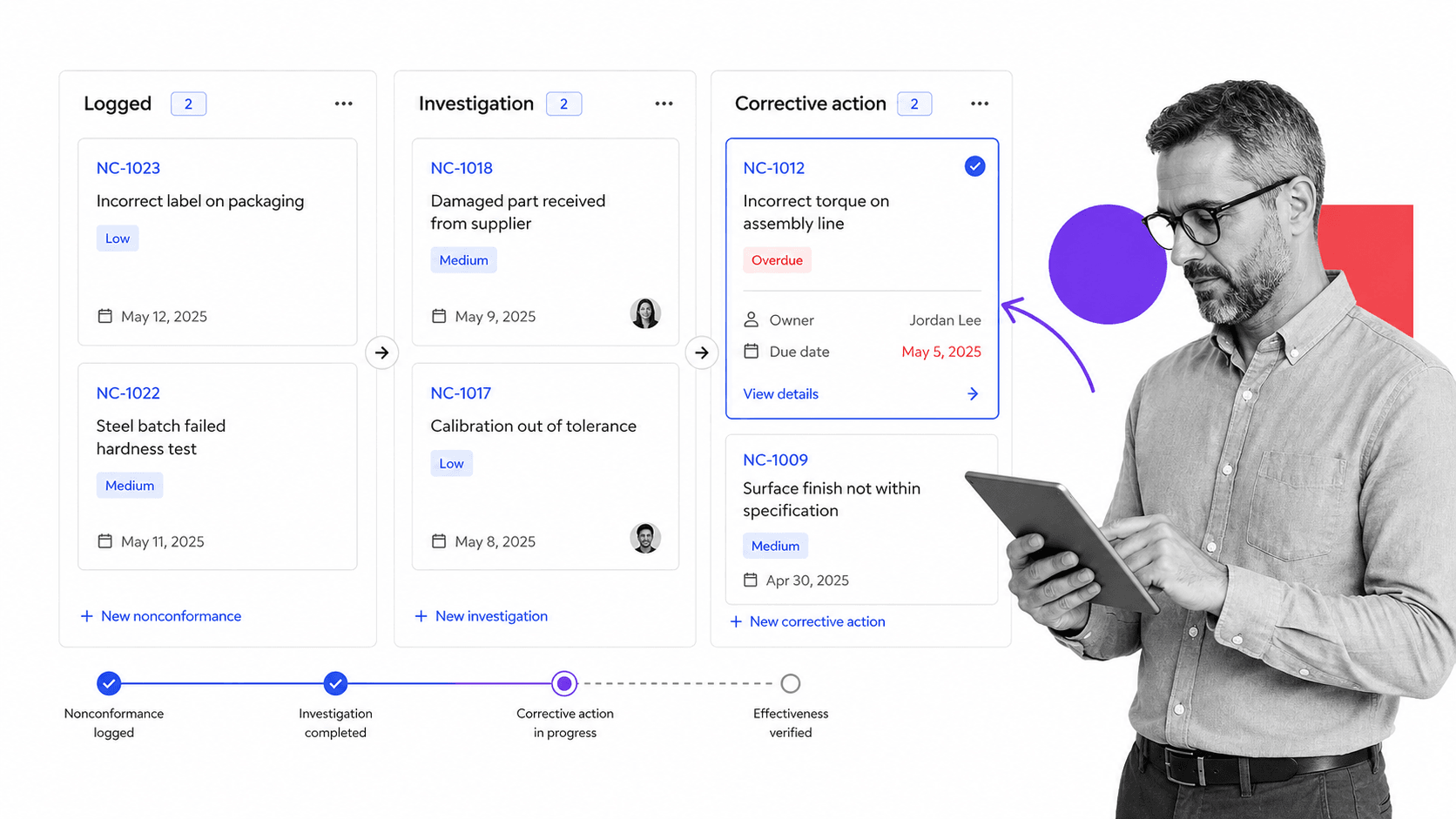
In practice, enterprise quality management software works by connecting a quality event to accountable, auditable work. A nonconformance, complaint, audit finding, or document change enters the system, and the platform links it to owners, procedures, evidence, and the next step.
From event to owner
A quality event might be a failed inspection, a returned unit, a supplier defect, or a gap found during an audit. The system logs the event, classifies its severity, and assigns an owner with a due date. Nothing depends on someone remembering to chase it, because the workflow carries the accountability.
From investigation to corrective action
For significant events, the owner runs an investigation, documents root cause, and defines corrective and preventive actions. Each action has an owner, a deadline, and an evidence requirement. This is where enterprise quality management software earns its place: it makes the path from problem to verified fix explicit and hard to skip.
From evidence to proof
Evidence is what proves the work happened. That might be a signed approval, an inspection record, a completed checklist, a photo, a certificate, or a training acknowledgment. When features like approvals and conditional logic route the right people through the right steps, the proof is generated as a byproduct of doing the work, not reconstructed before an audit.
This execution layer is the difference between a healthy quality system and a quality archive. A dashboard that flags an overdue corrective action is useful only if the organization can turn that signal into assigned work, a completed action, and preserved proof.
Benefits of enterprise quality management software
The clearest benefit of enterprise quality management software is a single, shared source of truth. Quality, operations, manufacturing, regulatory, and supplier teams work from the same documents and the same live status instead of reconciling different versions of reality.
Benefits teams see first
- Controlled documents that are always current, versioned, and approved.
- Clear ownership for corrective actions, audits, inspections, and training.
- Faster audit preparation because evidence is attached to the work as it happens.
- Fewer repeat defects because CAPA closes the loop and verifies effectiveness.
- Consistent supplier standards across sites, business units, and regions.
- Executive reporting that shows the real state of quality, not a hopeful summary.
That shared context is why quality connects naturally to continuous compliance and to broader compliance operations. When quality work is executed in a governed system, proof is generated by execution rather than assembled after the fact.
The limitation to plan for
Enterprise quality management software can also become heavy. Some systems require long implementations, specialized administrators, and constant data upkeep. If the tool turns into a database that people only update before an audit, it will not improve daily quality. The risk is rarely reporting. The risk is execution, because someone still has to update the procedure, complete the inspection, close the corrective action, and train the team.
Industries and standards that rely on EQMS
Enterprise quality management software is most common in regulated and safety-critical industries, where a quality failure carries real consequences and external auditors expect documented proof of control.
Industries that depend on it
- Medical devices and pharmaceuticals, where patient safety and regulatory filings are on the line.
- Automotive and aerospace, where supplier quality and traceability are contractual requirements.
- Manufacturing and industrial products, where defects are costly and recalls are catastrophic.
- Food and beverage, where safety standards and recalls demand tight traceability.
- Energy, chemicals, and other sectors where process discipline protects people and the environment.
Standards it helps you meet
Most quality programs are anchored to a recognized standard. The foundational one is ISO 9001, the general standard for quality management systems used across industries. Medical device makers work to ISO 13485, automotive suppliers to IATF 16949, and aerospace suppliers to AS9100, each of which builds on the same quality-system principles for its sector.
Regulated manufacturers also answer to government requirements. Medical device companies must meet the FDA Quality System Regulation, and any organization using electronic records and signatures for regulated quality data has to satisfy FDA 21 CFR Part 11. Enterprise quality management software is often the system that makes those controlled records, signatures, and audit trails defensible, which is why it overlaps with compliance management software and internal controls.
How to choose enterprise quality management software
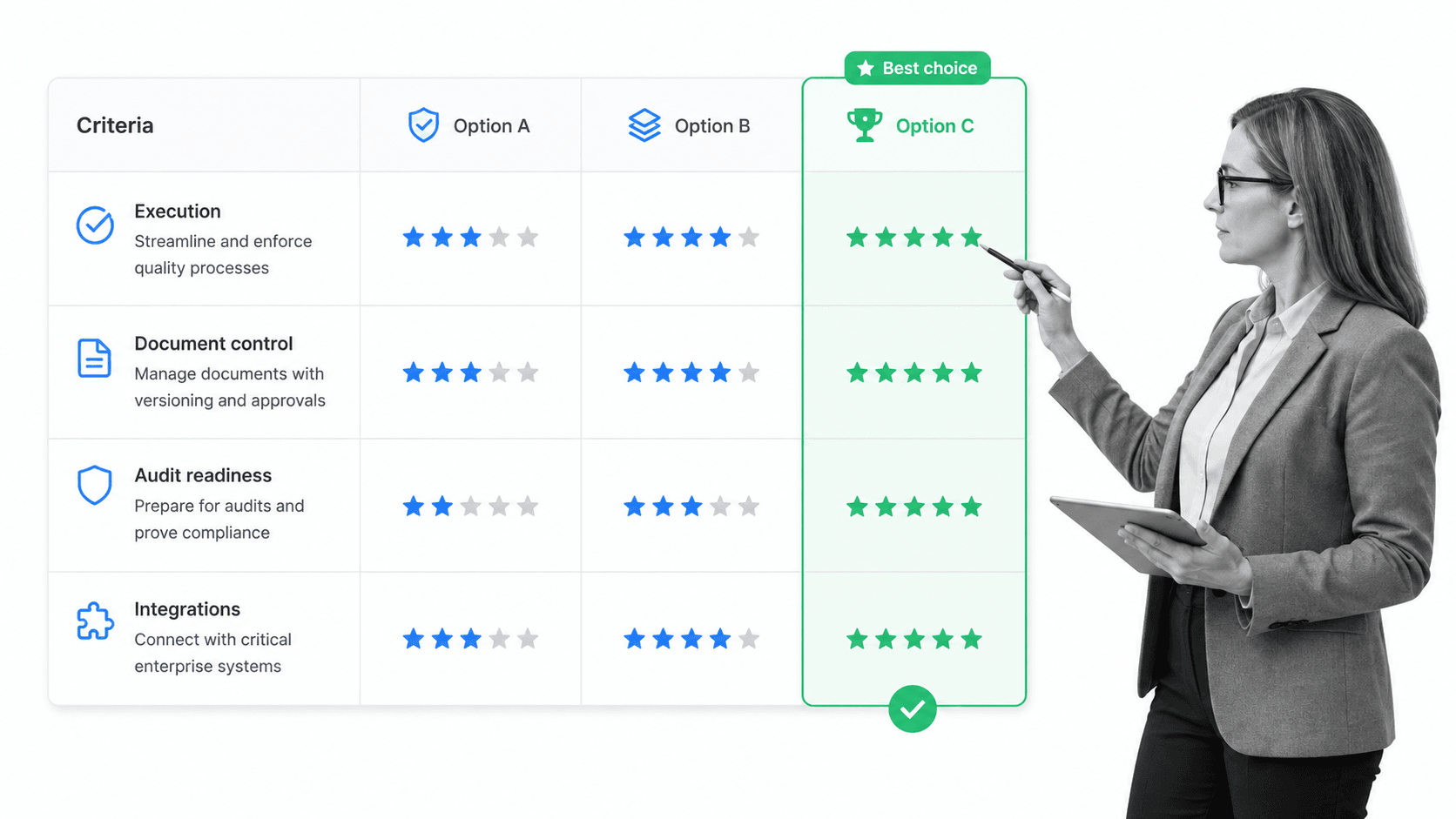
Choosing enterprise quality management software starts with your operating model, not a feature list. The best platform for a device manufacturer preparing for an audit may not suit a multi-site industrial group managing thousands of suppliers. Match the tool to the quality work that carries the most risk first.
Questions worth asking
- Which quality processes must the system manage first, and which can wait?
- Who owns each document, CAPA, audit, inspection, and training requirement?
- Can the system collect evidence while work happens, not after the fact?
- Can quality teams change workflows without waiting on IT or a consultant?
- Does the reporting answer the questions leaders and auditors actually ask?
- Will it connect to the systems where records, approvals, and supplier data already live?
Do not evaluate quality software only by module count. A platform with every module still fails if the work lives outside it. Compare options on how well they turn requirements into executed, provable work, then look at adjacent capabilities like quality management tools and quality management system software to round out the picture.
Build, buy, or start focused
Not every organization needs a full enterprise rollout on day one. A common, lower-risk path is to take the highest-risk recurring process, such as CAPA or document control, and put it under governed execution first. That proves value quickly and builds the habits a wider quality program depends on.
Common implementation mistakes to avoid
Most quality software disappointments trace back to a handful of avoidable mistakes. Knowing them in advance protects the rollout.
- Digitizing a broken process. Automating a confusing procedure just makes the confusion faster. Clean up the process, then configure it.
- Treating go-live as the finish line. Adoption, training, and continuous improvement are the real work, and they start after launch.
- Over-configuring on day one. Long, rigid implementations stall. Start with the highest-risk processes and expand as teams gain confidence.
- Leaving execution outside the system. If inspections, approvals, and evidence still happen in email, the platform becomes a reporting shell.
- Ignoring integrations. Quality data that cannot flow to and from the systems of record forces duplicate entry and erodes trust in the numbers.
A quick way to sanity-check a plan is to ask whether the day-to-day quality work will genuinely move into the platform. If the answer is no, the tool will report on quality without improving it.
Where Process Street fits
Process Street is a Compliance Operations Platform. It does not try to replace every specialized enterprise quality record system. It solves the execution problem underneath quality: making sure procedures, approvals, inspections, corrective actions, and evidence actually happen in the work itself, with a full audit trail.
That matters because quality programs rarely fail from a lack of dashboards. They fail because the real work lives outside the dashboard. Evidence goes missing, reviews run late, owners are unclear, and audit proof gets reconstructed after the fact. Process Street turns procedures into workflows with assigned tasks, required fields, approval gates, conditional paths, and complete activity history, so the correct process runs by default.
Quality by default
Teams can start with the quality processes that hurt most, using a quality management system template or an ISO 9001 checklist template to stand up controlled, repeatable execution quickly, then expand across sites and departments. Every completed task reinforces the correct procedure and leaves proof behind.
Connected execution
Process Street offers direct, universal integrations to thousands of systems, and when a new one is needed an AI agent can build it. That lets quality execution connect to the systems where product records, supplier data, approvals, and evidence already live, so the quality system reflects how the business actually operates. It is also enterprise ready, with SOC 2 Type II certification, HIPAA support, single sign-on, role-based access, and audit logs.
FAQs
What is enterprise quality management software?
Enterprise quality management software is a platform that manages quality processes across an organization in one connected system. It typically includes document control, corrective and preventive action, audit management, nonconformance handling, supplier quality, training records, and reporting, so teams enforce standards and prove quality was maintained.
What is the difference between a QMS and an EQMS?
A QMS is the overall quality management system, meaning the documented processes and records an organization uses to control quality. An EQMS is the enterprise software that runs that system at scale, adding multi-site governance, controlled document versioning, electronic signatures, audit trails, and reporting across departments and suppliers.
What features should enterprise quality management software include?
Core features include document and change control, CAPA, audit management, nonconformance and complaint handling, supplier quality, training and competency records, quality risk management, workflow automation with approvals, and reporting. The most important quality is how tightly those modules connect requirements to executed, provable work.
Which industries use enterprise quality management software?
It is most common in regulated and safety-critical industries such as medical devices, pharmaceuticals, automotive, aerospace, manufacturing, food and beverage, energy, and chemicals. These sectors face external audits and standards like ISO 9001, ISO 13485, and IATF 16949, which require documented proof of control.
How do you choose enterprise quality management software?
Start with the quality processes that carry the most risk and map who owns each one. Look for clear ownership, controlled documents, evidence collection during the work, flexible workflows that quality teams can maintain, strong reporting, and integrations. A focused first rollout on a high-risk process like CAPA or document control often beats a full big-bang implementation.
