Turn every policy into automated workflows with built-in enforcement and audit-ready proof.


Design Workflow Software
Last updated:

Design workflow software is a system for moving design work from request to approved delivery through a repeatable, visible process. It organizes the brief, research, concepts, files, feedback, decisions, approvals, handoff requirements, and improvement history around each design project.
The software does not replace the tools designers use to make interfaces, graphics, services, campaigns, or physical products. It controls the work around those tools. Designers get room to explore, while requesters, reviewers, and delivery teams know what information is required, when their input matters, and what must be true before the work moves forward.
This guide explains the stages, capabilities, review controls, implementation method, use cases, and buying criteria that matter. It also shows how a structured workflow design system can connect creative judgment to accountable execution without turning design into an assembly line.
In this article, we are going to cover everything you need to know about design workflow software, including:
- What is design workflow software?
- Design workflow stages from brief to handoff
- Capabilities design teams need
- How design workflow software improves review and approval
- How to build a design workflow
- Common design workflow use cases
- How to choose design workflow software
- Manage design workflows in Process Street
- FAQs
What is design workflow software?
Design workflow software coordinates the operational path behind design work. It captures a request, turns it into an actionable brief, assigns research and production tasks, routes work through critique and stakeholder review, records approval, and confirms that the final files and specifications reach the right destination.
Design tools create; workflow software coordinates
A design application helps a practitioner make the artifact. Workflow software answers a different set of questions: Why are we making it? Who owns the next decision? Which reference is current? What feedback is required? Has accessibility been checked? Who approved the final direction? What must be handed to engineering, production, marketing, or a client?
A reusable workflow and a live project run
The reusable workflow is the operating standard. It defines stages, roles, fields, rules, approval gates, and handoff requirements. A live run is one project moving through that standard. Each run carries its own requester, audience, constraints, files, review decisions, due dates, and delivery record.
Structure protects creative time
Weak process does not create freedom. It creates interruptions, missing context, duplicate reviews, unclear authority, and late changes. The right structure removes coordination work around the creative process. Designers spend less time reconstructing the brief or chasing approval and more time understanding the problem, exploring alternatives, and refining the result.
Design workflow software and DesignOps
DesignOps is the discipline of improving how design teams operate at scale. It covers people, practices, tools, governance, planning, and measurement. Design workflow software is the execution layer for that discipline. It turns agreed practices into repeatable work that can be assigned, adapted, observed, and improved.
Design workflow stages from brief to handoff
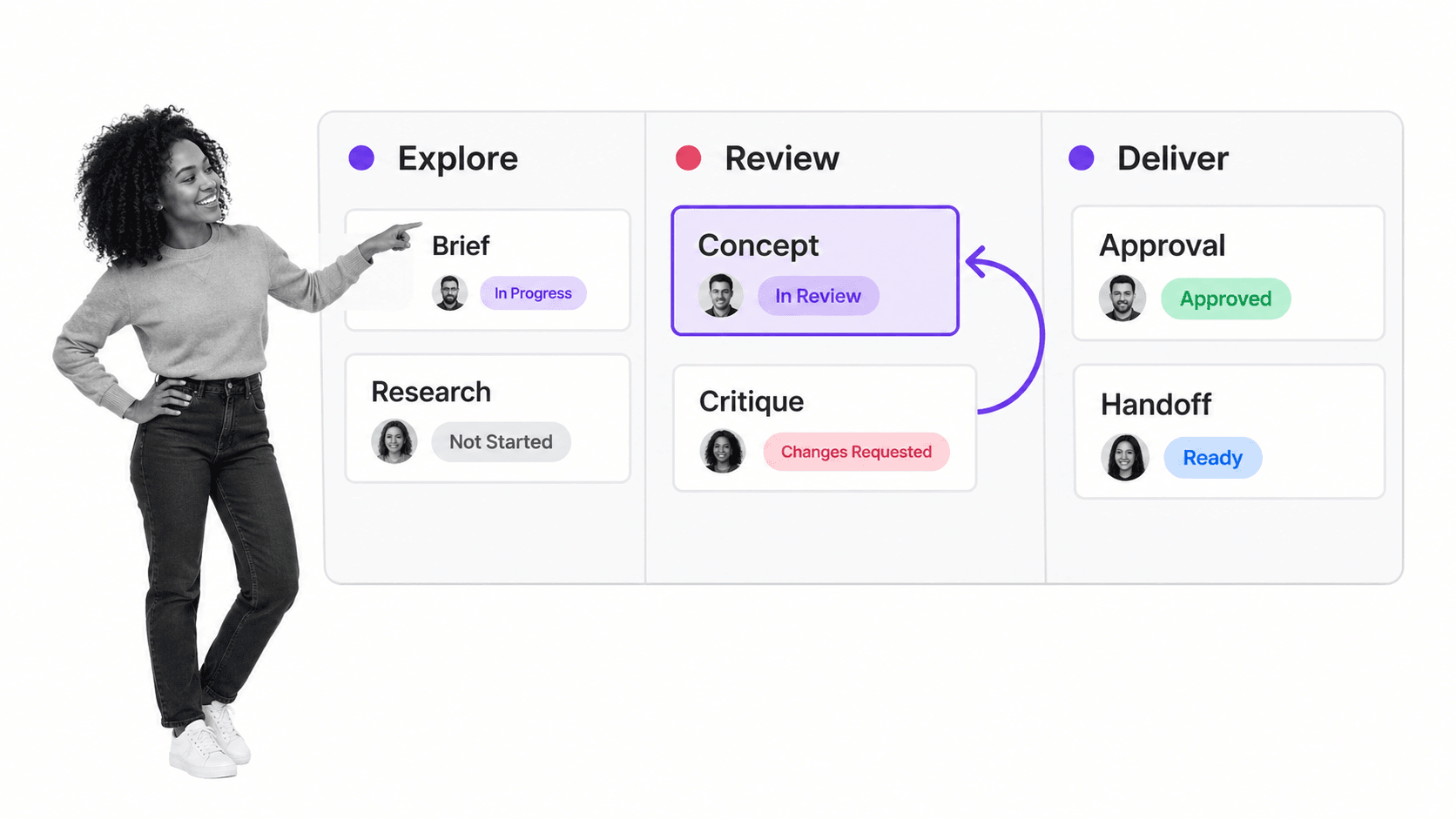
Design is iterative, so the stages are not a rigid waterfall. A useful workflow defines the purpose of each phase and allows controlled returns when evidence changes. The Design Council Double Diamond describes Discover, Define, Develop, and Deliver as a way to expand and narrow thinking. A practical workflow adds the requests, roles, reviews, approvals, and handoffs that make those phases executable.
1. Request and intake
The workflow begins with a structured request. Capture the business objective, target audience, deliverable, channel, required formats, deadline, dependencies, brand or regulatory constraints, and final decision owner. A good intake form distinguishes a real design problem from a vague request for an artifact.
Teams can adapt a graphic design process template or a design request workflow, but the request should still fit the work. Product design may need user evidence and engineering constraints. Marketing design may need campaign goals and channel specifications. Packaging may need materials, production, and legal requirements.
2. Discovery and evidence
Discovery gathers the information needed to design responsibly. That may include user research, analytics, existing assets, technical constraints, competitor patterns, brand standards, content requirements, support issues, or manufacturing limitations. The workflow should record which evidence was reviewed, not force every project to use the same research method.
The U.S. Web Design System principles recommend starting with real user needs, testing assumptions with real people, and documenting research findings. A design workflow can turn those principles into required evidence without prescribing one research technique for every project.
3. Definition and creative brief
The team turns discovery into a shared problem statement and brief. The brief defines the user need, business outcome, scope, constraints, success criteria, must-have content, required states, and decision process. It should be approved before expensive production begins, because an unclear brief multiplies rework later.
4. Concepts and exploration
Designers explore several directions at the level appropriate to the risk. Early concepts may be sketches, user flows, wireframes, mood boards, service blueprints, prototypes, or physical mockups. The workflow should make exploration visible without demanding polished artifacts too early.
5. Critique and iteration
Critique is an expert conversation about whether the work addresses the problem. It is different from stakeholder approval. Peers examine hierarchy, usability, coherence, accessibility, feasibility, content, systems fit, and edge cases. Feedback returns to the designer with context, an owner, and a decision about what happens next.
6. Stakeholder review and approval
Stakeholders decide whether the design satisfies agreed criteria and can move toward delivery. The workflow should name who recommends, who must be consulted, and who has final authority. A defined project approval process prevents the loudest or latest comment from reopening a settled decision without new evidence.
7. Production and quality checks
The team prepares final assets and runs the checks appropriate to the medium. Digital work may need responsive states, content validation, and accessibility review against Web Content Accessibility Guidelines. Print and packaging may need bleed, color, materials, dielines, legal copy, and production proofs. The workflow makes each required check explicit.
8. Handoff, release, and learning
Handoff is complete when the receiving team has the approved files, specifications, context, and decision record it needs to proceed. After release, the workflow can collect outcome data, implementation issues, customer feedback, and reusable lessons. A short retrospective improves the next project instead of allowing friction to repeat.
Capabilities design teams need
The best capability set follows the design process rather than copying a generic task board. The software should preserve context, support iteration, clarify decisions, and keep delivery evidence attached to the work.
Structured intake and brief templates
Requests should arrive through configurable forms, not incomplete messages. Required fields, examples, conditional questions, and validation improve input quality. Brief templates should adapt by deliverable type so a website redesign, social campaign, product feature, and print package do not pretend to need identical information.
Roles, assignments, and due logic
The workflow needs named responsibility at every stage. Assignments can follow role, project type, product area, region, or risk. Dynamic due rules are more reusable than fixed dates because they can schedule critique, approval, and handoff relative to the request or a required launch date.
File context and version clarity
The workflow should link the current design source, reference material, copy, requirements, and approved deliverables in one place. It does not need to become the design file repository, but it must make the authoritative version and its status obvious. Reviewers should not approve an outdated export from an old message thread.
Conditional routing
Different work carries different review needs. A public campaign may require brand and legal approval. A component change may require design system review and engineering feasibility. A high-risk user flow may require accessibility or security input. Conditional routing applies these controls only when the project needs them.
Approvals and decision records
Approvals should record the artifact or evidence reviewed, the decision, the approver, and any conditions. Rejection should return work to a defined stage with actionable reasons. This creates a durable decision record and prevents design intent from being reconstructed after launch.
Automation, integrations, and reporting
Useful automation starts work, creates connected records, alerts reviewers, updates status, schedules recurring reviews, and packages a handoff. Reporting should show cycle time, waiting time, review loops, late decisions, workload, and common return reasons. The point is to improve the system, not measure creative output by task count.
How design workflow software improves review and approval
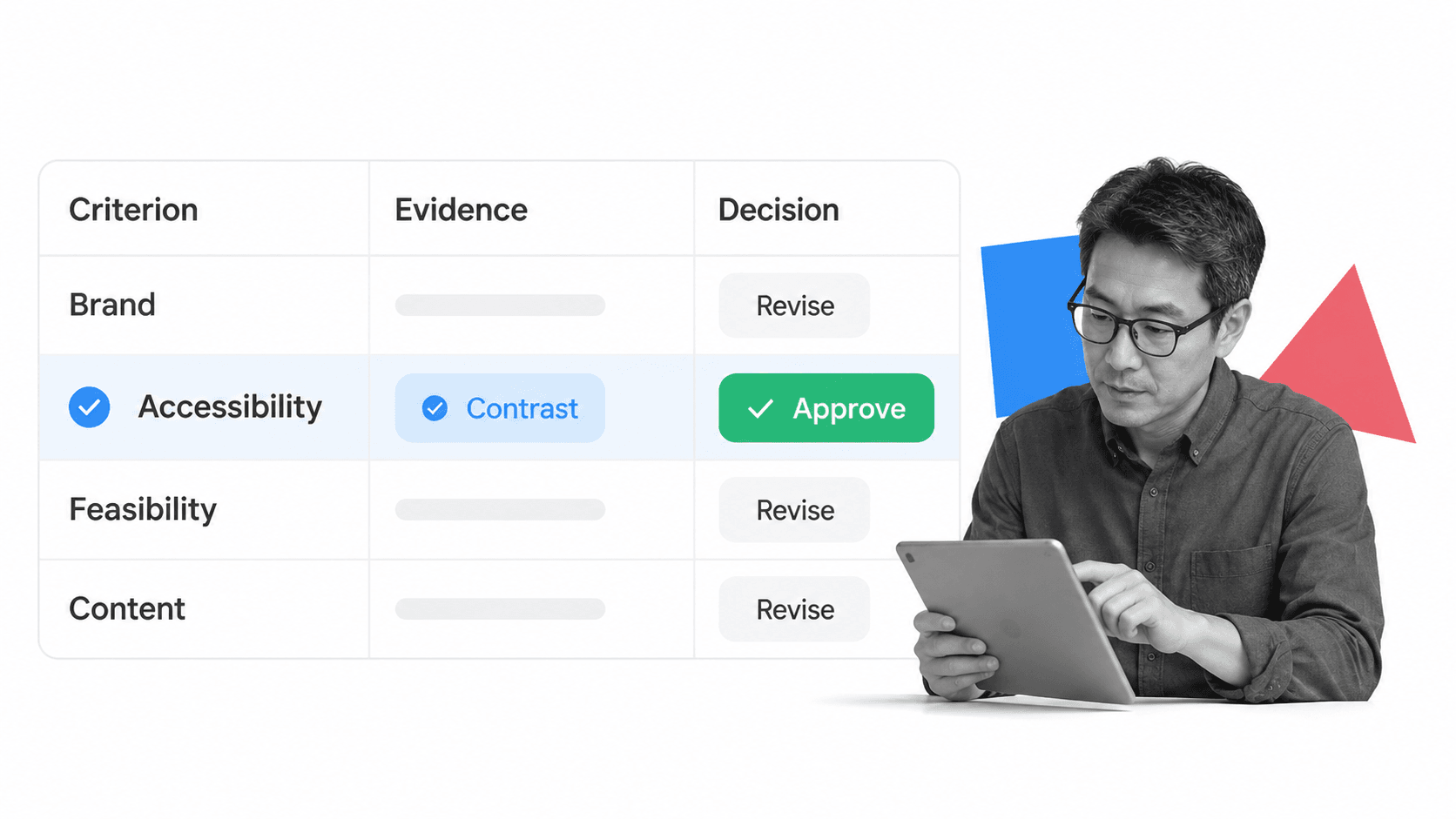
Review fails when comments arrive without criteria, authority, or timing. One stakeholder asks for a personal preference, another comments on an old version, and a final approver appears after production starts. Workflow software changes the review from an open conversation into a traceable decision process.
Separate critique, consultation, and approval
Critique helps improve the design. Consultation supplies specialized input. Approval authorizes movement to the next stage. Mixing these activities produces endless loops because every comment appears to carry the same weight. Separate tasks and roles make the purpose of each interaction clear.
Review against agreed criteria
Criteria should come from the brief and the medium. Reviewers can evaluate user need, brand fit, accessibility, content accuracy, technical feasibility, production readiness, and business outcome. A comment that does not connect to a criterion can still be considered, but it should not silently redefine the project.
Create one decision path
Design approval should have a known sequence and final owner. A documented approval workflow keeps decisions inside the work record, sets due dates, and shows what is waiting. If reviewers disagree, the workflow identifies who resolves the conflict instead of sending the designer back into a message maze.
Control late change
A late change may be necessary, but it should be visible. The workflow can require a reason, impact assessment, new approval, and updated handoff when scope changes after sign-off. That protects the team from invisible rework and gives leaders evidence about where the process needs better early decisions.
How to build a design workflow
Start with one recurring design process that already has recognizable stages, repeat volume, and costly coordination. Build the smallest complete workflow, test it on a real project, and improve it with the people who perform and receive the work.
1. Choose one deliverable family
Do not begin with one universal workflow for every kind of design. Choose a family such as product feature design, campaign creative, website updates, presentation design, packaging, or brand requests. A narrower first workflow makes roles, evidence, and handoffs easier to define.
2. Map the current path
Follow one recent project from request to release. Record every handoff, waiting period, side message, review loop, file location, and exception. Use process mapping tools to expose where the formal process and actual work differ.
3. Define the brief and completion criteria
List the information required before work begins and what must be true before it ends. Translate fuzzy expectations into fields, instructions, examples, and checks. Keep the brief focused enough to guide the work without prescribing the creative answer.
4. Assign decision rights
For each stage, name the person doing the work, the people consulted, and the final decision owner. Avoid committees as owners. Multiple reviewers can contribute evidence, but one role should decide whether the project advances, returns, or changes scope.
5. Build the main path first
Create intake, discovery, definition, concept, critique, approval, production, and handoff at the level your work needs. Add the instructions, required fields, owners, and due rules. Run the happy path before adding every exception so you can see whether the core workflow is understandable.
6. Add risk-based branches
Add conditional paths for work that needs extra scrutiny. Common triggers include public claims, personal data, regulated markets, accessibility risk, new brand patterns, localization, unusual production methods, or work that changes a shared design system. Keep each branch tied to a clear reason.
For digital services, the GOV.UK service manual overview of WCAG 2.2 is a useful model for translating accessibility principles into recurring design, content, code, manual-test, and audit checks. The workflow should route the relevant proof to the people responsible for the decision.
7. Test with a real project
Choose a project with genuine stakeholders and at least one likely exception. Observe where people leave the workflow, misunderstand a task, duplicate a comment, or wait for context. Fix those moments before automating more actions. A pilot should prove the whole path, not just the attractive intake form.
8. Measure flow and improve
Review cycle time, waiting time, return loops, late scope changes, approval delays, and handoff defects. Discuss the results with designers and downstream partners. Remove steps that add no control, strengthen inputs that prevent rework, and update the workflow when the design practice changes.
Common design workflow use cases
Marketing and brand design
Campaign assets need complete briefs, copy, channel specifications, brand review, legal review when claims require it, and coordinated release. A creative workflow management system can cover broader content operations, while the design workflow focuses on the visual artifact, critique, proofing, and production handoff.
Product and UX design
Product teams can coordinate research intake, problem framing, flows, prototypes, design system review, accessibility, engineering feasibility, approval, and implementation QA. The workflow helps preserve why a decision was made when the work crosses product, design, engineering, content, data, security, and support.
When implementation work carries its own technical review path, a connected software design workflow can translate the approved product direction into architecture, interface, validation, and release decisions without losing the original user and business context.
Web, service, and internal design
Website changes, service blueprints, presentations, internal communications, and operational materials all benefit from clear requests and review. Teams can begin with a website design process template and adapt its stages to the risk and delivery environment.
Packaging and production design
Packaging and production workflows coordinate specifications, copy, materials, dielines, proofs, legal checks, supplier handoffs, and final release. Strong control is especially useful because a late error can multiply across physical inventory and distribution.
How to choose design workflow software
Choose the system against your real workflow, not a generic feature grid. A useful evaluation starts with one difficult project and asks whether the platform can preserve context, support iteration, control decisions, and prove delivery without forcing designers to perform unnecessary administration.
Fit the work around the design tools
The workflow layer should link to the tools where designers create and collaborate. It should not require the team to duplicate the artifact in a new interface. Evaluate whether the system keeps the brief, decision, approval, and handoff connected while allowing specialists to use the right creation environment.
Test configuration depth
Look for configurable forms, roles, dynamic due rules, conditional paths, approvals, permissions, automations, integrations, and reusable templates. The system should handle a simple request without ceremony and a high-risk project without relying on side spreadsheets.
Inspect reviewer experience
Reviewers should understand what they are reviewing, which criteria apply, what decision they need to make, and when it is due. Designers should see one consolidated state, not translate comments from several channels. Test this with people who approve work infrequently, because their experience often determines whether the process holds.
Demand evidence and history
The platform should record who completed work, which evidence was supplied, what was approved, what changed, and where the final handoff went. This matters for accountability, learning, client confidence, accessibility, brand governance, and any environment where a design decision may need to be explained later.
Manage design workflows in Process Street
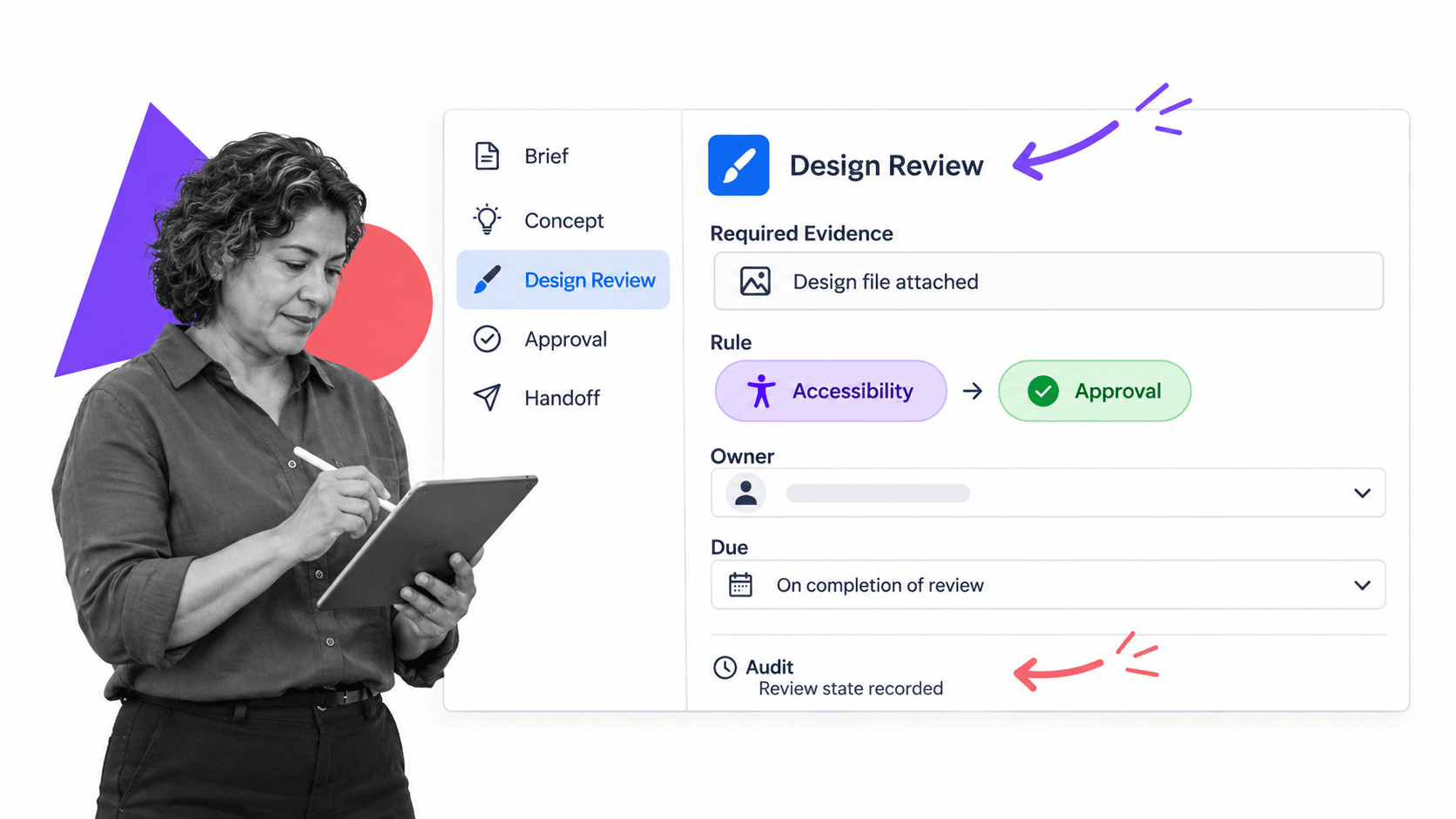
Process Street is an agentic process automation platform for teams that need recurring work to run correctly and leave proof. Its workflow editor lets builders create task sequences, instructions, forms, assignments, due dates, conditional logic, approvals, stops, and automation in one reusable workflow.
Turn the design standard into runnable work
Build a reusable workflow for each design family, then run it for every project. The template holds the standard. Each run captures the request, people, dates, files, evidence, decisions, and history for one project. This keeps process knowledge beside the work instead of inside a separate manual.
Route the right review
Use conditional logic to show extra tasks when the request includes a new pattern, accessibility risk, public claim, regulated market, or production exception. The standard path stays clear, while higher-risk work receives the review it needs.
Make approval explicit
Place approval tasks at the brief, final direction, or production release gates that matter. A stop can pause the workflow until the required decision lands. The run preserves the submitted evidence, decision, comments, and accountable approver.
Keep timing and ownership visible
Assignments give each task an owner. Dynamic due dates can schedule critique, approval, and handoff relative to the project start or another date in the run. That makes waiting visible and helps the team intervene before a launch is at risk.
Connect the wider design stack
Process Street can connect the workflow with the wider design stack. Teams can coordinate requests, records, files, notifications, delivery systems, and downstream actions while keeping the operating logic and approval record in one place.
Start with a real workflow such as a logo design process or design review checklist. Adapt the stages, roles, evidence, risk branches, and handoff to the way your team works, then improve the template from each completed run.
FAQs
What is design workflow software?
Design workflow software coordinates design work from request through research, concepts, critique, approval, production, and handoff. It keeps the brief, owners, files, feedback, decisions, due dates, and proof connected around each project.
What stages should a design workflow include?
Most design workflows include intake, discovery, definition, concept development, critique, stakeholder review, approval, production checks, handoff, and learning. The exact path should adapt to the deliverable and risk instead of forcing every project through identical review.
How is design workflow software different from design software?
Design software helps practitioners create an interface, graphic, service, campaign, or physical product. Design workflow software coordinates the people, inputs, decisions, approvals, and delivery around that creation work.
How does design workflow software reduce rework?
It improves briefs, exposes constraints earlier, separates critique from approval, routes specialized review when needed, and records decisions. Those controls reduce late surprises and keep teams from acting on incomplete requests or outdated feedback.
What should you look for in design workflow software?
Look for structured intake, reusable templates, assignments, dynamic due rules, file context, conditional routing, approvals, permissions, automation, integrations, reporting, and durable history. Test the platform against one real design project with an exception path and a downstream handoff.
Can Process Street manage design workflows?
Yes. Process Street can turn a design standard into a reusable workflow with tasks, forms, assignments, due dates, conditional logic, approvals, stops, automation, and run history. Teams can adapt the workflow by project type and preserve proof of each decision and handoff.