Turn every policy into automated workflows with built-in enforcement and audit-ready proof.


Form Generator
A form generator turns a description of the information you need into a structured digital form. Modern generators can suggest questions, field types, required states, answer choices, validation rules, and conditional branches, giving you a usable first draft without starting from a blank canvas.
The first draft is not the finished process. A generated form still needs a human to check what it asks, what it omits, who can see the answers, and what should happen after someone submits it. Those decisions determine whether the form merely collects data or creates reliable work.
This guide explains how form generators work, how to write a useful prompt, how to review the output, and how Process Street connects generated intake to assigned, conditional, and auditable workflow execution.
In this article, we are going to cover:
- What is a form generator?
- How a form generator works
- How to write a better form prompt
- Form generator features that matter
- How to evaluate generated form quality
- Form generator use cases
- Turn a generated form into a governed workflow
- How to launch and improve a generated form
- FAQs
What is a form generator?
A form generator is software that creates a form structure from instructions, a template, an existing document, or another source of requirements. In its simplest form, it adds fields to a page. In a more capable setup, it interprets intent and proposes the labels, response types, options, rules, and sections needed to collect usable information. The MDN web forms guide explains the underlying relationship between controls, submitted data, and processing that every generated form still relies on.
Form generator versus form builder
A form builder gives you controls for adding and arranging fields. A form generator performs more of the initial design work for you. The categories overlap, and many products include both capabilities. The practical difference is the starting point: a builder starts with components, while a generator can start with a description such as “Create a vendor security intake form for software purchases.”
If your main job is editing labels and layout, the form editor matters most. If your main job is creating a useful first draft from requirements, the generator matters first. Most teams need both, because generated output still requires editing and testing.
Form generator versus form workflow
A generator creates the intake surface. A form workflow controls the work around each response. That workflow may validate a request, assign an owner, collect evidence, request approval, update another system, or close the case with a complete record.
This distinction prevents a common mistake. Teams often improve the form and leave the handoff unchanged. The respondent sees a polished experience, but the internal team still copies answers, chases reviewers, and reconstructs decisions across email and chat.
What a generator should output
A useful output includes more than question text. It should give you a coherent section order, suitable field types, answer choices where consistency matters, required states, clear help text, validation ideas, and a reviewable set of branches. The result should be easy for a respondent to complete and easy for an operator to act on.
How a form generator works
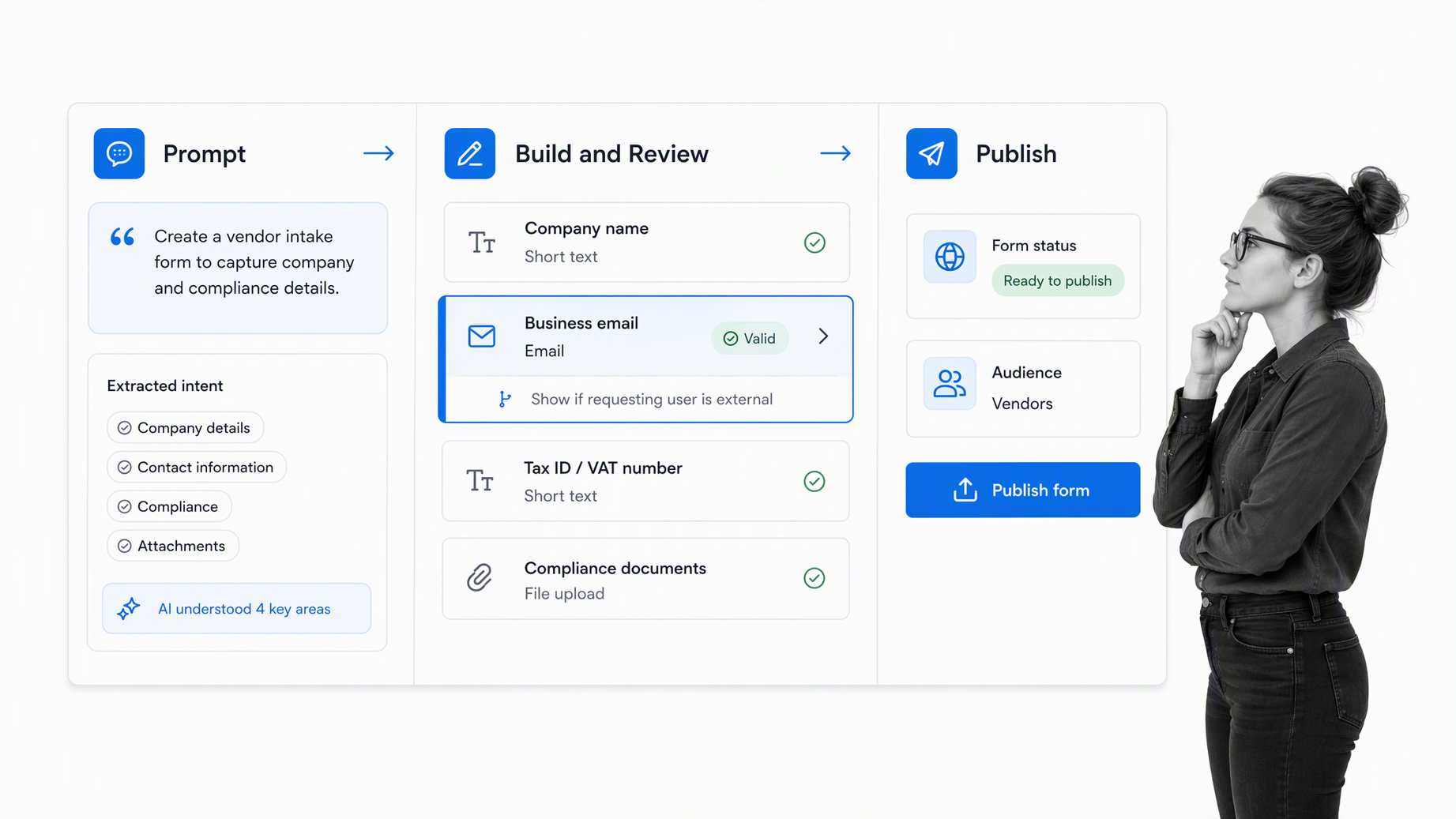
A form generator usually follows four stages: interpret the request, propose the structure, let a person review the draft, and publish the approved version. The quality of each stage affects the next one. A vague request creates a generic structure, and a rushed review lets weak assumptions reach real respondents.
1. Interpret the intended outcome
The generator first needs to understand the job. Is the form screening applicants, collecting an internal request, recording an inspection, registering an attendee, or gathering evidence? The same topic can produce very different forms depending on the decision the response must support.
2. Propose fields and sections
The system converts the request into sections and fields. A vendor intake form may include company details, service scope, data access, security evidence, commercial context, and an accountable business owner. A strong generator groups related questions and avoids asking for the same fact twice.
3. Suggest logic and validation
The generator may propose required fields, answer formats, and conditional questions. The W3C forms guidance emphasizes labels, instructions, validation, and notifications because respondents need to understand both the question and how to correct an error. Generated logic should support that experience, not make it unpredictable.
4. Route the approved form into action
The final form needs a destination. A response can create a workflow run, update a record, notify an owner, or start an approval path. A controlled form process makes those downstream steps explicit so every submission receives the right treatment.
How to write a better form prompt
A good prompt gives the generator the context it cannot safely guess. You do not need a long specification, but you do need to state the purpose, respondent, required decision, sensitive information, and what should happen next.
Name the respondent and the operator
State who completes the form and who uses the response. A customer completing an onboarding questionnaire needs different language from an internal manager requesting a new hire. Naming both roles helps the generator choose the right level of explanation and the right fields.
Describe the decision the form supports
Say what someone must decide after reading the response. If procurement must approve or reject a vendor, the form needs enough information to assess business need, risk, cost ownership, and required evidence. If support only needs to route a request, a shorter classification form may be enough.
List required evidence and constraints
Include files, dates, identifiers, consent, policy acknowledgments, or required supporting details. Also name information the form should not collect. This helps prevent an apparently thorough form from gathering sensitive data without a clear purpose.
Specify meaningful branches
Describe the answers that should change the path. For example, access to regulated data may reveal extra security questions, while a low-risk purchase can skip them. The conditional logic for forms guide recommends testing rules in the same order respondents encounter them.
Ask for concise labels and instructions
Tell the generator to use plain labels, brief help text, and one idea per question. Avoid internal acronyms unless every respondent knows them. The goal is not to sound formal. The goal is to collect answers that mean the same thing to the respondent and the reviewer.
Form generator features that matter
The best features reduce ambiguity before submission and manual work after it. A large template gallery can be useful, but it does not replace control over field behavior, review, routing, permissions, and records.
Field variety with structured answers
Look for short text, long text, numbers, dates, dropdowns, multiple choice, checkboxes, files, and signatures where appropriate. Use controlled choices when the answer drives reporting or routing. Reserve open text for context that cannot be represented safely by a fixed option.
Validation that helps respondents recover
Validation should catch missing, malformed, or out-of-range input and explain how to fix it. The OWASP input validation guidance recommends validating as early as practical while retaining server-side controls. A generated rule is only a suggestion until it has been tested against real input.
Conditional questions and sections
Conditional logic shortens the form and limits irrelevant questions. It should expose meaningful differences, not create a maze. Keep the number of branches reviewable, document why each branch exists, and test every path before launch.
Versioning and ownership
Teams need to know who can generate, edit, approve, publish, and retire a form. A governed form platform should preserve ownership and version history so a useful intake surface does not drift into an unmanaged shadow process.
Submission automation
A form becomes operational when each response starts the correct work. Process Street Forms can trigger workflow runs or send response data to other applications, as described in the Forms documentation. That connection removes manual copying and gives the response an accountable next step.
How to evaluate generated form quality
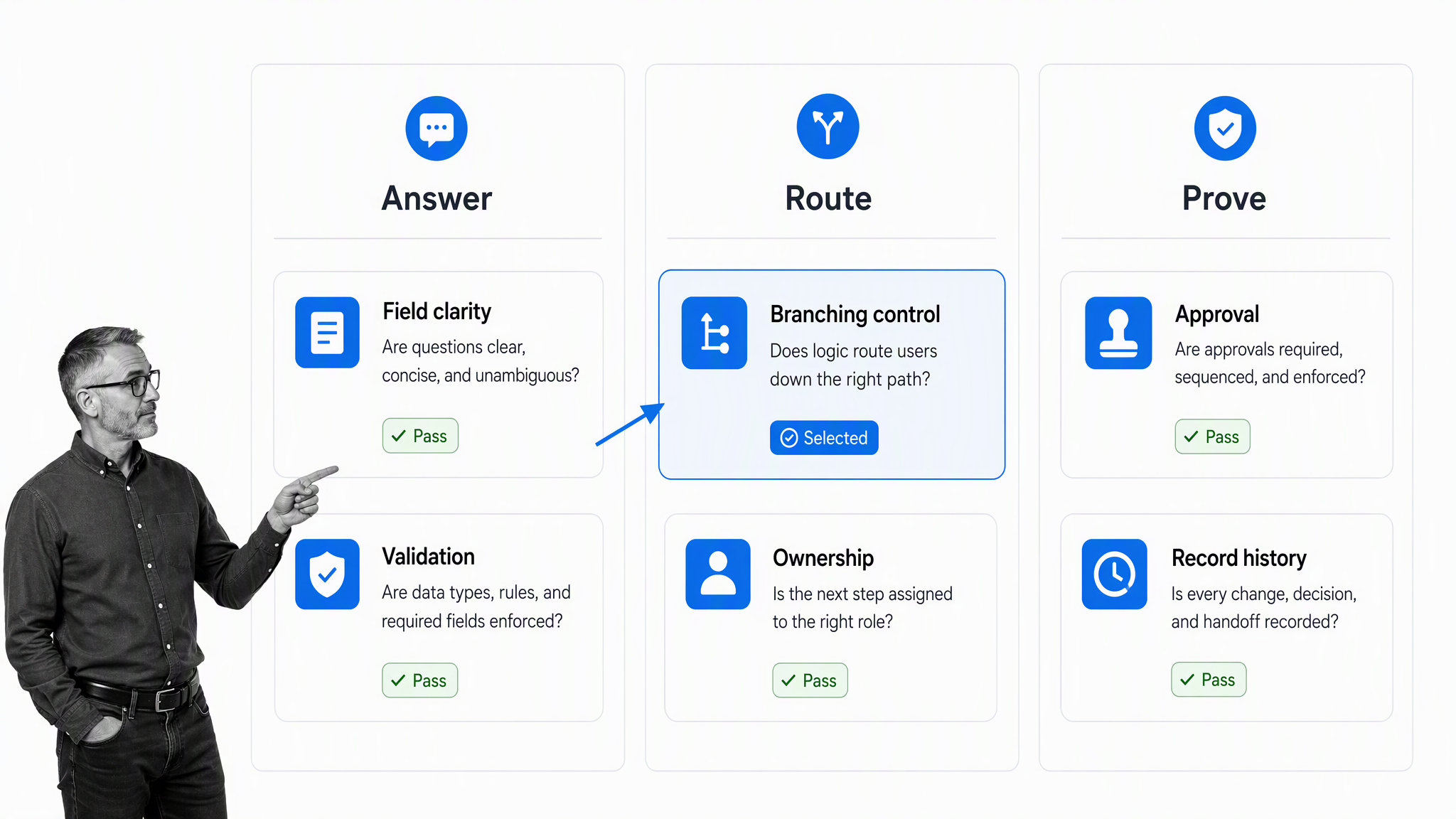
Treat generated output as a draft that must pass quality control. Review the respondent experience, the decision logic, and the evidence record separately. A form can look clean and still collect weak data or route a request incorrectly.
Answer quality
Read every question as if you had no internal context. Check whether the label identifies the requested information, the help text resolves likely uncertainty, and the answer type fits the fact being collected. Remove questions that do not support a decision or obligation.
Routing control
Trace every branch from start to finish. Confirm that required fields remain visible when needed, hidden sections do not contain mandatory fields, and high-risk answers reach the right reviewer. A branch should change the process for a clear reason, not because the generator inferred an arbitrary distinction.
Accessibility and mobile use
Check keyboard order, visible labels, instructions, error messages, focus behavior, touch targets, and narrow-screen layout. Do not rely on placeholder text as the only label. Test with the devices and assistive technologies your respondents actually use.
Privacy and data minimization
Collect only what the process needs, limit access, and define retention before launch. The NIST Privacy Framework treats privacy risk as something organizations identify, govern, control, communicate, and protect throughout data processing. The FTC data security guidance also stresses collecting only necessary information, controlling access, and disposing of data securely. Form design is one of the earliest places to apply that discipline.
Proof and auditability
Confirm that the original response, files, decisions, comments, assignments, and completion history stay connected. If someone asks why a request was approved or rejected, the record should answer without reconstructing the story from inboxes and spreadsheets.
Form generator use cases
Form generators are most useful when the form type is familiar but the details change by team, policy, or use case. They accelerate the first draft while keeping the process owner responsible for the final questions and rules.
Employee onboarding and internal requests
HR can generate a new hire intake form for role details, location, equipment, system access, and manager context. An employee onboarding checklist can then coordinate HR, IT, finance, security, and the hiring manager after the request is approved.
Vendor and procurement intake
Procurement can generate a form that captures business purpose, vendor details, data access, contract context, budget ownership, and required evidence. A vendor management workflow routes each submission through the reviews that its answers require.
IT service and access requests
IT can generate request forms for accounts, devices, software, incidents, or changes. An IT support ticket workflow gives each request an owner, priority, approval state, due date, and completion record.
Customer onboarding and implementation
Customer teams can generate intake for goals, stakeholders, data, integrations, dependencies, and launch constraints. A structured customer onboarding process converts those answers into a shared implementation plan instead of leaving them in a response export.
Inspections, audits, and evidence collection
Quality and compliance teams can generate forms for inspections, control tests, exceptions, attestations, and evidence requests. These forms need careful review because the wording affects what proof is collected and whether reviewers can compare one response with another.
Turn a generated form into a governed workflow
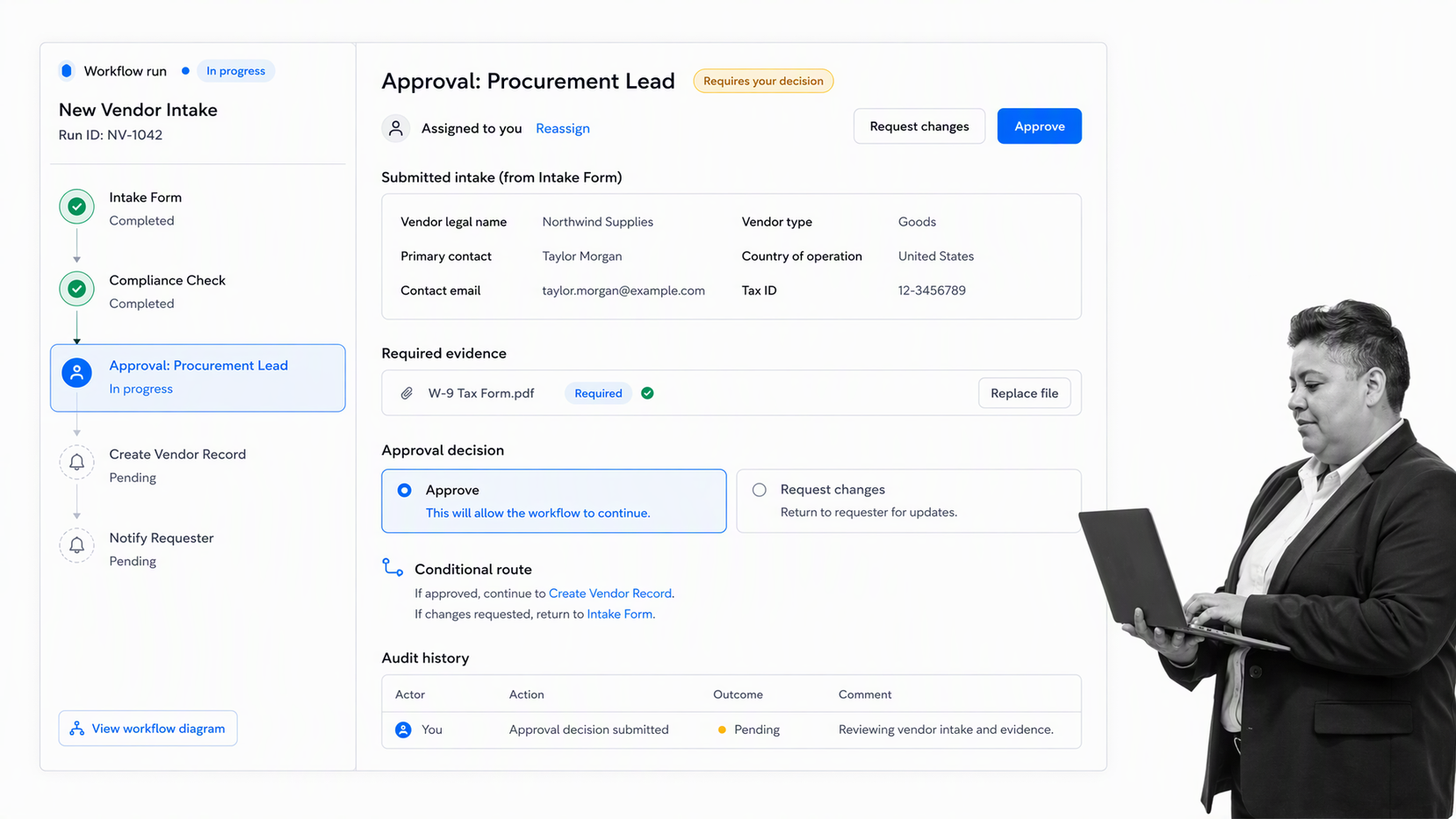
A generated form becomes dependable when the submission starts a governed workflow. The form captures the signal. The workflow assigns the work, applies the rule, records the decision, and preserves the proof.
Start the correct workflow automatically
Map each published form to the process it should start. Carry the response into the workflow so operators do not retype names, dates, classifications, or file links. Give the first task a clear owner and due date as soon as the response arrives.
Use responses to control the path
Conditional logic can route low-risk submissions through a shorter path and require more review for higher-risk answers. Keep the logic visible to process owners, and test it with realistic edge cases before it affects live work.
Put approvals at decision points
Use approvals where a person must authorize the next step, not as a decorative sign-off. Process Street supports single, multi-stage, and sequential approvals within workflows, according to the approvals guide. The approval should preserve the reviewer, status, comments, and evidence considered.
Automate routine updates
Once the human decision is clear, automate the predictable actions around it. That can include creating records, sending confirmations, updating systems, or launching another workflow. Process Street has 5,000+ integrations, and an AI agent can build a new connection when the required system is not pre-wired.
Keep the record attached to the work
Store the submission, follow-up answers, files, approvals, exceptions, and completion history in the same run. This is what separates an isolated form response from an accountable form engine for repeatable operations.
How to launch and improve a generated form
Launch the smallest version that can support the real decision, then improve it from observed behavior. More questions do not automatically create better data. A shorter, tested form often produces more consistent answers and less cleanup.
Test with realistic response sets
Submit a complete response, an incomplete response, a low-risk case, a high-risk case, and an unusual edge case. Confirm the respondent sees the right fields and the operator receives the right task, data, owner, and route each time.
Preview before publishing
Preview every branch as the intended respondent and as the internal reviewer. The workflow preview guide explains how to test conditional logic and approvals before changes reach active runs. The same discipline belongs in every generated-form launch.
Monitor for friction and weak answers
Review abandonment, validation errors, repeated free-text patterns, missing evidence, rework, and time to first action. A form monitoring practice should test the full journey, including the downstream workflow start, not only whether the public page loads.
Regenerate carefully
When requirements change, do not regenerate the whole form blindly. Identify the affected section, preserve stable fields and reporting keys, review every changed branch, and test with the same response set. Uncontrolled regeneration can break integrations, historical comparisons, and operator expectations.
Retire forms cleanly
Remove obsolete links, stop new submissions, preserve required records, and route users to the current form. A clear retirement process prevents old forms from continuing to create incomplete or unowned work after the business process has changed.
FAQs
What is a form generator?
A form generator is software that creates a digital form structure from a prompt, template, document, or set of requirements. It can suggest questions, field types, choices, validation rules, sections, and conditional paths, but a person should review the result before publishing it.
How is a form generator different from a form builder?
A form builder gives you controls for manually adding and arranging fields. A form generator can create an initial structure from a description or source material. Many platforms combine both, so you can generate a first draft and then edit it before launch.
What should I include in a form generator prompt?
Name the respondent, the purpose, the decision the response must support, required evidence, information that should not be collected, and any answers that should change the path. Ask for plain labels, concise help text, and reviewable conditional logic.
Can an AI form generator publish a form without review?
It may be technically possible, but it is a poor control for business-critical intake. Review field wording, accessibility, validation, permissions, privacy, routing, and every conditional branch before publishing a generated form.
How do I connect a generated form to a workflow?
Map the published form to the workflow it should start, carry response values into workflow fields, assign the first owner, and use answers to control routing and approvals. Test complete, incomplete, low-risk, and high-risk submissions before launch.
Can Process Street work as a form generator?
Process Street can help teams create forms and workflow structure, then turn responses into assigned and auditable workflow runs. It is strongest when a generated form is the front door to a repeatable process with conditional logic, approvals, evidence, automations, and history.