


Turn every policy into automated workflows with built-in enforcement and audit-ready proof.



Note Taking Tools
Note taking tools help you capture ideas, organize reference material, and retrieve the right detail when you need it. The best choice is not the app with the longest feature list. It is the tool that fits how you capture information and what needs to happen after the note is written.
A quick-capture app, a linked personal knowledge base, and a shared team workspace solve different problems. This guide compares six strong options, including tools for individual recall, collaborative notes, meeting records, research, and operational follow-through. If you need category fundamentals first, start with how note taking software works and then use this shortlist to choose a product.
Each tool was evaluated against the same practical questions: How quickly can you capture a thought? How easy is retrieval after the library grows? Can notes move between people and devices? Who controls the data? Can an important decision become assigned, trackable work?
In this guide, you will find:
- Note taking tools at a glance
- How we evaluated note taking tools
- 1. Process Street
- 2. Notion
- 3. Microsoft OneNote
- 4. Evernote
- 5. Obsidian
- 6. Google Keep
- How to choose the right note taking tool
- How to turn notes into action
- FAQs about note taking tools
Note taking tools at a glance
The short version: Process Street is the strongest fit when team notes need to become controlled recurring work. Notion works well for collaborative notes and connected docs. OneNote suits freeform notebooks, Evernote is built around broad capture and retrieval, Obsidian prioritizes local linked knowledge, and Google Keep keeps everyday capture deliberately light.
| Tool | Best for | Standout feature | Pricing |
|---|---|---|---|
| Process Street | Turning team notes into controlled recurring workflows | Approval gates, assignments, required fields, and audit history | Custom quoted plans with a Pro trial |
| Notion | Collaborative notes and connected team docs | Pages, databases, comments, and meeting summaries in one workspace | Free Plan and paid plans |
| Microsoft OneNote | Freeform notebooks in Microsoft environments | Flexible pages organized inside sections and notebooks | Free to use, with optional Microsoft 365 features |
| Evernote | Web capture and mixed-media note organization | Web Clipper, search, notebooks, tasks, and calendar | Free, Starter, Advanced, and Enterprise |
| Obsidian | Local-first linked knowledge bases | Plain-text Markdown files, backlinks, and plugins | Free app with optional paid Sync and Publish |
| Google Keep | Fast lightweight notes, lists, and reminders | Simple card grid with labels, pins, and reminders | Available through a Google Account |
There is no universal winner for every person and team. A researcher may value backlinks and local files. A sales manager may care more about shared meeting notes. An operations leader may need approvals and proof that follow-up steps were completed. Start with the job, then pick the tool.
How we evaluated note taking tools
We evaluated these note taking tools around real work, not novelty features. Every product had to support a clear capture-and-retrieval job. It also had to offer a distinct reason to choose it instead of another general text editor.
Capture speed
A note system fails when opening it feels like work. Fast capture can mean a mobile share action, a browser clipper, an always-ready blank page, a meeting command, or a simple card. The important test is whether you can record an idea before the context disappears.
Organization and retrieval
Folders, notebooks, tags, links, databases, and search all solve the same core problem: finding information later. As a library grows, structure matters more than visual polish. A durable note taking system gives you a repeatable capture rule and a retrieval habit instead of a pile of disconnected notes.
Collaboration and handoff
Shared notes need permissions, comments, ownership, and a clear path from decision to action. A dedicated note taking assistant may capture or summarize a meeting, while meeting management software can coordinate the broader meeting cycle. The handoff matters because an accurate summary still creates no value if nobody owns the next step.
Portability, privacy, and offline access
Your notes may become years of intellectual and operational history. Check export formats, offline behavior, account requirements, and where files live. Local-first tools give you more direct control. Cloud workspaces usually make sharing easier. Neither model is automatically better; the right answer depends on the sensitivity of the information and the people who need access.
Methodology and source date
Product capabilities and plan structures were checked against first-party vendor pages on September 2, 2026. Pricing cells use durable plan descriptions rather than promotional monthly figures. The ranking reflects use-case fit, not a claim that one product is objectively best for every workflow.
1. Process Street
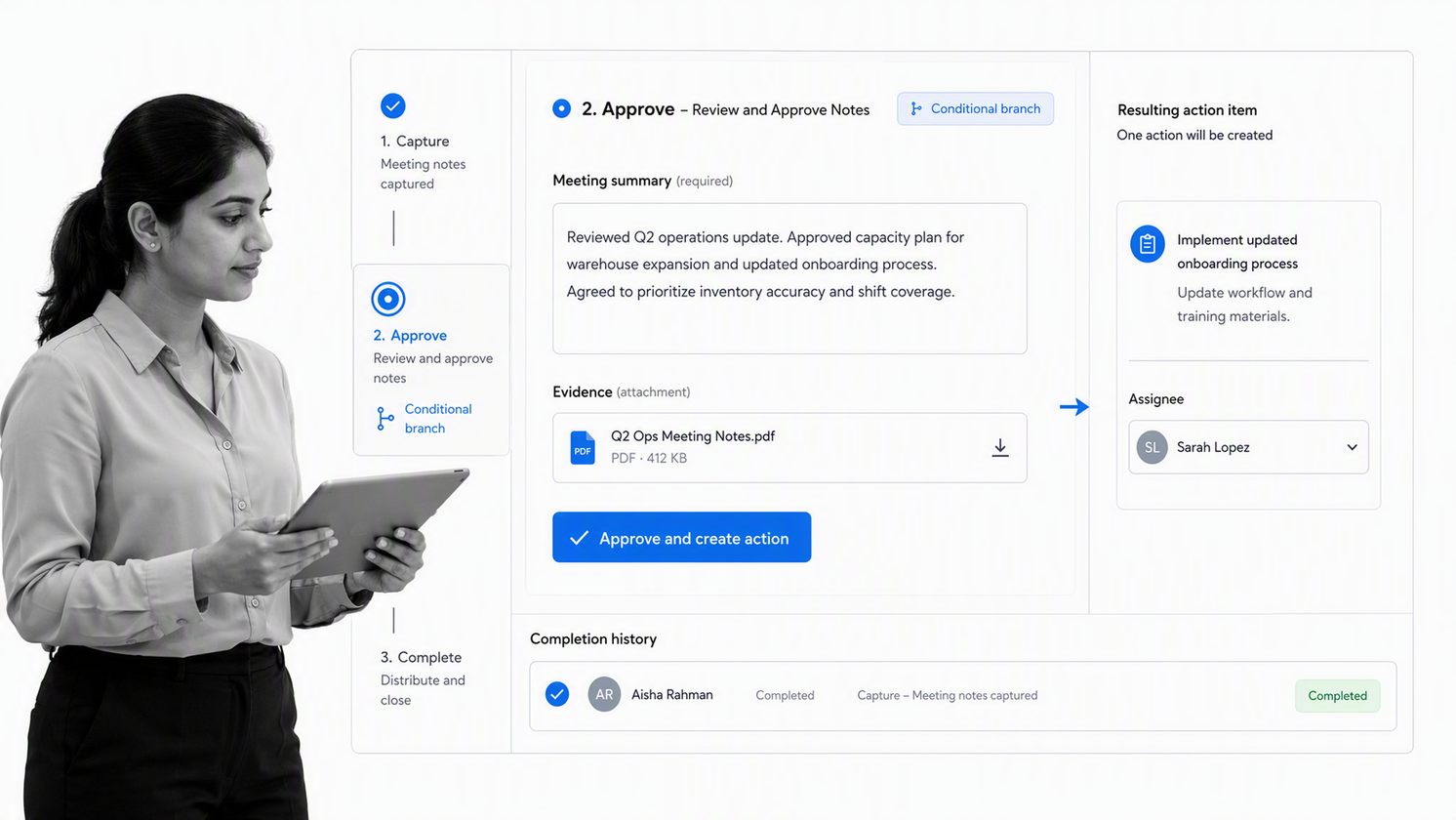
Best for: turning team notes into controlled recurring workflows.
Process Street is an agentic process automation platform for work that must be executed consistently. It is not a personal scratchpad. It belongs at the point where a meeting note, decision, policy, or procedure becomes assigned work with owners, due dates, required information, and a record of completion.
The distinction is simple. A note records what someone said. A workflow controls what happens next. Teams can place a decision into a guided run, require evidence, route an exception with conditional logic, and pause progress behind workflow approvals. That makes Process Street useful for onboarding, approvals, audits, recurring reviews, customer handoffs, and other work where missed steps create real risk.
Why it stands out
The strongest note tool for a consequential team process is often the system that prevents the follow-up from disappearing. Process Street connects knowledge to execution, so an action item is not merely another bullet. It receives an owner, a due date, a defined completion condition, and an auditable history.
What to watch
Use a faster personal tool for disposable thoughts and early research. Move only durable procedures, recurring decisions, and controlled handoffs into Process Street. A standard operating procedure template is a useful starting point when the note has matured into a repeatable standard.
2. Notion

Best for: collaborative notes and connected team docs.
Notion combines notes, documents, page hierarchies, databases, and collaboration inside one workspace. Its official notes and docs page positions the product as a searchable, shareable home for everything from a grocery list to product specifications and board minutes.
The block-based editor is flexible enough for lightweight notes, structured meeting records, project references, and team wikis. Database properties make it possible to sort and filter notes by owner, status, project, or type. Comments and shared pages keep the context close to the work.
Why it stands out
Notion is strongest when notes need structure and collaboration without becoming formal workflows. Teams can keep meeting summaries beside project pages, link a note to a database record, and reuse templates for consistent capture. AI Meeting Notes adds transcription and summaries directly inside the workspace.
What to watch
Flexibility creates setup choices. A workspace can become inconsistent when every team invents a different hierarchy or property system. Establish a small number of page types, name an owner for shared databases, and avoid building elaborate systems before the capture habit is stable.
3. Microsoft OneNote
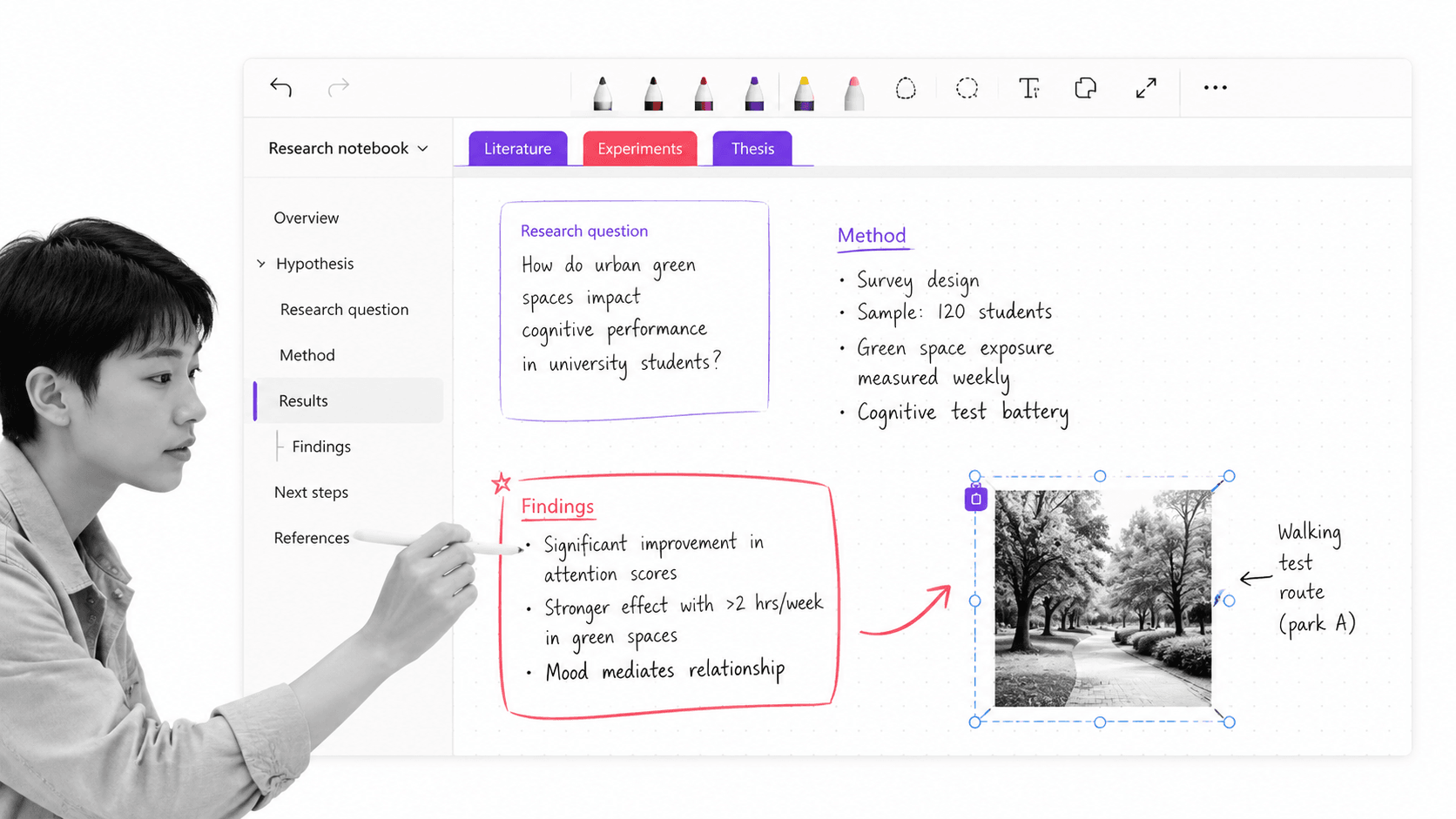
Best for: freeform notebooks in Microsoft environments.
Microsoft OneNote uses a familiar hierarchy of notebooks, sections, pages, and subpages. Microsoft explains that structure in its official guide to organizing OneNote notebooks. Inside a page, note containers can sit in different positions, which makes the experience feel closer to a flexible paper notebook than a linear document.
That freedom works well for classes, research, sketches, meeting notes, and mixed typed-and-handwritten material. It is especially convenient for people already working across Microsoft accounts and devices, because supported desktop, web, and mobile versions connect to cloud notebooks.
Why it stands out
OneNote gives structure without forcing every thought into a database. You can create a section for a subject, a page for each meeting or topic, and subpages for supporting detail. Freeform placement and ink support make it a natural fit when diagrams, handwriting, and spatial arrangement matter.
What to watch
A large notebook can become difficult to scan if sections and page names are inconsistent. Use a small hierarchy, add clear page titles, and decide whether search or manual navigation will be the primary retrieval method. Teams should also agree where shared notebooks live and who maintains the top-level structure.
4. Evernote
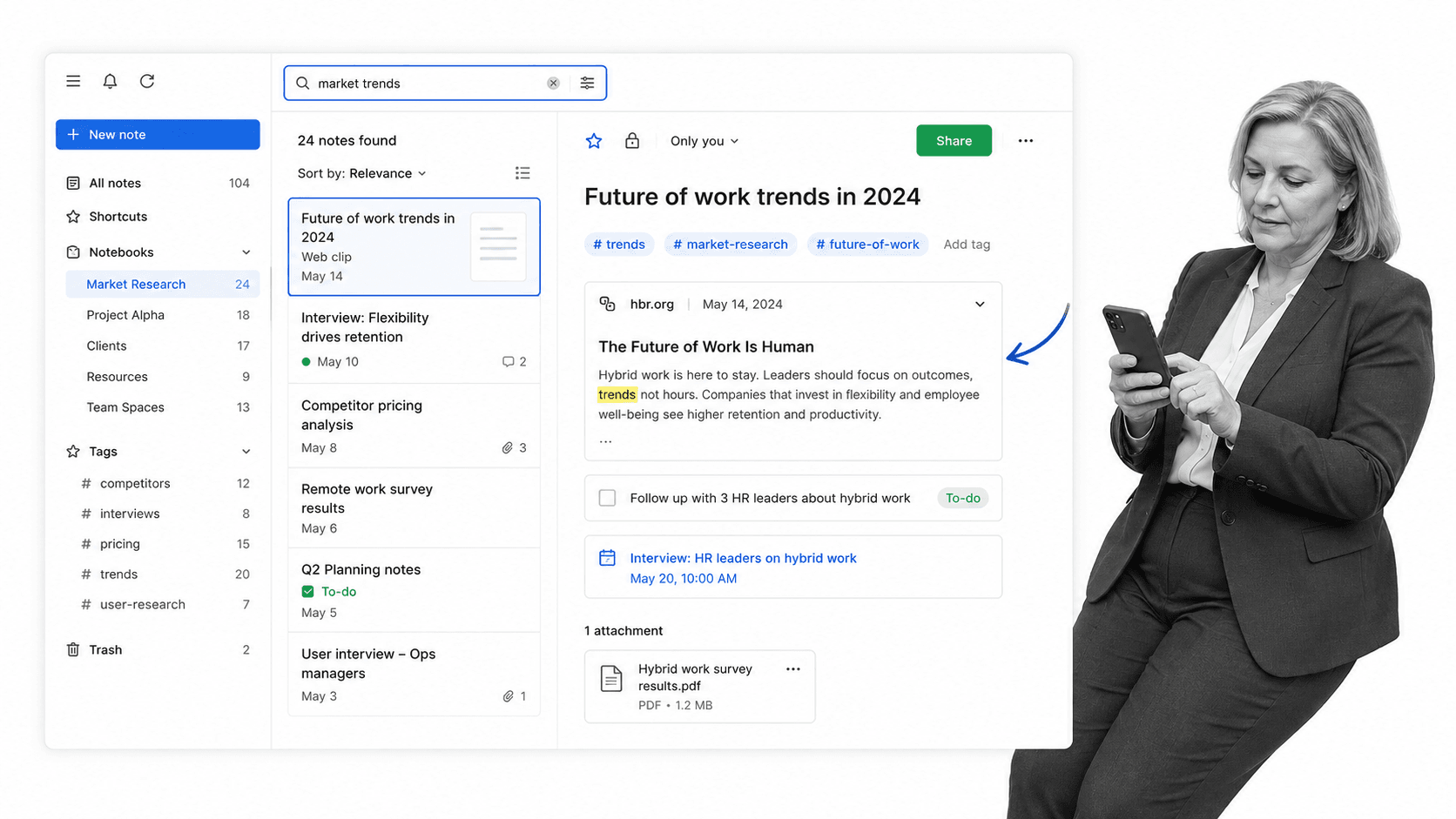
Best for: web capture and mixed-media note organization.
Evernote focuses on getting many kinds of information into one searchable place. The official Evernote product page highlights notebooks, spaces, search, tasks, calendar connections, Web Clipper, collaboration, and AI features. That breadth suits people who collect articles, images, files, meeting material, and personal notes together.
Web Clipper is a practical differentiator for research. It reduces the gap between finding a useful source and storing it with enough context to retrieve later. Tasks and calendar links also let a note hold light follow-up without requiring a separate project system for every small item.
Why it stands out
Evernote gives capture and retrieval equal weight. The product supports several intake formats and pairs them with notebooks, tags, and search. That makes it useful for people whose information arrives from the browser, email, meetings, files, and mobile devices rather than one clean writing surface.
What to watch
Plan limits differ meaningfully, so compare the current Free, Starter, Advanced, and Enterprise options against your note volume and device needs. More importantly, test retrieval with your own material. A broad capture system is valuable only if search and organization remain trustworthy after months of use.
5. Obsidian
Best for: local-first linked knowledge bases.
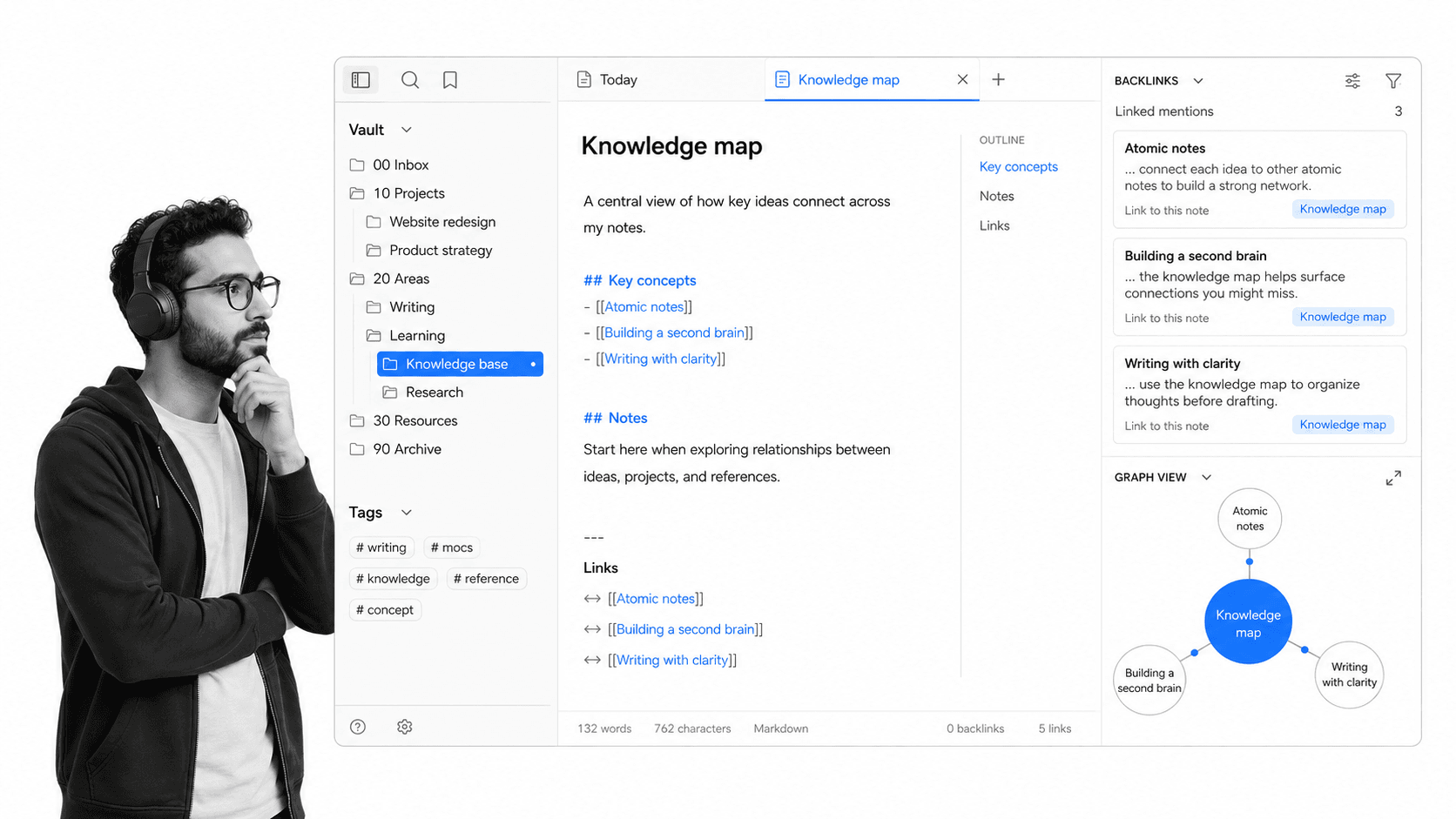
Obsidian stores notes locally as plain-text Markdown files and lets you connect ideas through links and backlinks. Its official Obsidian overview emphasizes private device storage, open file formats, plugins, themes, and linked personal knowledge. That makes it appealing to writers, researchers, and technical users who want direct control over their files.
Links change the retrieval model. Instead of placing every idea in one perfect folder, you can connect a note to related people, projects, sources, or concepts. Backlinks show where a note is referenced, and graph views can reveal clusters of connected thinking.
Why it stands out
Local Markdown files reduce format lock-in and keep the core library usable outside the app. The plugin ecosystem lets advanced users shape editing, capture, and review around their own methods. Optional Sync and Publish services add cross-device and web publishing capabilities without changing the local-first foundation.
What to watch
Obsidian rewards deliberate habits. Plugins and customization can become a distraction, and collaboration needs more planning than a cloud-first team workspace. Start with plain notes, links, and a simple folder structure. Add automation only when a recurring need is clear. It works best as a personal knowledge management system, not as a substitute for every operational system.
6. Google Keep
Best for: fast lightweight notes, lists, and reminders.
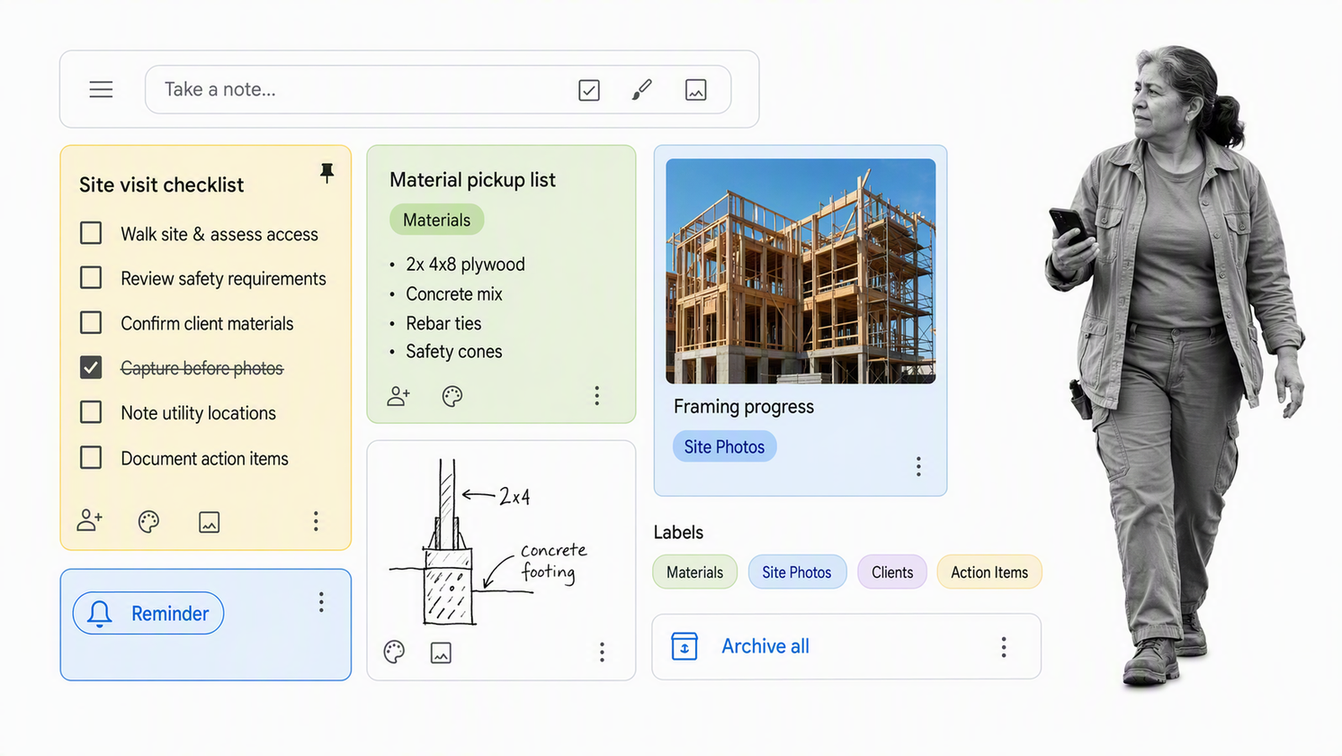
Google Keep minimizes the distance between thought and capture. Its official Google Keep help center covers text notes, lists, image notes, drawings, sharing, reminders, search, and export. The core interface uses a simple card grid, which makes short notes and checklists easy to scan.
Keep is useful for errands, quick ideas, lightweight shared lists, and reminders that do not need a deeper knowledge model. Labels, colors, and pins provide enough organization for a modest library without turning capture into database administration.
Why it stands out
Speed is the product. A short note can be captured, pinned, labeled, shared, or given a reminder with little setup. That makes Keep a good companion tool even when a team uses a more structured workspace for durable knowledge.
What to watch
The simplicity becomes a limit when notes need deep hierarchy, rich relationships, formal permissions, or complex team governance. Keep the library intentionally small. Promote durable knowledge into a more structured home instead of trying to turn a lightweight card grid into a complete company memory.
How to choose the right note taking tool
Choose a note taking tool by running a realistic trial, not by comparing screenshots. Import a small but representative set of meeting notes, research, reference files, and quick captures. Then test the complete loop from capture to retrieval to action.
| Decision | Choose this pattern | Why |
|---|---|---|
| Notes must trigger accountable work | Process Street | Owners, due dates, approvals, required fields, and history control follow-through |
| A team needs flexible shared docs | Notion | Pages, databases, comments, and meeting notes live together |
| You want a digital freeform notebook | Microsoft OneNote | Sections, pages, ink, and movable containers support spatial capture |
| Most material comes from the web | Evernote | Web capture, notebooks, tags, tasks, and search support a broad archive |
| You want local files and links | Obsidian | Markdown, backlinks, and plugins create a portable personal knowledge base |
| You need the fastest simple capture | Google Keep | Cards, checklists, labels, and reminders keep friction low |
Run a seven-day retrieval test
Capture at least twenty real notes from the devices and contexts you use. One week later, try to find five specific details without browsing every folder. Retrieval speed is the best predictor of whether the system will still work after the library grows.
Test export before committing
Export a notebook or workspace during the trial. Check whether text, attachments, links, and structure survive in useful formats. A note library is long-lived, so the exit path deserves the same attention as the capture experience.
Use one primary home
Multiple tools can coexist, but each needs a clear role. A quick-capture inbox may feed a linked research library, while team decisions move into process documentation. The failure mode is ambiguity, where nobody knows which tool contains the authoritative version.
Must-have checklist
| Requirement | Test | Pass condition |
|---|---|---|
| Fast capture | Create a note from phone, desktop, and browser | The common path takes seconds |
| Reliable retrieval | Find five old details by search and navigation | Results are accurate without manual hunting |
| Device fit | Work online and offline across normal devices | Notes stay current and available |
| Safe sharing | Share one private and one team note | Permissions are clear and predictable |
| Portability | Export notes and attachments | The output remains readable and reusable |
| Action handoff | Assign one real follow-up | The owner and completion state remain visible |
How to turn notes into action
Notes become operationally valuable when the right information reaches the right person at the right time. Start with a consistent meeting minutes template, capture decisions in plain language, and separate reference material from commitments. Every commitment should name an owner, due date, and completion condition.
When the same follow-up repeats, stop recreating it as a fresh checklist in every note. Promote it into workflow management software. A recurring customer handoff, access review, quality check, or approval path should run from a defined workflow that guides each participant and records the result.
A note taking generator or note taking service can reduce capture effort. Strong knowledge management tools can improve retrieval. Neither automatically enforces action. Build the handoff explicitly: note, decision, owner, workflow, evidence, completion.
A practical notes-to-action pattern
- Capture the discussion in the tool that best matches the meeting or research context.
- Mark decisions separately from background information.
- Convert every commitment into an owned action with a due date.
- Move recurring actions into a reusable workflow with clear conditions.
- Review completion history so the process improves instead of repeating the same misses.
This is the boundary between useful notes and reliable operations. Knowing what process documentation is helps teams decide which material should stay informal and which should become governed. The note is the memory. The workflow is the execution and proof.
FAQs about note taking tools
What are the best note taking tools?
The best note taking tools depend on the job. Process Street fits notes that must become controlled workflows, Notion suits collaborative docs, OneNote supports freeform notebooks, Evernote emphasizes broad capture, Obsidian supports local linked knowledge, and Google Keep keeps quick notes simple.
How do I choose a note taking tool?
Choose a note taking tool by testing capture speed, retrieval, device support, sharing, export, and action handoff with real material. A seven-day trial using your normal meetings, research, and quick notes reveals more than a feature checklist.
Which note taking tool is best for teams?
Notion is a strong fit for collaborative notes and connected team documents. When team notes must trigger controlled recurring work with owners, approvals, required fields, and audit history, Process Street is the stronger execution surface.
Which note taking tools work offline?
Offline behavior varies by product, platform, and plan. OneNote supports desktop and mobile apps connected to cloud notebooks, while Obsidian stores its core Markdown files locally. Test the exact device and sync path your team uses before committing.
What is the difference between a note taking tool and a knowledge management system?
A note taking tool prioritizes fast capture and personal or team recall. A knowledge management system adds broader structure, governance, ownership, and durable access across an organization. Some products overlap both categories, but the operating intent is different.
How should a team turn meeting notes into action?
Separate decisions and commitments from background notes, then give every commitment an owner, due date, and completion condition. When the same follow-up repeats, move it into a reusable workflow so execution and proof no longer depend on someone rereading the notes.
