


Turn every policy into automated workflows with built-in enforcement and audit-ready proof.



10 Best Quality Management Software Platforms
Quality management software gives teams one place to define standards, run repeatable quality processes, capture evidence, resolve issues, and prove that work was completed correctly. The right platform replaces disconnected documents and follow-up messages with controlled workflows that people can actually follow.
This guide compares 10 quality management software platforms across workflow execution, CAPA, audits, document control, training, inspections, and regulated operations. Process Street leads the list for teams that want quality procedures to operate as assigned, auditable workflows. The other products serve more specialized quality, manufacturing, life sciences, and product-development needs.
Quality management software contents
- 10 best quality management software platforms
- What is quality management software?
- How should you choose quality management software?
- Which quality management software features matter most?
- How do you implement quality management software?
- Quality management software questions and answers
10 best quality management software platforms
The strongest choice depends on what the quality system must control. Some teams need a flexible workflow layer that can standardize approvals across departments. Others need a specialized eQMS for medical devices, life sciences, manufacturing, or product records. Use the table to narrow the field, then validate the finalist with a real quality process.
| Platform | Fit | Quality focus |
|---|---|---|
| Process Street | Cross-functional quality operations | Controlled workflows, approvals, forms, assignments, and evidence |
| MasterControl | Regulated quality organizations | Documents, training, CAPA, audits, and risk |
| Qualio | Life sciences teams | Connected eQMS processes across the quality lifecycle |
| Octave Reliance | Configurable enterprise quality | Audits, documents, change, training, and risk |
| Greenlight Guru | Medical device companies | Quality and design controls for device development |
| QT9 QMS | Manufacturing quality teams | CAPA, audits, inspections, training, and deviations |
| SafetyCulture | Frontline and multi-site inspections | Mobile checks, reports, corrective actions, and visibility |
| ComplianceQuest | Enterprise quality and safety | Connected quality processes on one platform |
| Arena PLM & QMS | Product companies | Product records linked with quality processes |
| Odoo Quality | Odoo manufacturing operations | Checks and alerts inside production and inventory work |
Process Street
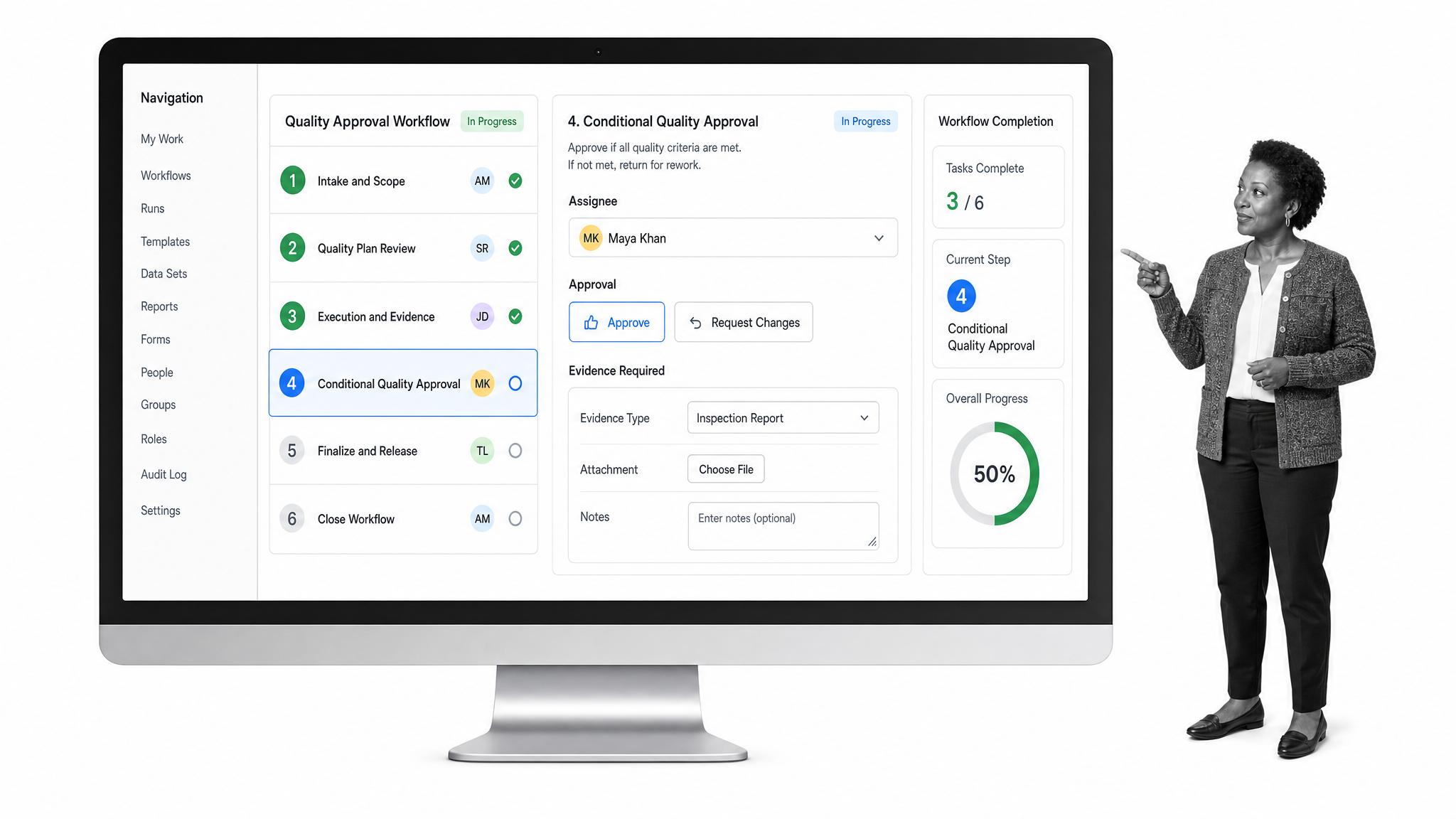
Process Street is the strongest choice for teams that need quality procedures to run as enforced, auditable workflows. Build an SOP as a workflow, assign each task to the right role, collect structured data with forms, route exceptions for approval, and retain a record of what happened. Recurring schedules and automations reduce manual coordination, while reporting helps managers see incomplete work and recurring bottlenecks.
It is especially useful when quality touches operations, customer support, HR, finance, and compliance rather than living in a single department. Teams can use the same platform for quality control workflows, supplier reviews, incident investigations, change requests, internal audits, training attestations, and CAPA execution. That flexibility makes Process Street a practical quality operating layer without forcing every team into an overly rigid system.
MasterControl
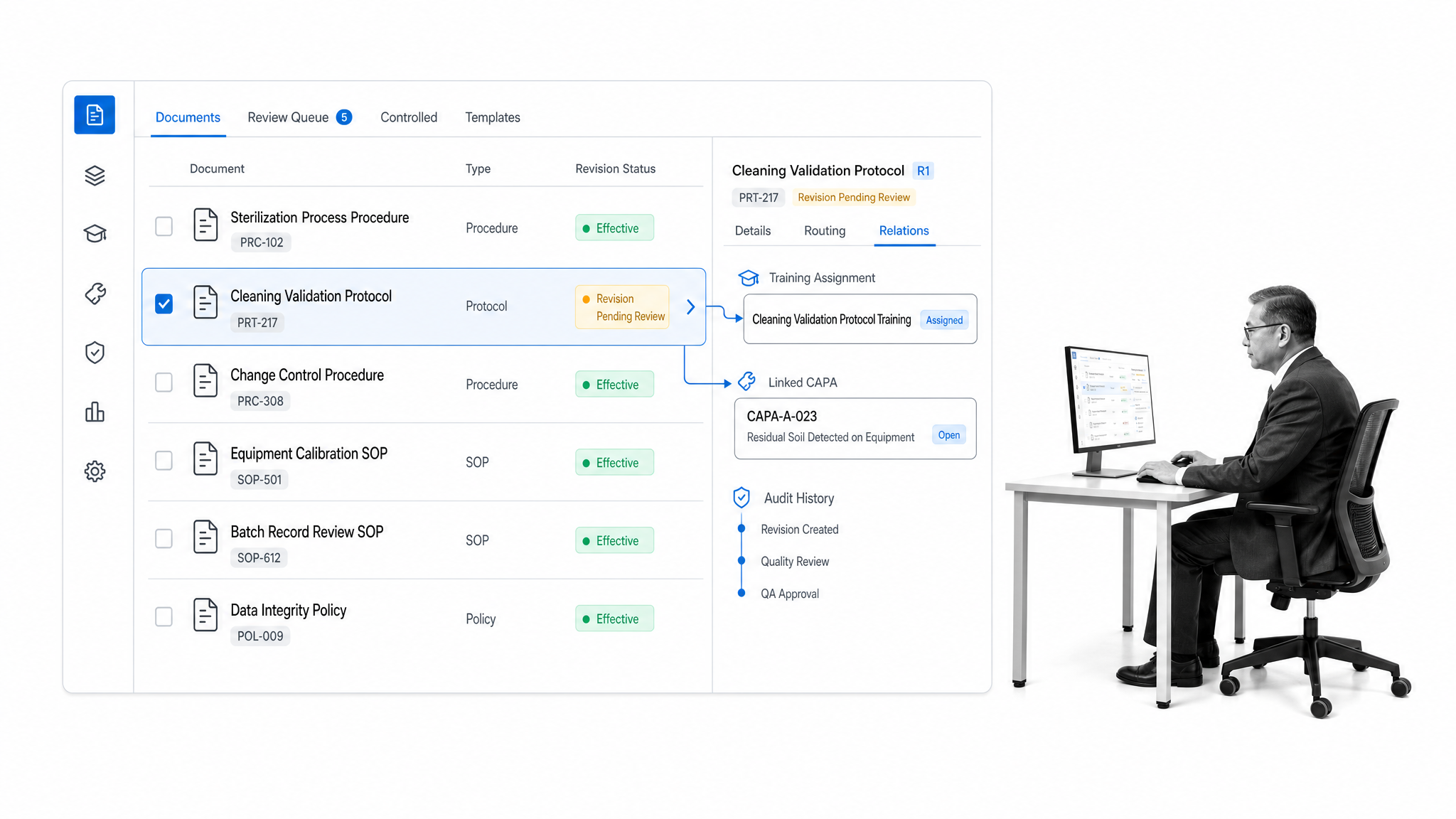
MasterControl is designed for regulated quality environments that need closely connected controls. Its Quality Excellence platform brings document control, training, CAPA, audits, and risk processes together. That scope suits organizations with mature quality teams, formal validation requirements, and a large volume of controlled records.
Consider MasterControl when the buying group includes quality assurance, regulatory, manufacturing, and IT stakeholders, and when implementation can support a broad enterprise system. During evaluation, test how a controlled document change triggers training, how a deviation becomes a corrective action, and how the full record is retrieved for an audit.
Qualio
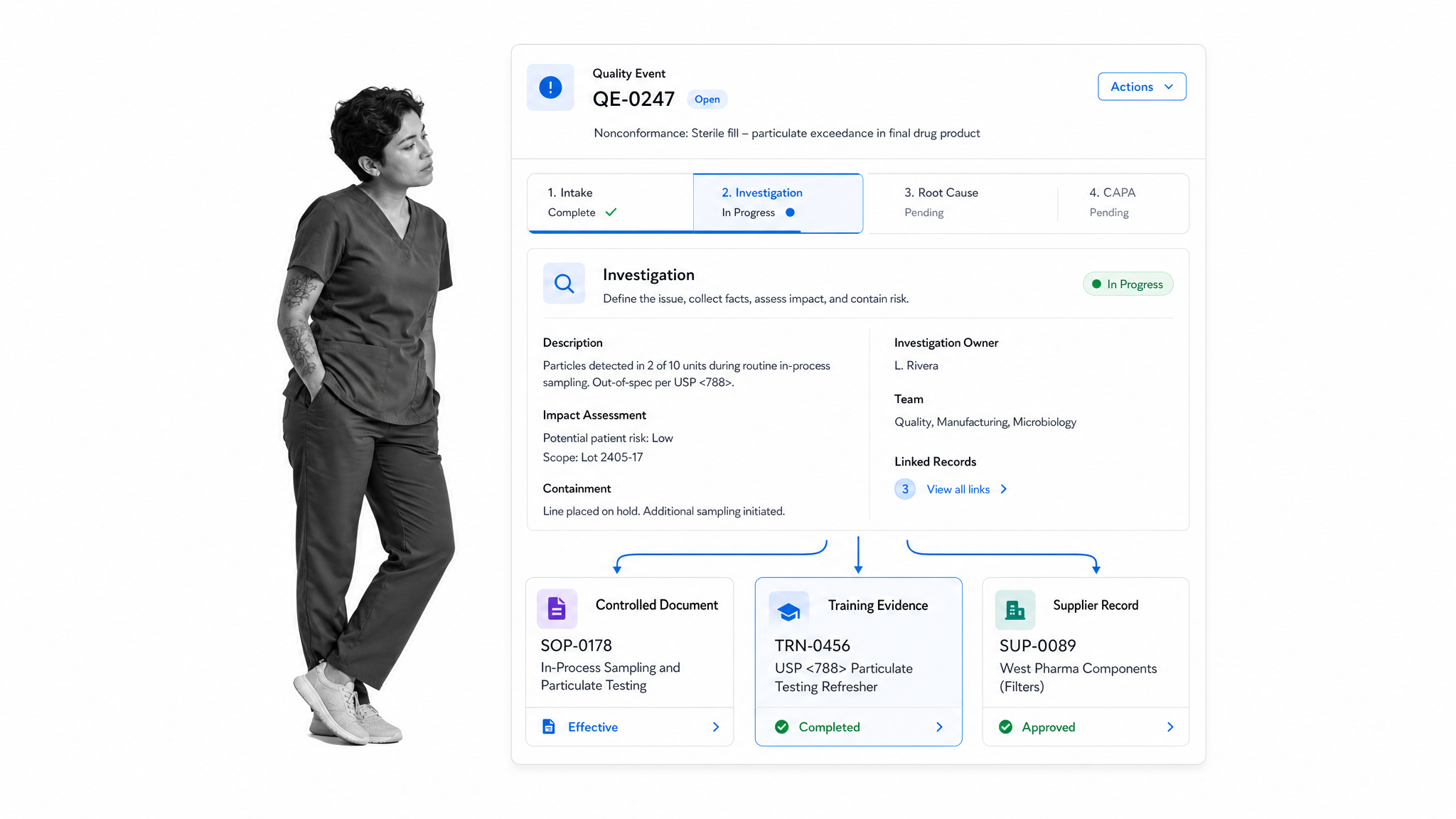
Qualio focuses on life sciences quality management. The product connects document, supplier, design, risk, training, change, audit, CAPA, and nonconformance controls. It can be a strong situational fit for growing medical device, pharmaceutical, biotechnology, and contract organizations that want an eQMS aligned with how life sciences quality teams work.
Evaluate Qualio with a complete scenario instead of an isolated feature. Start with an approved procedure, assign the associated training, record a quality event, open a corrective action, and verify the resulting audit trail. That sequence reveals whether the system supports the handoffs your quality team performs every day.
Octave Reliance
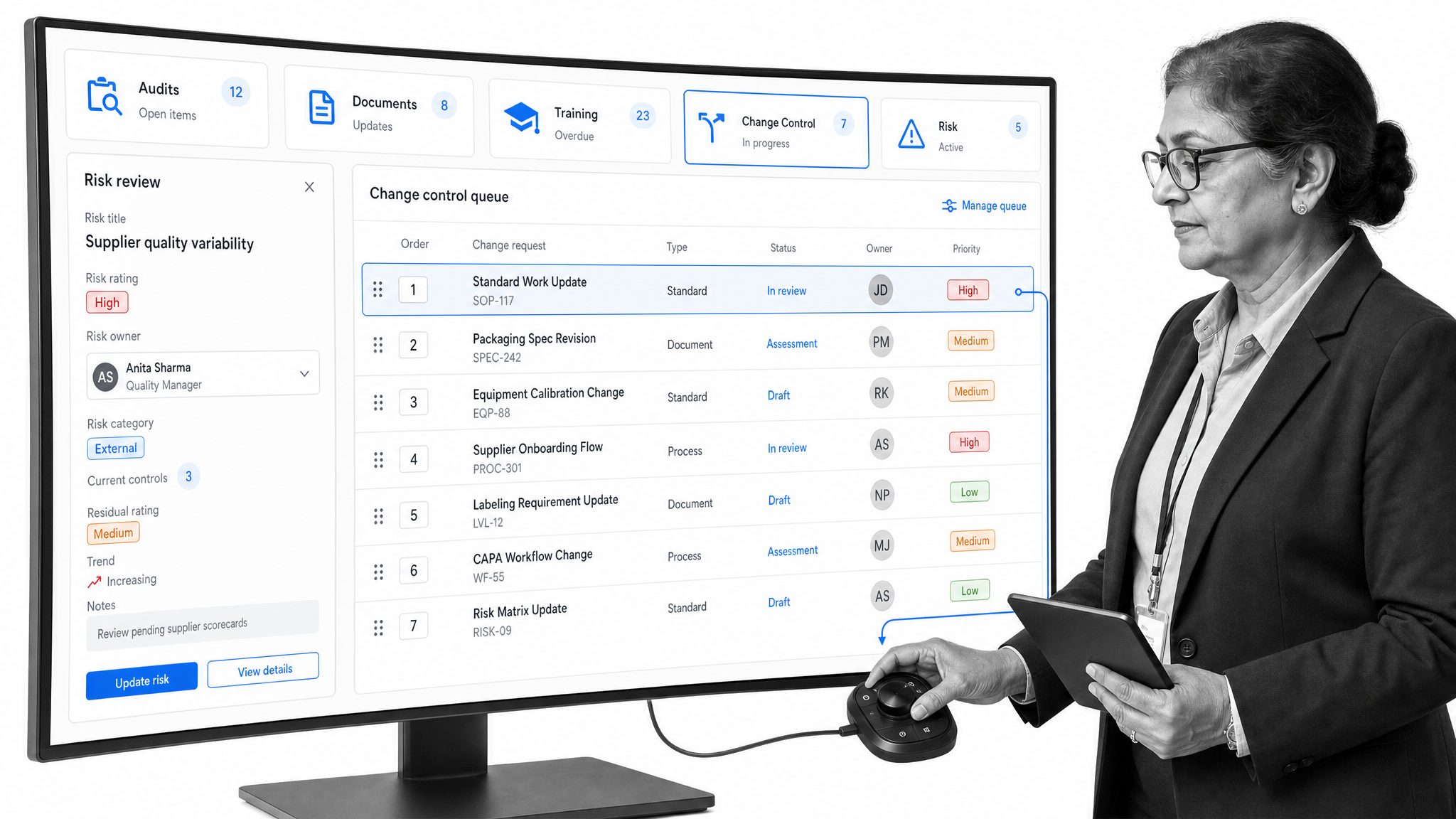
Octave Reliance is the current, rebranded version of ETQ Reliance. It provides configurable quality applications for audits, training, document control, change, and risk management. The platform is suited to enterprises that want a broad QMS and have the resources to configure workflows around existing quality processes.
Configuration depth can be valuable, but it should be tested against administrative effort. Ask who will own changes, how quickly the team can adapt a workflow, and how updates are governed. A proof of concept should cover one cross-functional process, such as a nonconformance that requires investigation, risk review, approval, and effectiveness checks.
Greenlight Guru
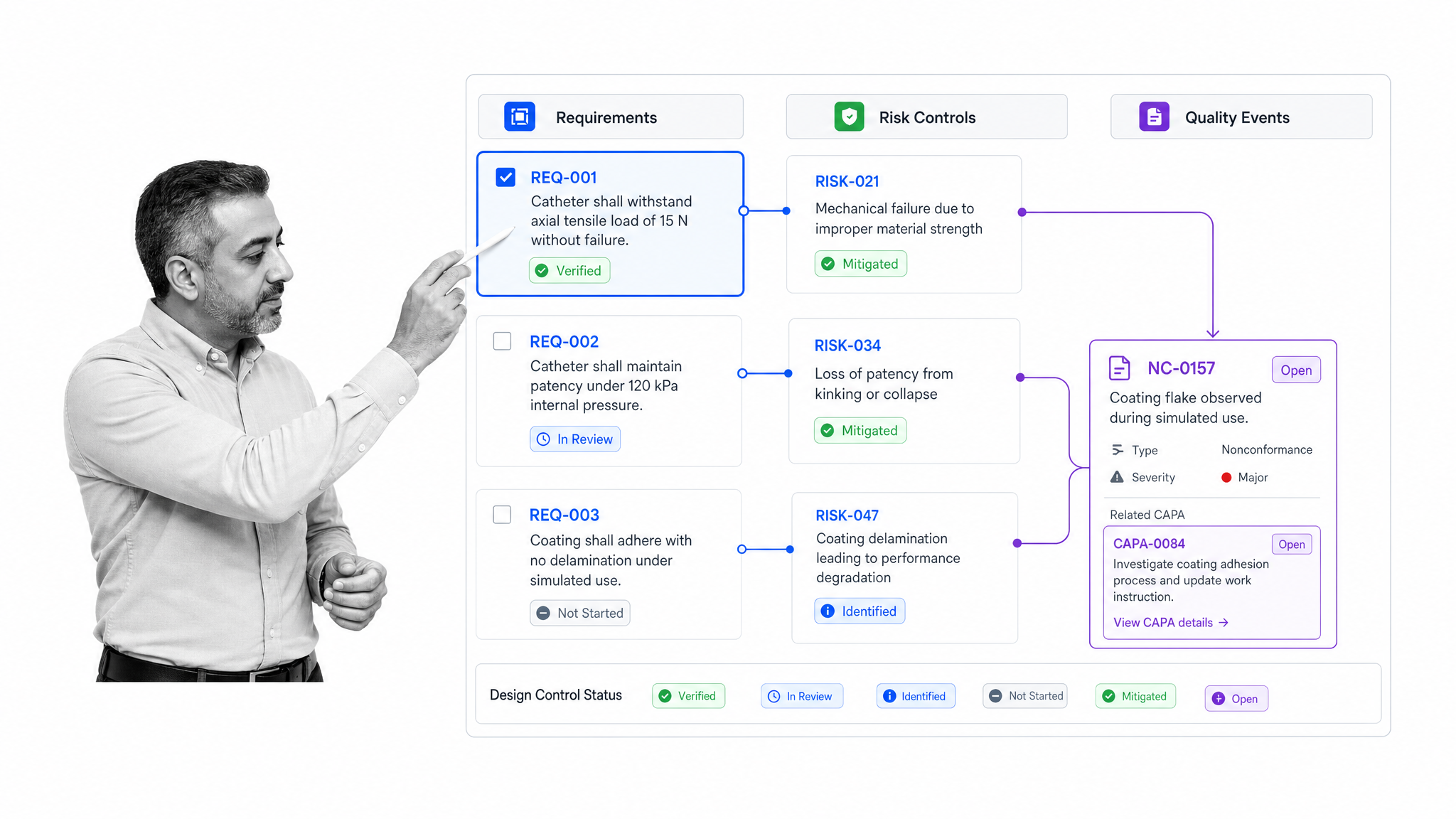
Greenlight Guru is purpose-built for medical device companies. Its quality management capabilities cover document and change control, training, suppliers, quality events, risk, CAPA, nonconformance, audits, and design controls. That specialization makes it relevant when quality records must stay closely connected to device development.
The critical evaluation question is traceability. Test whether requirements, risks, design outputs, quality events, and corrective actions stay linked as a product changes. Also include regulatory, engineering, and quality users in the trial, since the value depends on those teams sharing a consistent product and quality record.
QT9 QMS
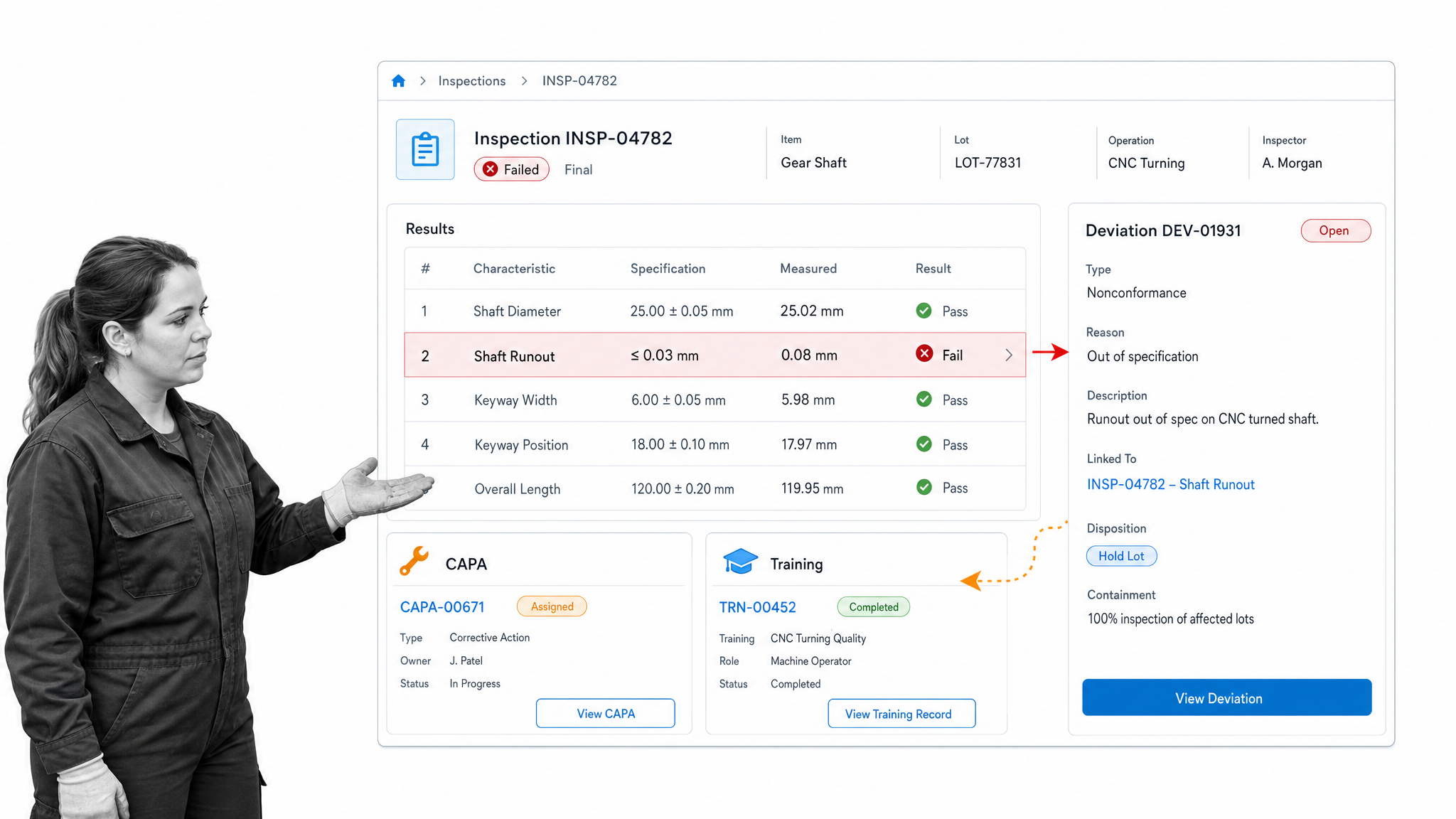
QT9 QMS is oriented toward manufacturers that need core quality processes in a dedicated system. Its capabilities include CAPA, audits, document control, training, inspections, risk, and deviations. This mix can work well for teams moving away from spreadsheets and shared drives while keeping quality activities connected to manufacturing operations.
Use a trial to assess day-to-day usability for inspectors, supervisors, and quality engineers. Record a failed inspection, initiate a deviation, assign corrective work, and confirm that the related documents and training records are easy to retrieve. Reporting should make recurring failure modes visible without extensive manual preparation.
SafetyCulture
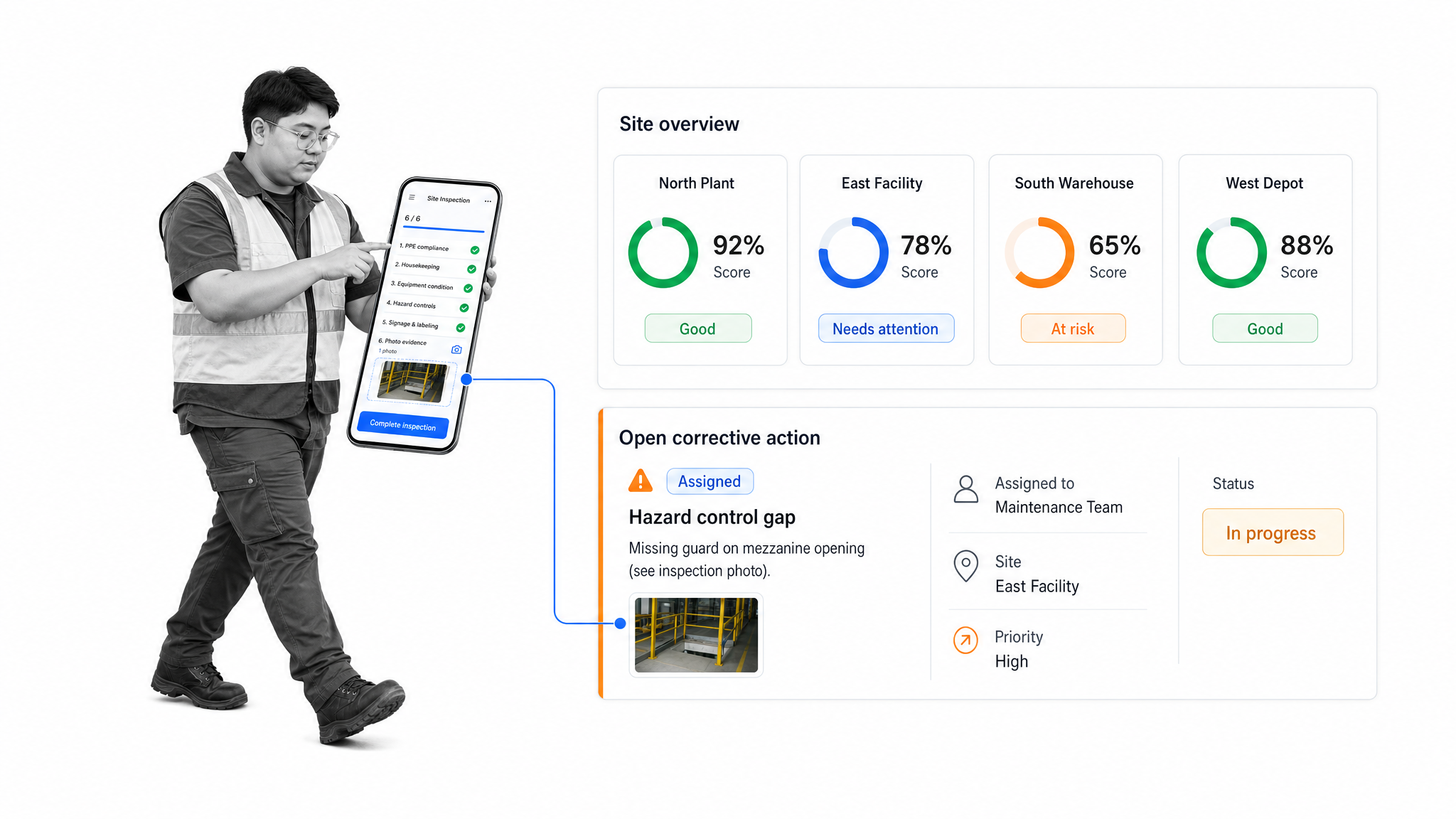
SafetyCulture emphasizes mobile inspections, reports, corrective actions, and visibility across sites. It is a practical situational fit when quality evidence is collected by frontline teams in stores, facilities, warehouses, construction sites, or field operations rather than at a desk.
Evaluate the mobile experience under real working conditions. Check how quickly a user can complete an inspection, attach evidence, escalate a failure, and confirm that the action was closed. Managers should also test whether site-level results roll up into useful patterns without hiding the underlying inspection detail.
ComplianceQuest
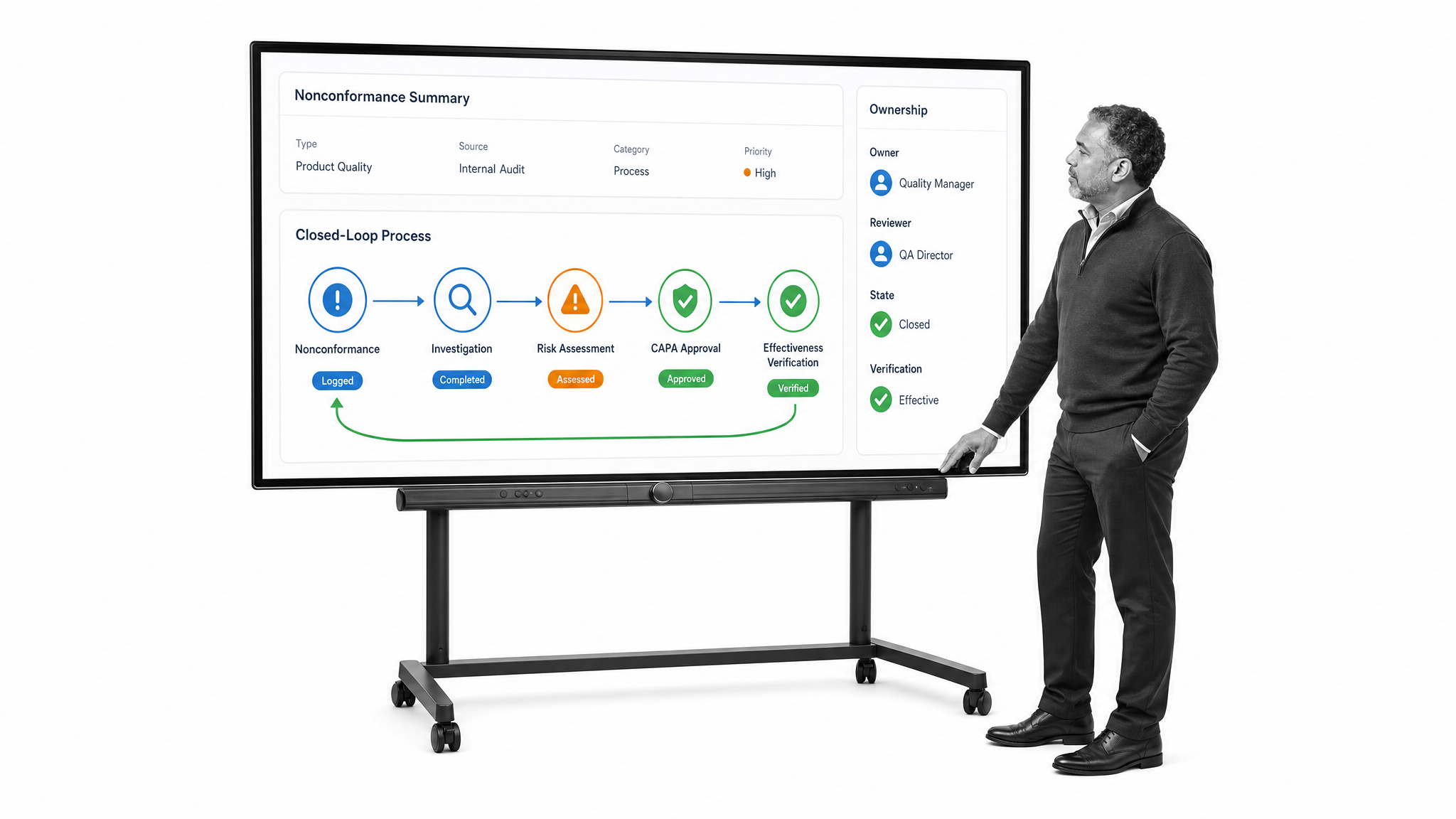
ComplianceQuest connects quality processes such as CAPA, audits, document control, training, supplier management, nonconformance, and risk. It is suited to organizations looking for an enterprise platform that can coordinate quality and adjacent operational controls across business units.
A serious evaluation should examine process continuity. Follow a complaint or nonconformance through investigation, risk assessment, corrective action, approval, and effectiveness verification. Confirm that permissions and reporting can support both local ownership and corporate oversight without duplicating records.
Arena PLM & QMS
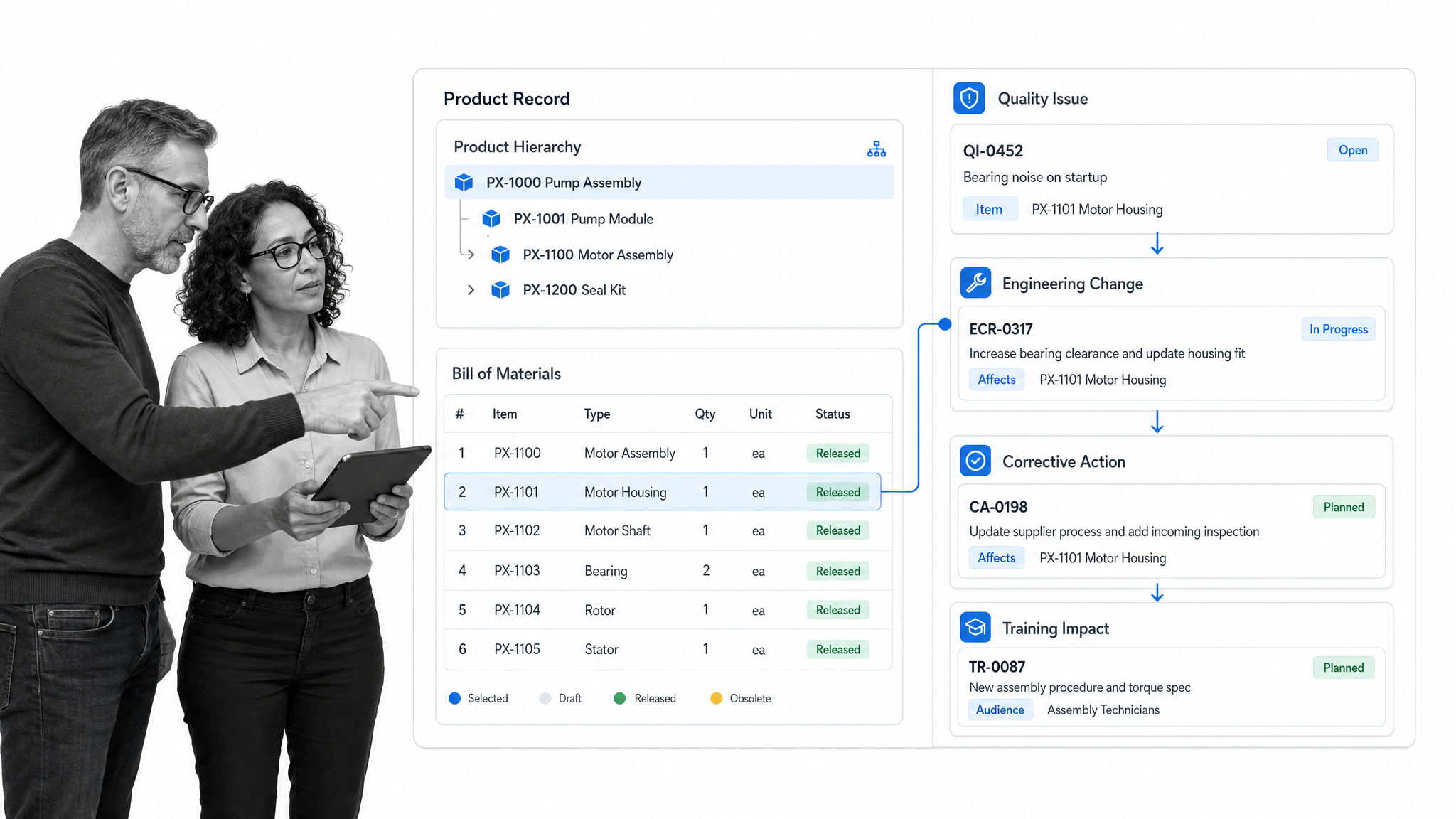
Arena PLM & QMS combines product lifecycle and quality management in one cloud platform for product companies. It links product records with quality processes such as issues, complaints, audits, corrective actions, and training. The combined model is useful when product changes and quality events must reference the same controlled information.
During a trial, begin with a product change and trace its effect on documents, suppliers, training, and open quality records. Engineering and quality users should be able to see the same context while retaining appropriate ownership. This is a more specialized fit than a general workflow platform, especially for companies with complex product records.
Odoo Quality
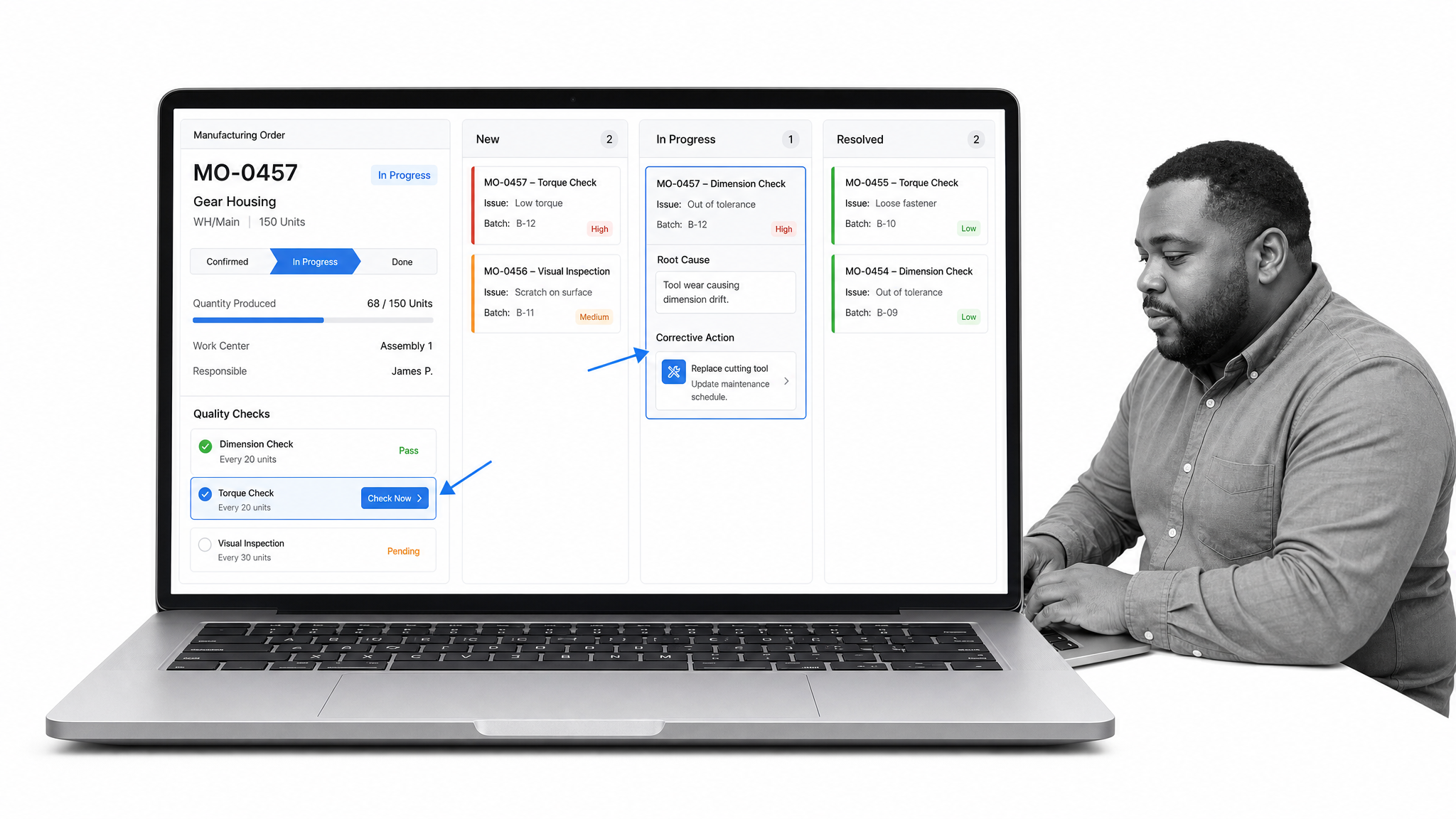
Odoo Quality adds recurring checks to manufacturing and inventory operations within the Odoo environment. Teams can create quality alerts, investigate root causes, assign corrective actions, and review quality reporting. It is most relevant for organizations already using Odoo and looking to keep production checks close to operational records.
Test Odoo Quality inside an actual manufacturing or inventory flow. Confirm where checks appear, what happens when a check fails, and whether alerts reach the right owner. Organizations with complex regulated requirements should compare the available controls with a dedicated eQMS before committing.
What is quality management software?
Quality management software is a digital system for defining, executing, monitoring, and improving the processes that determine whether products or services meet requirements. It can manage controlled documents, audits, training, inspections, deviations, nonconformances, complaints, supplier quality, CAPA, risk, and management review.
The purpose is not merely to store quality records. A useful QMS turns policies into repeatable work: the right person receives the right task, required evidence is captured, approvals occur in sequence, exceptions are escalated, and the complete history remains available for analysis or audit. This process orientation reflects the quality management principles and process approach described by ISO.
Regulatory context also affects the selection. For medical device manufacturers serving the United States, the FDA Quality Management System Regulation became effective on February 2, 2026 and incorporates ISO 13485:2016 by reference. Buyers should map software capabilities to the requirements that apply to their products, markets, and quality system.
How should you choose quality management software?
Start with the operating problem, not a feature checklist. Document the process that creates the greatest quality risk or administrative burden, identify everyone involved, and define what evidence a successful run must produce. Then compare platforms using that scenario.
- Define the scope. Decide whether the system will manage one workflow, a complete QMS, product records, frontline inspections, or multiple operational functions.
- Map required controls. List the documents, approvals, signatures, training records, permissions, retention rules, and audit evidence your organization needs.
- Run a realistic process. Test an end-to-end case with the people who will perform, approve, administer, and audit the work.
- Measure administrative effort. Evaluate how easily an owner can change a workflow, add a field, update a role, and produce a report.
- Plan adoption. Identify process owners, training needs, migration work, integrations, and the first group that will use the system.
- Assess vendor fit. Review security, support, implementation services, product direction, and contractual requirements with the appropriate stakeholders.
A useful proof of concept produces a result you can inspect. For example, configure an internal audit workflow, capture a finding, assign corrective work, obtain approval, and retrieve the complete evidence trail. A polished dashboard is less important than whether the process remains controlled from start to finish.
Which quality management software features matter most?
- Controlled workflows: Defined steps, owners, due dates, conditional paths, and approvals turn a procedure into accountable work.
- Document control: Versioning, review, approval, access, and acknowledgment help teams use current instructions. See how document control software supports that lifecycle.
- CAPA and issue management: The system should connect the initial event with containment, investigation, root cause, corrective work, and effectiveness review.
- Audit management: Planning, evidence collection, findings, actions, and follow-up should stay linked.
- Training records: Procedure changes should reach the affected people, and completion evidence should be easy to retrieve.
- Structured data capture: Forms, required fields, attachments, and validation improve the consistency of quality evidence.
- Permissions and traceability: Role-based access and complete histories establish who did what and when.
- Reporting: Managers need visibility into overdue work, recurring issues, cycle times, risk patterns, and process performance.
- Integration and automation: The QMS should exchange data with the systems that initiate or depend on quality work.
- Usability: A controlled process only works when employees can complete it accurately. Test the experience for occasional frontline users as well as quality specialists.
How do you implement quality management software?
Implementation works best as a controlled process. Assign a business owner and system administrator, choose one meaningful workflow, and agree on success measures before configuration starts. Keep the first release focused enough to learn quickly but important enough that users feel the benefit.
- Baseline the process. Record the current steps, owners, systems, delays, errors, and evidence requirements.
- Design the future workflow. Remove redundant steps, define decision rules, and assign ownership before building.
- Configure controls. Add fields, permissions, approvals, due dates, notifications, and retention settings.
- Validate with users. Run normal, exception, and failure cases with performers, approvers, and auditors.
- Migrate deliberately. Decide which active records, controlled documents, and historical evidence must move.
- Train by role. Give each group practice with the tasks they will actually perform.
- Launch and monitor. Track completion, errors, cycle time, and support requests during the first operating period.
- Expand from a stable pattern. Reuse governance, naming, and reporting conventions as more managed workflows enter the system.
Governance continues after launch. Establish how workflow changes are requested, tested, approved, communicated, and measured. That prevents the software from becoming another uncontrolled repository and keeps the quality system aligned with actual operations.
Quality management software questions and answers
What is the main purpose of quality management software?
The main purpose is to make quality processes consistent, accountable, traceable, and measurable. It helps teams control procedures, assign work, capture evidence, resolve issues, and demonstrate that requirements were followed.
What is the difference between QMS software and document management software?
Document management software focuses on storing, organizing, reviewing, and controlling files. QMS software uses controlled documents within broader processes such as training, audits, nonconformance, CAPA, supplier quality, and management review.
Can quality management software support ISO 9001?
Yes. Software can support controlled information, process execution, audit evidence, corrective action, risk-based thinking, monitoring, and continual improvement. Certification still depends on the organization’s implemented quality management system, not the software alone.
How long does quality management software implementation take?
Timing depends on scope, complexity, validation needs, migration volume, integrations, and available process owners. A focused workflow can move faster than an enterprise eQMS program. Vendors should estimate timing against a documented scope and implementation plan.
What should a quality management software demo include?
A useful demo should follow one of your real processes from initiation through approval and reporting. Include an exception, a reassignment, an overdue task, a document change, and retrieval of the final evidence trail.
