Extract plain text from files uploaded to File Upload form fields — PDFs, Word documents, spreadsheets, images, and scanned documents. The extracted text becomes a variable you can pass directly into AI Tasks for processing, summarization, or data extraction. Uploaded files with extracted text are also searchable in the global search box.
Users: Only Administrators or a Builder with ‘edit’ permission can enable text extraction on form fields.
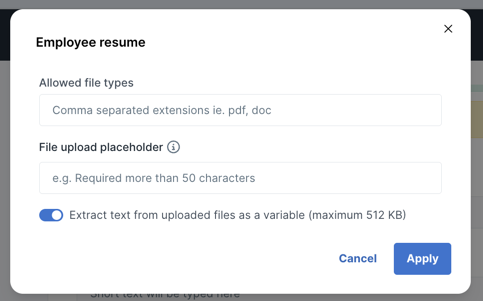
When a file is uploaded during a workflow run, the system extracts up to 512KB of plain text from it automatically.
OCR (optical character recognition) automatically extracts text from images and scanned documents. No additional setup is required — OCR activates automatically when text extraction is enabled.
OCR works with:
Note: If a PDF contains both text and images, standard text extraction is used instead of OCR. This avoids unwanted noise from attempting to recognize characters in images alongside existing text.
OCR-extracted text works the same way as standard extracted text — it populates the {{form.Field_name.text_content}} variable and makes uploaded files searchable in the global search box.
Note: OCR currently supports English only. Contact support to request additional language support.
Once text extraction is enabled, the extracted content is available as a variable anywhere you see the magic wand icon in the workflow editor.
The variable follows this pattern:
{{form.Field_name.text_content}}
For example, if your File Upload field is called “Employee Resume”, the variable is {{form.Employee_resume.text_content}}.
Files with extracted text — including OCR-processed images and scanned PDFs — are indexed and searchable in the global search box. Type a keyword from the file’s content into Search to find matching uploads.
This is especially useful for locating scanned documents or images by the text they contain, without needing to open each file individually.
Pass the extracted text variable into an AI Task to process, analyze, or transform the content. Common use cases include:
To set this up, add an AI Task after the File Upload task in your workflow. In the AI Task’s prompt, insert the {{form.Field_name.text_content}} variable and describe what you want the AI to do with the text.
Here are some AI Task types that work well with extracted text:
PDFs, Word documents, and text-based files like CSV, TXT, TSV, and ODS. Image types (PNG, JPG) are also supported — OCR extracts text from images and image-only PDFs automatically.
The uploaded file can be any size up to the standard file upload limits, but only the first 512KB of extracted text is available — roughly 100,000 words.
If the file has no recognizable text content even after OCR processing, the variable returns empty.
OCR currently supports English. Contact support if you need additional language support.
No. If a PDF contains selectable text alongside images, standard text extraction is used. OCR only activates for image-only PDFs and image files. This prevents character-recognition noise from interfering with the existing text.
Learn more about File Upload form fields and AI Tasks.
Help us improve this help center.







