


Turn every policy into automated workflows with built-in enforcement and audit-ready proof.



Process Application
Process application is the work of translating a designed business process into daily execution. It connects the trigger, people, rules, systems, handoffs, evidence, and measures required for the process to produce a dependable result.
A process is not applied merely because someone drew a flowchart or published an SOP. Application happens when the process starts reliably, guides real decisions, handles exceptions, records proof, and gives owners enough feedback to improve it.
This guide explains how to judge readiness, move from design to rollout, govern adoption, and use Process Street to turn process intent into controlled work.
In this article, we are going to cover:
- What is process application?
- Process application vs. process design and implementation
- What makes a process ready for application
- The process application lifecycle
- How to apply a process step by step
- Process application governance and adoption
- Process application in Process Street
- Process application examples
- Process application FAQs
What is process application?
Process application is the operational use of a repeatable process in a specific business setting. It begins with a defined need and ends with an outcome that can be observed, checked, and improved. The phrase can describe one process being put into practice, or the broader discipline of making process designs usable across a team.
A process becomes real through execution
A document can explain what should happen, but only execution shows whether the design works. The process must reach the right owner at the right time, provide the right input, make the decision rule clear, and preserve what happened. If any of those connections fail, people create side channels and the official process loses authority.
Good process documentation supports application by defining purpose, scope, steps, roles, and standards. It does not replace the operating mechanism that assigns work and captures proof.
Application joins people, process, and technology
People bring judgment and accountability. The process provides sequence, rules, and handoffs. Technology launches work, routes data, enforces required actions, and records history. A practical process application aligns all three. Optimizing only one layer creates predictable failure: trained people with weak systems, polished software with unclear rules, or detailed procedures nobody follows.
The term also has a software meaning
Some business process management platforms use process application to mean a deployable software package that contains process models, forms, rules, services, and related resources. This guide focuses on the broader management meaning: applying a business process in live operations. The software package is one possible implementation surface inside that broader job.
Process application vs. process design and implementation
Process design, process implementation, and process application overlap, but each answers a different question. Design asks how the process should work. Implementation builds and launches the operating environment. Application proves that the process can be used consistently in real conditions.
Process design defines the intended path
process mapping makes the flow visible. It identifies activities, decisions, roles, inputs, outputs, and handoffs. Teams may use simple diagrams or a formal standard such as the OMG BPMN specification. The goal is shared understanding, not diagram complexity.
Process implementation prepares the organization
process implementation configures the tools, data, assignments, training, communication, and rollout plan needed to support the process. Microsoft process-focused implementation guidance recommends making business processes the core drivers of a solution implementation because they reflect organizational needs and define functional scope.
Process application tests the operating truth
Application reveals whether the designed and implemented process survives real volume, exceptions, ambiguous inputs, absent owners, system delays, and competing priorities. It is the point where the organization learns whether people can use the process without inventing workarounds.
The distinctions are useful, but the work should remain connected. A design that cannot be applied needs revision. An implementation that does not drive adoption is incomplete. An applied process that cannot be measured will eventually drift.
What makes a process ready for application
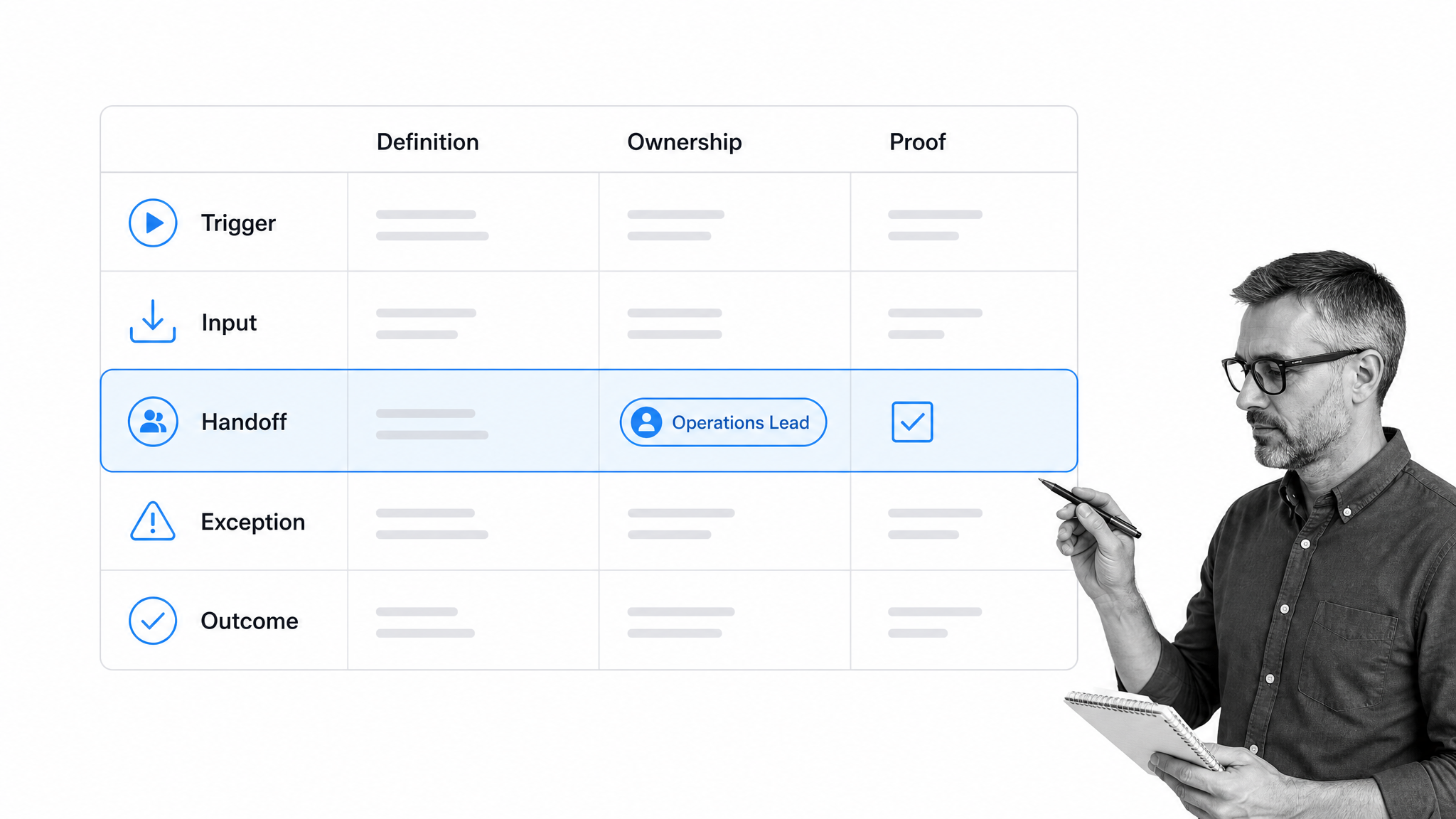
A process is ready for application when its operating conditions are explicit enough for a real team to run it. Readiness is not perfection. It is the minimum clarity and control needed to pilot the process safely and learn from evidence.
A clear trigger and outcome
The trigger tells people when the process begins. The outcome tells them when it is complete and what value it produced. Vague starts and finishes create orphaned work, duplicate effort, and arguments about ownership. Define observable events, not intentions.
Usable inputs and decision rules
Every step should have the information needed to proceed. Required inputs, acceptance criteria, and decision rules should be visible where the work happens. If people must search for a hidden policy or ask a manager to interpret routine cases, the process is not ready to scale.
Named owners and handoffs
Each stage needs an accountable role. Handoffs need a sender, receiver, required package, timing expectation, and exception route. Most process failures happen between tasks rather than inside them, so the handoff deserves the same design attention as the work itself.
Exception paths and approvals
A process that models only the happy path is a demonstration, not an operating process. Define what happens when an input is missing, a risk is high, an approval is rejected, a deadline passes, or an upstream system fails. Use review gates only where judgment or risk justifies them.
Evidence and measures
The process should create proof as a byproduct of execution. Useful evidence includes completed fields, attachments, decisions, approvals, comments, timestamps, and activity history. Measures should cover flow, quality, conformance, and outcome so leaders do not optimize speed at the expense of correctness.
The process application lifecycle
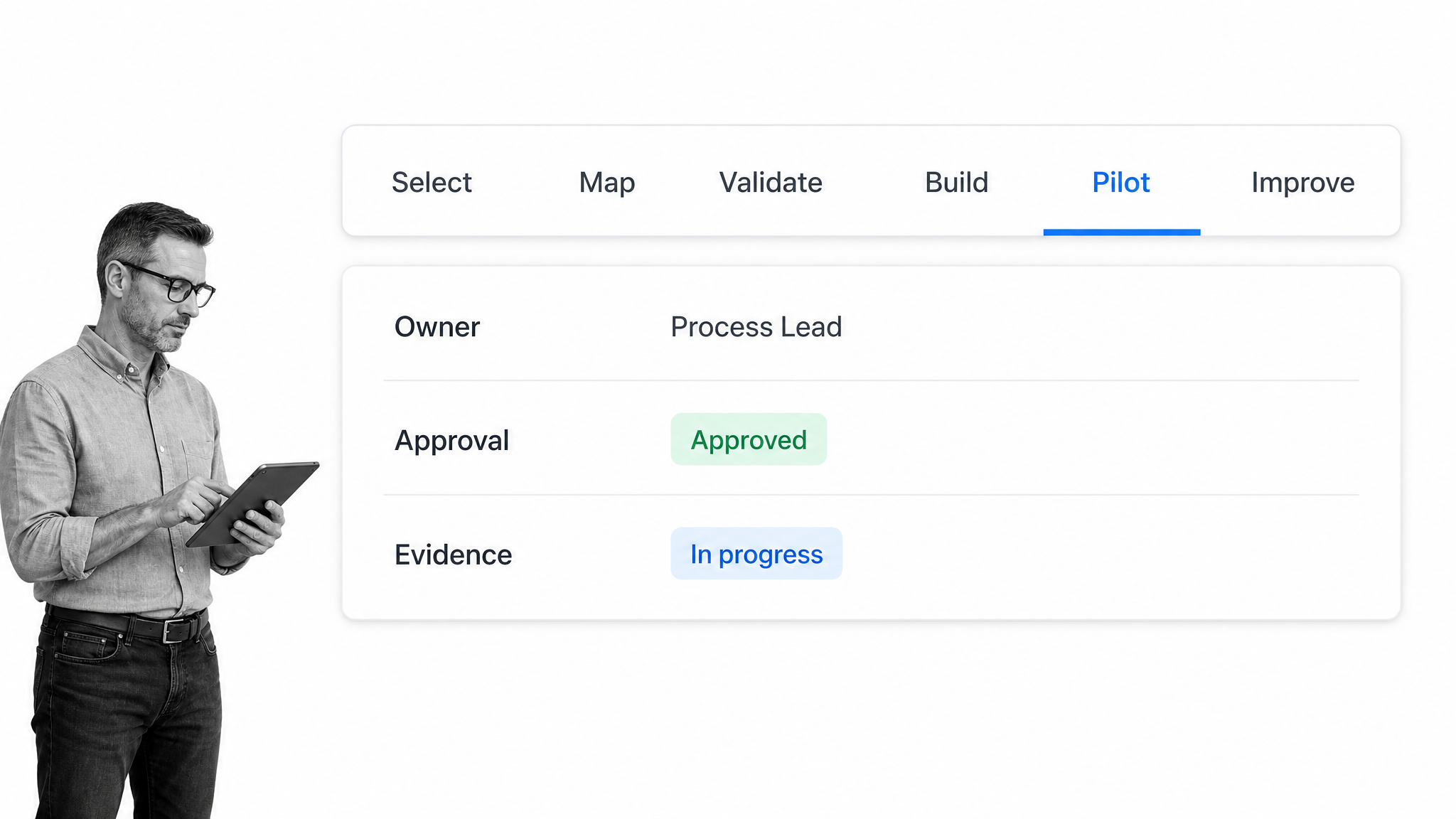
The process application lifecycle moves from selecting the right process to improving it after real use. The stages are connected, and teams may loop backward when evidence exposes a weak assumption.
1. Select the process
Choose a process with a meaningful outcome, identifiable owner, repeatable demand, and visible pain. Frequency alone is not enough. A low-volume process may deserve priority if a missed step creates serious customer, compliance, safety, or financial risk.
The APQC Process Classification Framework can help organizations establish a common process language and identify where a candidate process sits in the wider operating model.
2. Map the current and target states
Observe how work happens today, including side channels and exceptions. Then define the target state. Preserve necessary judgment, remove avoidable delay, and make the handoffs explicit. A target map should explain the operating logic without becoming a mural no one can maintain.
3. Validate with the people doing the work
Walk through realistic cases with frontline users, owners, reviewers, and downstream recipients. Ask what information is missing, where judgment enters, which exceptions are common, and which controls cannot be skipped. Validation catches design errors before software makes them expensive.
4. Build the operating workflow
Use a process builder to translate the target state into tasks, fields, assignments, rules, due dates, automations, evidence, and approvals. The workflow should make the correct path easier than the workaround.
5. Pilot with bounded scope
Run the process with one team, location, customer segment, or case type. Define the pilot period, expected volume, support route, success measures, and stop conditions. A pilot should generate evidence about usability and control, not merely prove that the workflow can start.
6. Roll out, monitor, and improve
Expand after the process works under realistic conditions. Use process monitoring and process analytics to see completion, wait time, rework, exceptions, conformance, and outcomes. Feed those findings into continuous improvement.
How to apply a process step by step
Apply a process by building the smallest controlled version that can produce the intended outcome, then improving it with live evidence. The following sequence keeps the effort grounded in operational reality.
Step 1: Write the application statement
State who uses the process, what triggers it, what outcome it produces, and which risk or performance problem it solves. This one sentence keeps the project from expanding into every adjacent workflow.
Step 2: Define the process record
Capture the owner, scope, trigger, outcome, roles, inputs, steps, rules, systems, evidence, measures, review cadence, and version. A structured process documentation template gives the team a practical starting point.
Step 3: Design work at the point of action
Put instructions, fields, rules, and references inside the task where they are needed. Avoid relying on a separate manual for routine execution. Keep each task focused on one meaningful action and make completion criteria explicit.
Step 4: Add controls without creating friction
Use conditional logic to show only the steps relevant to the case. Add required fields where evidence matters. Add approvals where a qualified reviewer must decide. Automate notifications and system updates that do not require judgment.
Step 5: Prepare people and systems
A practical implementation template coordinates configuration, data, training, communication, support, and launch. A change management process template helps address the people side of the rollout, including who must work differently and how ownership transfers.
Step 6: Run the pilot and review evidence
Review actual runs with users. Look for skipped steps, unclear fields, repeated exceptions, approval delays, duplicate data entry, side-channel communication, and outcomes that do not match expectations. Fix the process, not the person, when the same defect repeats.
Step 7: Standardize and scale
After the pilot meets the exit criteria, publish the controlled version, expand the user group, and establish ownership for maintenance. Standardization should preserve a clear route for legitimate exceptions and local requirements.
Process application governance and adoption
Process application governance keeps the process useful after launch. It defines who may change the design, how versions are approved, how performance is reviewed, and how the organization prevents local workarounds from becoming invisible policy.
Assign process ownership
The process owner is accountable for the end-to-end result, not merely one department’s task. Task owners execute work. System owners maintain technology. Control owners review specific obligations. Keeping these roles distinct prevents accountability gaps.
Control versions and changes
Every material change should have a reason, reviewer, effective date, communication plan, and rollback path. Urgent fixes may move faster, but they still need a record. Users should always know which version governs the current run.
Manage adoption as operating behavior
process adoption depends on more than training. The process must fit the job, the system must be usable, managers must reinforce the standard, and users must have a route to report defects. Prosci 3-Phase Process emphasizes preparing the approach, managing change, and sustaining outcomes.
Review performance and conformance together
A process can be followed perfectly and still produce a poor outcome. It can also produce a good short-term result through an unsafe workaround. Review outcome measures beside conformance, flow, quality, and exception data.
Use a regular review meeting to turn those measures into decisions. Start with the intended outcome, then examine where work waited, repeated, failed a rule, or entered an exception path. Sample the underlying records so the group can distinguish a reporting anomaly from a design defect. Assign each improvement to an owner, define the evidence that will show whether it worked, and set a review date. Keep a small change log that links each revision to the observed problem. This discipline prevents dashboards from becoming passive reports and helps the process owner improve the operating system without reacting to one unusual case.
The ASQ PDCA cycle provides a simple improvement rhythm: plan the change, test it, review the evidence, and act on what was learned. A PDCA process checklist can turn that rhythm into repeatable work.
Process application in Process Street
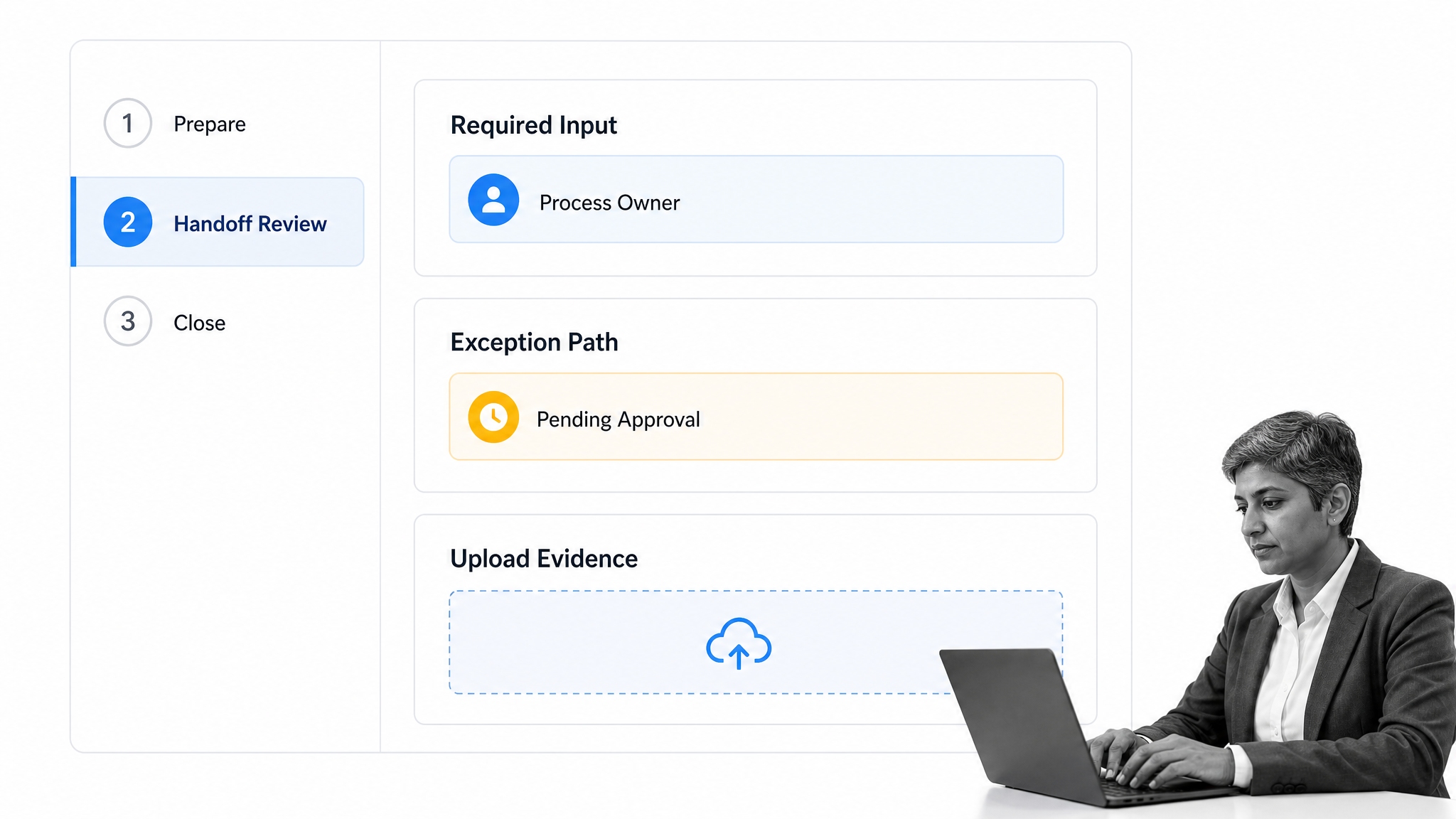
Process application in Process Street means converting a process design into a workflow that guides execution, enforces required actions, captures evidence, and shows what happened across every run.
Build the process as executable work
Process owners can define tasks, instructions, form fields, assignments, due dates, approvals, and exception paths in one workflow. Users see the action and context together, which reduces the gap between the written standard and the work.
Route each case according to its conditions
The same process can handle different case types without forcing every user through every step. Conditions can show or hide work, route higher-risk cases to additional review, and assign specialists when an exception needs judgment.
Keep process data structured
Data Sets can hold controlled reference data used across forms and workflow runs. Structured inputs make routing more dependable and make later analysis easier than free-text records scattered across tools.
Connect the workflow to the wider stack
Process Street has direct, universal integrations to 5,000+ systems. Need a new one? An AI agent builds it on the fly.
The integration layer helps a process collect inputs, update systems of record, notify collaborators, and move evidence without asking users to copy the same data between applications.
Improve from execution evidence
A live process system makes the process visible as a managed operating asset. Owners can review run history, completion patterns, delays, exceptions, and outcomes, then update the controlled workflow rather than issuing another reminder.
Process application examples
The pattern applies across functions. The details differ, but every strong example has a defined trigger, outcome, owner, exception path, evidence requirement, and review rhythm.
Employee onboarding
A signed offer triggers tasks for HR, IT, finance, security, and the hiring manager. Conditional paths reflect location and role. Evidence includes issued equipment, access completion, policy acknowledgment, training, and manager signoff.
Vendor approval
A vendor request triggers due diligence based on risk. The process collects business justification, security evidence, legal review, finance approval, and exception decisions. High-risk vendors receive deeper review while low-risk cases avoid unnecessary delay.
Customer onboarding
A closed deal triggers data collection, implementation planning, owner assignments, customer communication, configuration, acceptance, and handoff to ongoing success. Application keeps the customer experience consistent while preserving room for contract-specific needs.
Corrective action
A failed inspection or control triggers containment, root-cause analysis, corrective action, approval, evidence, and effectiveness review. The process closes only when the organization proves the issue was addressed and the improvement held.
Change rollout
An approved change triggers impact analysis, communication, training, system updates, deployment, adoption checks, and post-implementation review. Ownership transfers from the project team to the operational process owner after the new behavior stabilizes.
Process application FAQs
What is process application?
Process application is the work of putting a designed business process into daily use. It connects triggers, people, rules, systems, handoffs, evidence, and measures so the process produces a dependable outcome.
How is process application different from process implementation?
Process implementation prepares and launches the systems, roles, data, training, and workflow needed for a process. Process application focuses on whether the process is actually usable, adopted, controlled, and effective in real operating conditions.
What makes a process ready to be applied?
A process is ready when it has a clear trigger and outcome, usable inputs, named owners, defined handoffs, exception paths, approval rules, evidence requirements, and measures. It should be clear enough to pilot without depending on hidden knowledge.
How do you apply a business process?
Write the application statement, define the process record, build work at the point of action, add controls, prepare people and systems, run a bounded pilot, review evidence, and scale only after the pilot meets its exit criteria.
How do you measure process application?
Measure flow, quality, conformance, exceptions, adoption, and outcomes together. Useful signals include completion, wait time, rework, skipped steps, approval delay, evidence quality, user workarounds, and the result the process was designed to produce.
How does Process Street support process application?
Process Street turns process designs into executable workflows with assignments, required fields, conditional logic, approvals, automations, structured data, evidence, and run history. That helps teams apply the process consistently and improve it from real execution data.
