





What if the company powering more than 40% of the internet’s websites had no office at all? Automattic runs a fully remote workforce spread across 75 countries, and it still ships the software behind a huge share of the web.
Remote work is far bigger than working from home, when you set it up right. At Process Street, we’ve been fully remote from the start, so we know the difference firsthand. This guide breaks down Automattic’s remote work framework and shows how your team can reach autonomous asynchronous nirvana.
Plenty of people underestimated remote work until a global pandemic sent everyone home. Even then, many teams treated it as a temporary “work from home because you have to” arrangement rather than a better way to operate.
Automattic’s framework shows what the mature version looks like. Here is what we cover:
- Arguments against remote work
- The man behind Automattic’s remote work guide
- The five levels of Automattic’s remote work framework
- Gain a strategic advantage with the five levels of remote work
Let’s talk business.
Arguments against remote work
“Offices are where people get the most work done. That’s where they need to be.”
Every employee has their own work style or preference for where they want to work. Office spaces are the more traditional option, but they aren’t the only place to be productive.
Remote work recognizes this and embraces it. As an employee in a remote-first company, you can work in an office if that makes you more productive. That’s what co-working spaces are for.
What about the employee that’s more productive when they have a flexible schedule and can work from anywhere they choose? A remote-first culture gives you the freedom to do just that.
“Employees can’t achieve a good work-life balance when they work from home.”
This statement can be true, but it also applies to the workaholics staying at the office until 2 AM. Separating work from your home life requires you to look at your personal preferences as an employee.
For instance, some workers achieve this separation by using a coworking space. Once the day is over, they leave and switch off work mode.
Others have a dedicated workspace in their home that’s reserved for all things work-related. Having these clear work areas helps create a separation between work life and home life. It’s time to work when they’re seated in this space. Work mode is switched off when they’re somewhere else.
You can also do this digitally. That means going offline on Slack when your workday is over or muting email notifications until the next morning.
The man behind Automattic’s remote work guide
Matt Mullenweg is the founder of Automattic and the author of the remote work framework we’re looking at today. His company has been valued at $7.5 billion, with no central office and a team that collaborates entirely online.
Considering that, you can see why he’s the one to help master communication across distributed teams.
The five levels of Automattic’s remote work framework
Automattic’s remote work guide is broken down into:
- Resembling a state of emergency: Levels 1 and 2 fit into this category, and it’s where most organizations operated during the pandemic.
- Making the transition: Level 3 fits into this section, and it’s where companies begin adopting a remote-first culture.
- Work becomes harmonious: Level 4 is where businesses work through the kinks found during Level 3 and daily operations begin feeling a lot smoother.
- Autonomous and asynchronous communication is achieved: Level 5 is the final phase of this remote framework, where companies operate with autonomy and effective asynchronous communication.
By understanding the characteristics and challenges of each level, HR managers can be better prepared for conducting business operations remotely.

Level 1, non-deliberate action
No deliberate actions have been taken by the company.
Despite this, employees are still equipped to fulfill their working responsibilities if they remain at home. While working away from the office, they have access to their email and smartphone.
In most instances, they join a few meetings. However, they don’t complete the majority of their tasks until they are back in the office.
During Level 1, the employee isn’t as productive as they would be in the office because they don’t have the proper resources to achieve optimal productivity.
This is the stage most organizations were at during the pandemic.
Level 2, mimicking office life
Level 2 is where a lot of businesses still find themselves. This is especially true for more traditional organizations. During this stage, employees have access to:
- Their email and smartphones;
- Instant messaging software (like Slack);
- Video conferencing software (like Zoom).
Rather than redesigning the workspace to make the most of these tools, employees virtually recreate how they would work while in the office. That means workers are expected to be at their computers from 9 until 5 each day.
In many instances, there’s screen-logging software involved. That way, employers can feel satisfied that their employees are online from 9 to 5. As you can imagine, there’s still a lot of work to be done at this level.
Level 3, adopting a remote-first culture
At this level, companies are taking advantage of the virtual tools they invested in during Level 2. The main difference between Levels 2 and 3 is that they are no longer trying to replicate the ‘in-office experience’.
This is also the stage where organizations invest in more advanced setups for their employees. Those might include:
- Noise-canceling microphones;
- Lighting for virtual meetings.
During this phase, effective asynchronous and written communication becomes vital. Jumping on a call at any time is avoided unless absolutely necessary. Instead, employees have a preference for written communication.
When meetings do happen at Level 3, the team at Automattic:
- Set their meetings to 15 minutes as a default, only going over time if needed.
- Only schedule meetings if it’s a necessity and they can’t achieve the same result from an instant message, email, or Loom video.
- Have a desired outcome and a specific agenda for each meeting.
- Send invites only to necessary attendees unless it’s an all-hands company meeting.
- Never use meeting time to simply share information, since they believe that’s what email or instant messaging is for.
- Use the time to set next steps and due dates, and to assign the responsible departments, teams, and people.
Level 4, harmony at last
“Employees shouldn’t always be connected.”
That’s one of the biggest criticisms opponents of remote work have. The belief is that people will feel pressured to work nonstop and won’t be able to set boundaries between work time and personal time.
Asynchronous policies and procedures ensure there is a separation and allow employees to “leave the office” guilt-free.
One of the most important things employees learn at Level 4 is that not everything needs an immediate response. For many tasks, an instant message or one-way email works fine, and the recipient can respond when they are back ‘in the office’.
The type of communication should reflect the urgency of the task. So hop on a call or send a last-minute video invite only if it’s truly urgent.
By giving knowledge workers time to think and create, you also give them time to get into a flow state. This is a psychological state that McKinsey links to being up to five times more productive. Asynchronous communication is also tied to making better decisions.
“If you want to cut the emotion out of the equation, increase the response time.”
– Robert Greene, The 48 Laws of Power
When communicating asynchronously, you want to:
- Offer enough information and, where necessary, clear outcomes and action items;
- Set a due date;
- Give a recourse path if the recipient can’t meet these requirements.
Process platforms like Process Street are what keep asynchronous work afloat and sailing smoothly.
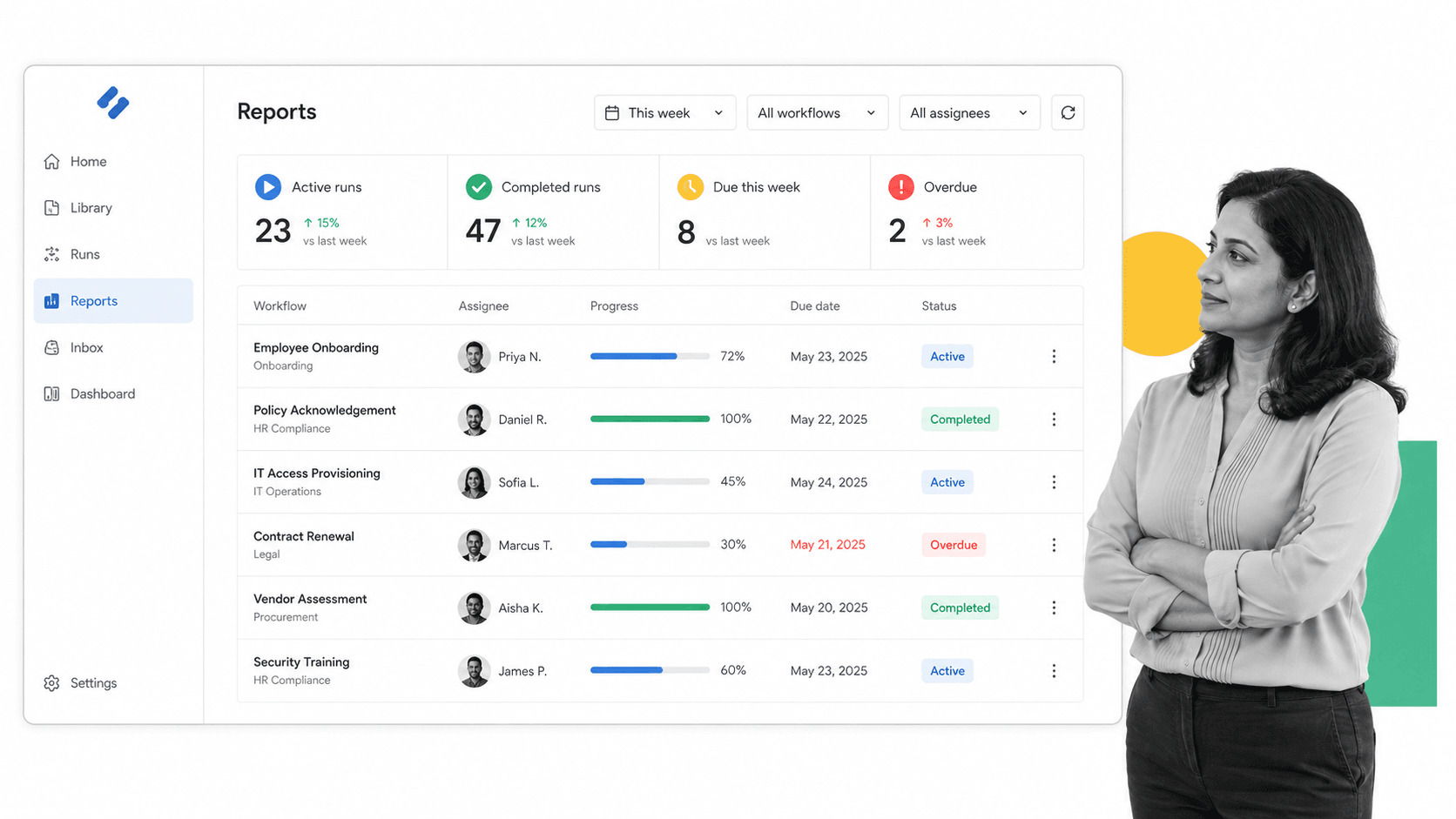
A real-time reports view shows how everyone is handling their workload, so you never have to chase people for a status update. It’s right there in Process Street.
Level 5, nirvana
By offering employees autonomy over their work, you unlock a rare sense of freedom. It empowers them to design their working day around their health and well-being, and they maintain a better work-life balance as a result.
That autonomy comes with challenges, though. One of the biggest is that people often struggle with the freedom and can end up overworking. You overcome this by putting policies in place to prevent burnout.
For example, you could offer an unlimited time-off policy that encourages employees to rest when they need to, whether that’s vacations, mental health days, or sick days.
Many employees with unlimited PTO actually take less time off than those with a set number of days, out of fear that taking ‘too much’ will affect their standing. Unlimited time off is a genuine benefit, but it also needs maintenance and direction from managers and leadership.
Gain a strategic advantage with the five levels of remote work
Asynchronous communication isn’t easy to implement, but once it’s set up, the payoff is real. Process Street helps you get there.
Process Street is a Compliance Operations Platform. It brings your governed documents and your day-to-day execution into one place. Policies and SOPs are authored in Docs, they run as automated workflows in Ops, and built-in AI watches how the work actually happens. For a distributed team, that means every process is written down once and then runs the same way for everyone, no matter which time zone they log in from.
Well-designed workflows give your whole team complete transparency. Process Street enables accountability through clear assignments and documentation, while approvals and notifications keep everyone informed about what needs to be done and when it’s due.
Even as you hand autonomy to your team, you keep visibility over the work with the real-time reports dashboard. It’s easy to track what progress is being made and where bottlenecks are forming, without a single status meeting.
The way people expect to work has shifted for good, toward flexibility and autonomy. That’s a real opportunity for forward-thinking companies, and the right remote work software makes it far easier to offer people the autonomy, flexibility, and balance they now expect.
Give them that, and you get to keep the top talent everyone else is competing for. Following Automattic’s remote work framework helps you build the kind of workplace people want to join and stay in.
What rules do you think matter most for effective asynchronous communication? Over-communicating? Not messaging after certain hours? Let us know in the comments.