





CRM and marketing automation software both help businesses use customer data, but they are built around different jobs. A CRM gives sales and service teams a dependable record of relationships. Marketing automation helps marketing teams segment audiences, run campaigns, and respond to behavior at scale.
That distinction matters because buying the wrong system first creates more work instead of less. The right choice depends on the problem you need to solve, the people who will use the system, and the handoffs that connect marketing activity to revenue. This guide explains the practical differences in CRM vs marketing automation, then shows how the two can work together.
- CRM fundamentals
- Managing customer relationships at scale
- Four ways teams use CRM data
- Marketing automation explained
- Benefits of marketing automation
- Making CRM and marketing automation work together
- Choosing the right system
CRM fundamentals
Customer relationship management, usually shortened to CRM, is a business discipline and a category of software. The discipline is about understanding and improving relationships with prospects and customers. The software creates a shared place to record the people, companies, conversations, opportunities, tasks, and outcomes involved in those relationships.
Think about the contacts app on your phone. It keeps a person’s name, number, email address, and perhaps a note about how you know them. A CRM applies that basic idea across an organization, then adds ownership, history, deal stages, service activity, reporting, and controls. Instead of one person remembering the relationship, an authorized team can understand it.
The central object in most CRM systems is a person, account, or opportunity. Teams update that record as a relationship develops. A sales representative can see the last conversation, the next step, and the value of an open deal. A manager can see pipeline coverage and stalled opportunities. A support or success teammate can review context before contacting a customer.
That shared context is why a CRM is often described as a system of record. It should answer basic operational questions without forcing people to search through inboxes and private notes: Who is this customer? Who owns the relationship? What has happened? What was promised? What should happen next?
Managing customer relationships at scale
A spreadsheet may be enough when a founder has ten prospects and remembers every conversation. It breaks down as the number of contacts, sellers, products, territories, and customer touchpoints grows. Rows do not reliably enforce ownership, preserve a complete interaction history, or show how one contact relates to an account and an opportunity.
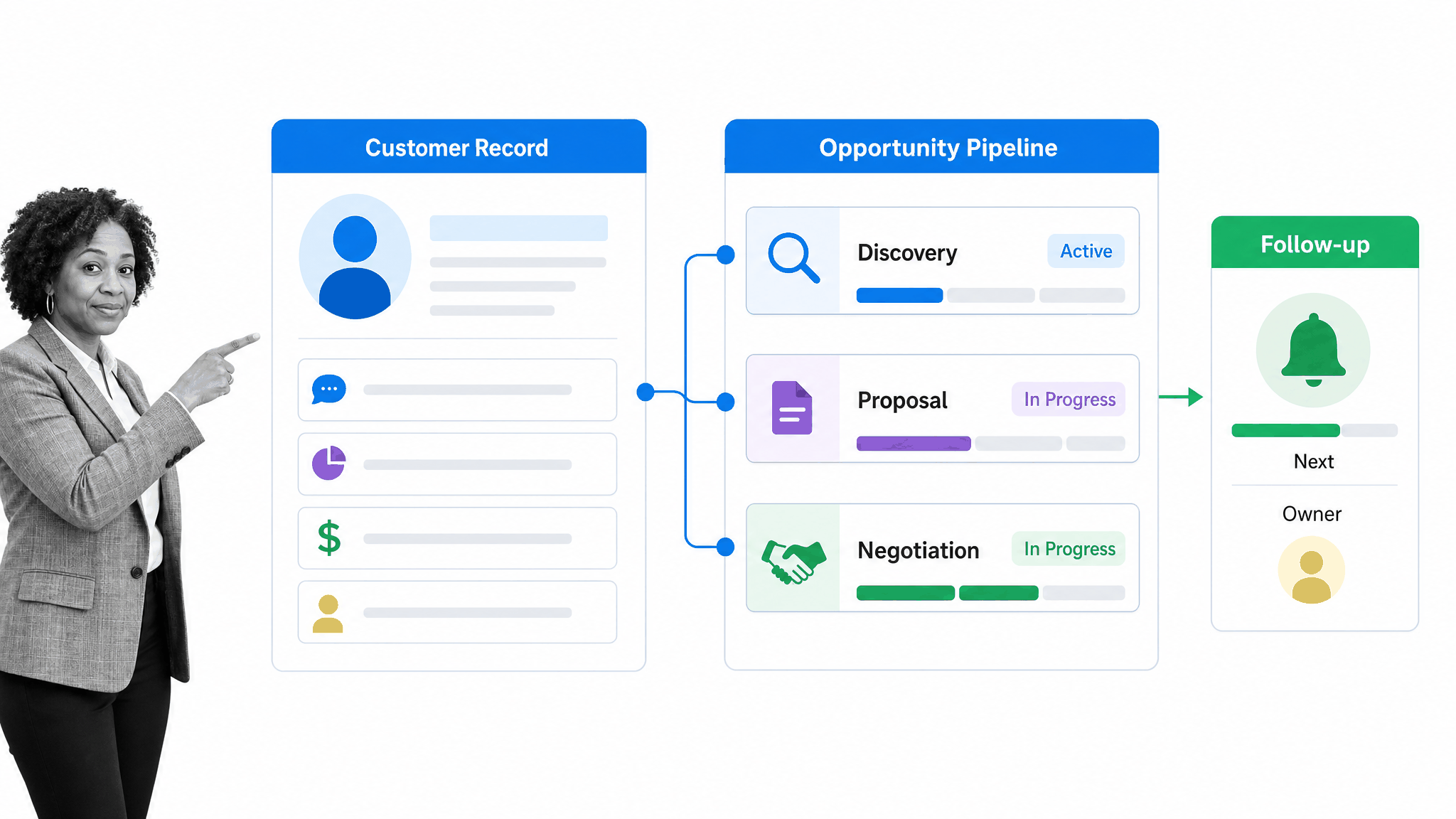
CRM software organizes that complexity into related records and controlled stages. New leads can be assigned to the right owner. Required fields can improve data quality. Tasks can keep follow-up from disappearing. Pipeline stages can make the sales process visible. Permissions can limit access to sensitive customer information while still giving teammates the context they need.
The value comes from disciplined use, not simply installing the database. Teams need clear definitions for lifecycle stages, account ownership, qualification, opportunity value, next steps, and closed outcomes. If every seller interprets a stage differently or records activity inconsistently, the reports will look precise while the underlying picture remains unreliable.
Adoption improves when the CRM reduces friction in the seller’s real workflow. Capture only the information that supports a decision, handoff, obligation, or useful analysis. Automate routine enrichment and activity logging where the source is trustworthy, but make owners responsible for fields that require judgment. Managers should use the same records in coaching and reviews so maintaining the system is part of the work, not an extra reporting exercise.
A well-designed CRM also supports continuity. When someone is out of office or changes roles, the relationship does not vanish with them. The next owner can review the record, understand the customer’s situation, and continue without asking the customer to repeat everything.
Four ways teams use CRM data
CRM systems support many processes, but four uses explain most of their day-to-day value. Each one turns scattered relationship data into a shared operational view.
Conversation history
Emails, calls, meetings, notes, and agreed next steps form the history of a relationship. Recording them in or alongside the CRM helps a representative prepare before an interaction and helps a manager understand progress without requesting a separate update. It also reduces the risk that an important promise stays trapped in one person’s inbox.
The goal is not to capture every word. Useful history highlights the customer’s need, the decision context, commitments, objections, and the next action. Teams should define what must be recorded and avoid collecting information they do not need.
Sales pipeline
An opportunity record connects a potential purchase to an account, owner, amount, stage, expected timing, and next step. When those fields are current, the pipeline shows where revenue may come from and where deals are slowing down. Sales leaders can coach the work instead of assembling status from separate spreadsheets.
Pipeline automation can assign tasks, flag missing next steps, or notify a manager when an opportunity meets a condition. It should reinforce the sales process rather than hide it. People still need to qualify the opportunity, make judgments, and maintain honest data.
Contact context
A contact record helps teams understand the person behind the activity. It can connect job role, account, communication preferences, consent, product interest, support history, and related opportunities. That context makes communication more relevant and prevents several departments from treating the same person as unrelated records.
Good governance is essential. Access should reflect business need, retention should follow policy, and fields should have owners. Duplicate records and unreviewed enrichment can quickly weaken trust in the CRM.
Campaign coordination
A CRM can show which campaigns or sources influenced a lead, which contacts belong to an account, and whether marketing activity led to an opportunity. This gives sales useful context and gives marketing a line of sight beyond clicks and form fills. It does not mean the CRM should run every campaign itself.
That boundary leads to marketing automation. The CRM remains the relationship record, while the automation platform manages audience rules, campaign journeys, communication timing, and engagement signals. Clear ownership of the data passed between them is more important than forcing both jobs into one interface.
Marketing automation explained
Marketing automation software helps teams plan, execute, and measure repeatable marketing activity across an audience. It can segment contacts, trigger messages from behavior, schedule campaigns, score engagement, personalize content from known attributes, and route qualified responses to the right team.
The central object is usually an audience member, campaign, or journey rather than a sales opportunity. A workflow might begin when someone requests a guide, visits a product page, joins an event, or reaches a score. The system can then send an appropriate message, wait for a condition, branch based on behavior, and alert sales when a handoff rule is met.
Automation does not remove the need for strategy or good content. It executes the logic a team defines. Poor segmentation sends irrelevant messages faster. Weak consent practices create risk at scale. An effective program starts with a clear audience, a useful offer, an explicit purpose for each step, and rules for frequency, suppression, and human follow-up.
The distinction is easiest to remember this way: CRM software primarily helps a team manage known relationships and revenue work. Marketing automation primarily helps a team manage repeatable engagement across audiences. Products may overlap, but their operating centers remain different. Capterra’s comparison makes a similar sales-versus-marketing distinction.
Benefits of marketing automation
Marketing automation becomes valuable when the number of contacts, channels, segments, and campaign steps exceeds what a team can manage manually. It creates consistency around work that would otherwise depend on someone remembering when to send, whom to exclude, and what should happen after a response.
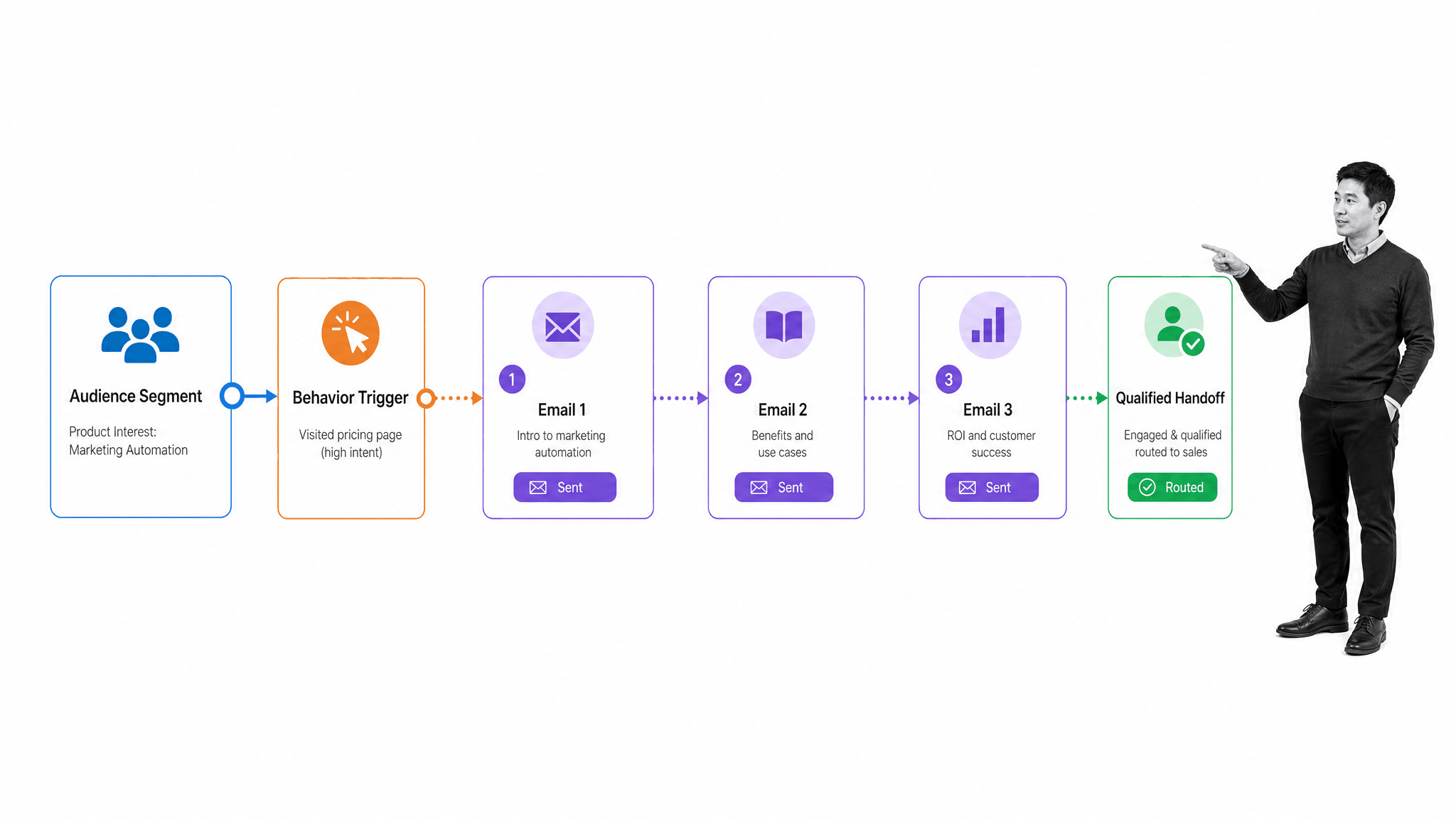
- Segmentation: Build audiences from relevant attributes, consent, lifecycle state, and behavior so messages fit the recipient.
- Triggered journeys: Respond to actions such as a request, registration, visit, renewal date, or inactivity without rebuilding the sequence each time.
- Nurturing: Deliver useful information over time and adjust the path when engagement changes.
- Handoffs: Notify or assign sales when a person meets agreed qualification criteria, with the context needed for follow-up.
- Measurement: Compare campaign, audience, and journey performance so the team can improve the program.
The most immediate benefit is operational capacity. A small team can maintain timely communication across a larger audience without manually sending every message. Templates, approval rules, and reusable journeys can also improve consistency, especially when several regions or teams contribute to campaigns.
A second benefit is responsiveness. Behavior-triggered automation can react while an action is still relevant. Someone who registers for an event can receive the right preparation immediately. Someone who requests pricing can be routed according to territory and account ownership. A customer approaching renewal can enter a coordinated sequence instead of relying on a calendar reminder.
A third benefit is learning. Campaign data shows where people enter, engage, pause, convert, or opt out. The team can use that evidence to improve segmentation and content. Metrics should connect to business outcomes, not just volume. More emails sent or more contacts scored does not automatically mean better marketing.
Automation also needs lifecycle controls. Every active journey should have an owner, a documented purpose, entry and exit rules, approved content, a suppression policy, and a review cadence. Test branches before launch, monitor failures and unexpected audience counts, and retire obsolete journeys. These practices prevent an old rule from continuing to contact the wrong people long after the original campaign team has moved on.
Making CRM and marketing automation work together
Many growing businesses need both systems. Marketing automation identifies and develops engagement; the CRM manages the sales relationship and opportunity. The systems exchange selected data at defined points so each team can work in the environment designed for its job.
| Decision area | CRM | Marketing automation |
|---|---|---|
| Primary users | Sales, success, and service | Marketing and demand generation |
| Core record | Contact, account, opportunity | Audience member, campaign, journey |
| Main job | Manage relationships and revenue work | Manage engagement at scale |
| Typical automation | Assignment, tasks, stages, forecasts | Segments, triggers, nurture, scoring |
| Useful outcome | Clear ownership and pipeline | Timely, relevant campaign response |
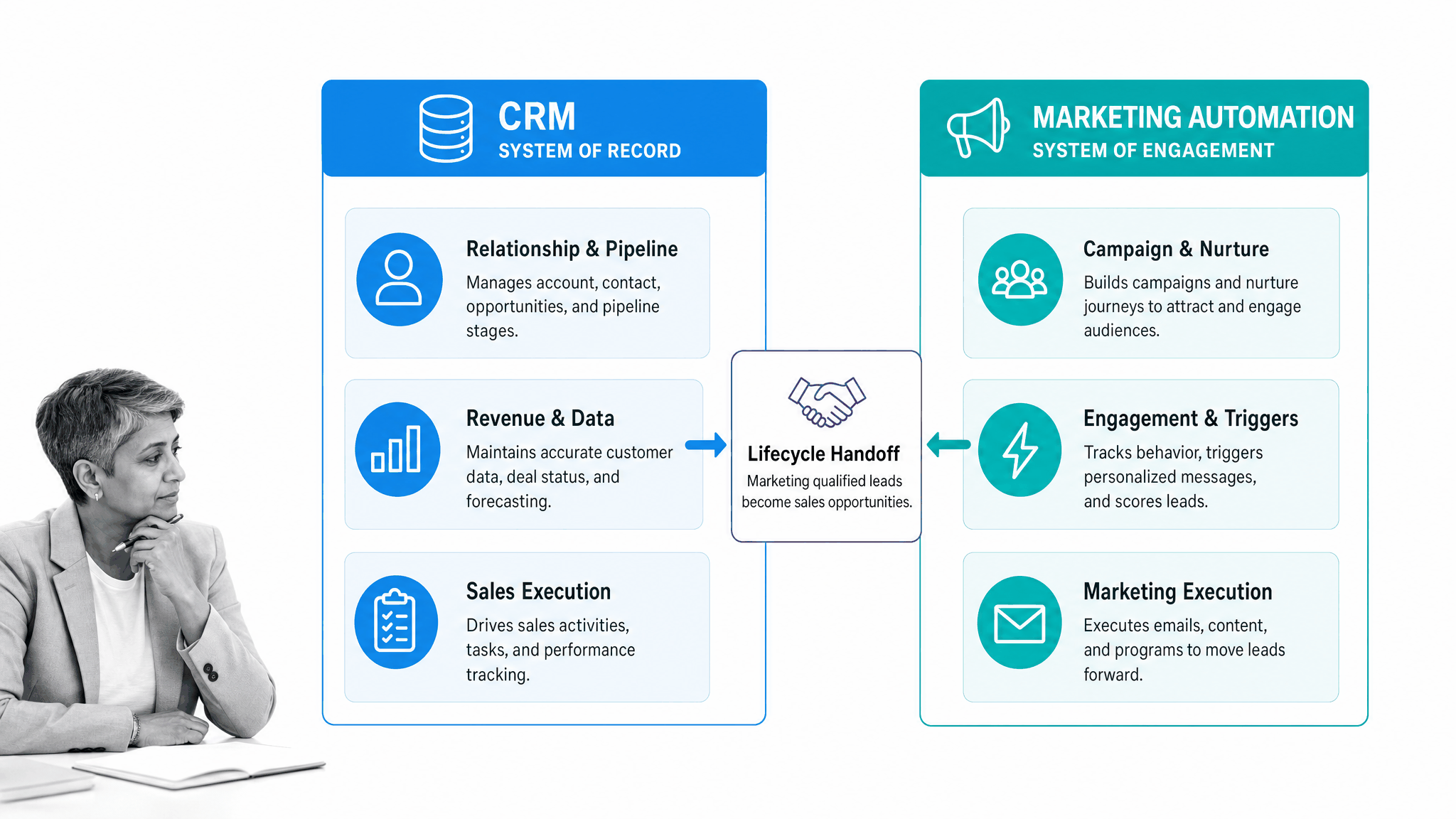
Integration needs more than a field mapping. Marketing and sales should agree on lifecycle definitions, qualification rules, ownership, consent, suppression, and which system is authoritative for each field. They should also decide what happens when data conflicts, a contact matches several accounts, or a handoff receives no response.
A practical flow might create or update a CRM lead after a meaningful marketing action, assign it using territory rules, notify the owner, and return the disposition to marketing. If the lead is not ready, the automation platform can continue an appropriate nurture. If an opportunity opens, campaign messaging may need to change or pause.
Monitor the integration as an operating process. Useful controls include sync-failure alerts, duplicate rates, records without owners, delayed handoffs, missing consent values, and leads that never receive a disposition. Review a sample of completed handoffs with both teams, and assign one owner to coordinate corrections across system boundaries. A technically successful sync can still produce a poor customer experience if the message, timing, or ownership rule is wrong.
This coordination is where Process Street can govern the work between systems. Process Street is one Compliance Operations Platform. Its Docs capability area gives teams a controlled place to author, approve, version, and share the procedures and policies behind a customer handoff. Its Ops capability area turns those instructions into assigned workflows with forms, conditional logic, approvals, permissions, and audit trails.
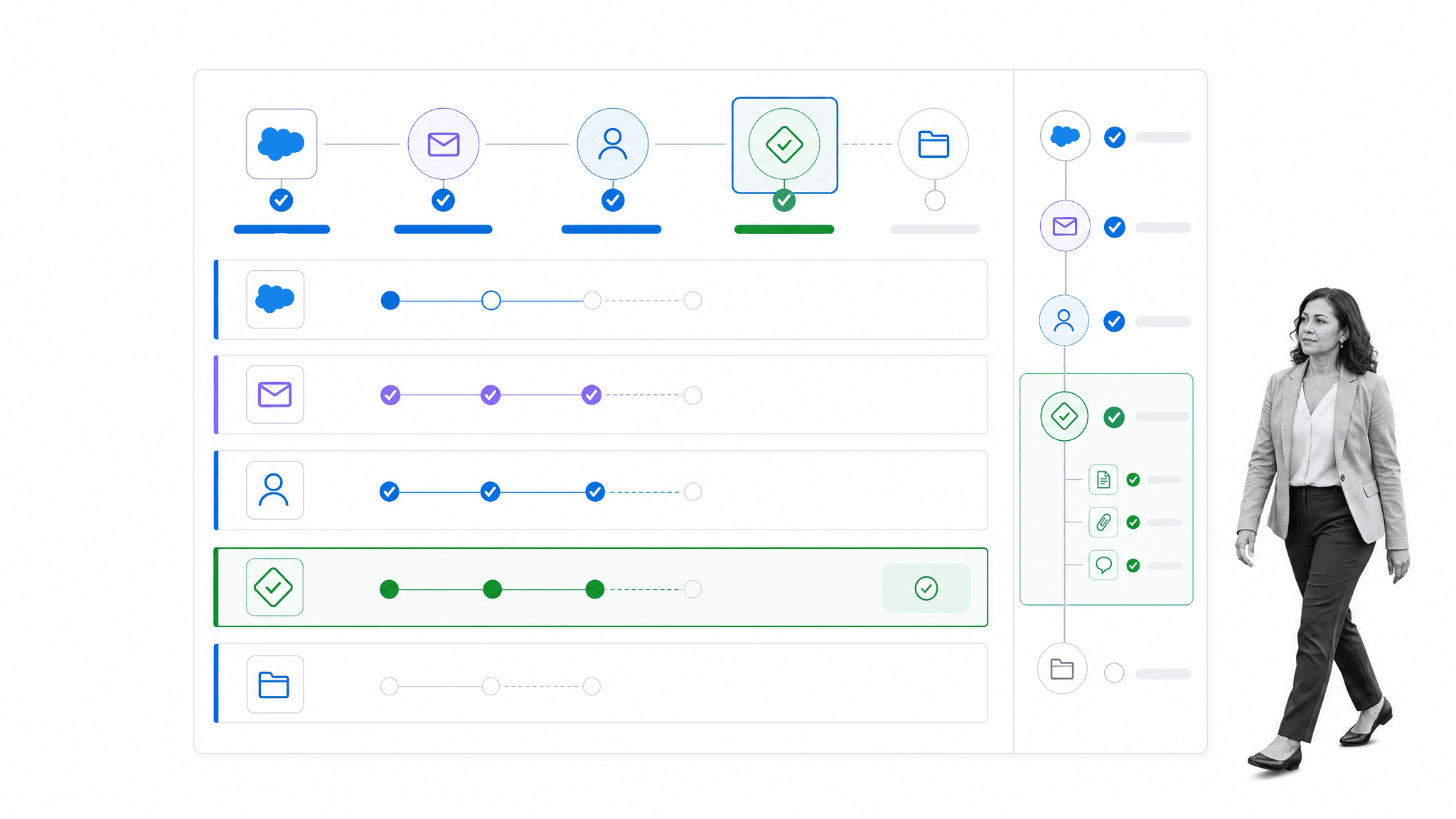
Built-in AI can assist with drafting, classification, retrieval, and workflow execution while human owners control what becomes authoritative. A team can trigger a Process Street workflow from a CRM event, collect the evidence required for the handoff, route an exception for approval, and preserve an audit trail of the completed work.
Process Street has direct, universal integrations to 5,000+ systems. Need a new one? An AI agent builds it on the fly. That connectivity helps teams coordinate the controlled process around CRM and marketing automation without treating either application as the entire operating model.
For more help evaluating the sales side of the stack, compare the options in this guide to the best CRM software for different business needs. Product features matter, but ownership, process design, integration behavior, and adoption usually determine whether the system produces reliable results.
Choosing the right system
Start with the operational constraint that costs the business the most. If salespeople cannot see relationship history, ownership is unclear, pipeline reporting is unreliable, or customer context lives in private notes, CRM is usually the first priority. It creates the record and discipline that later automation will depend on.
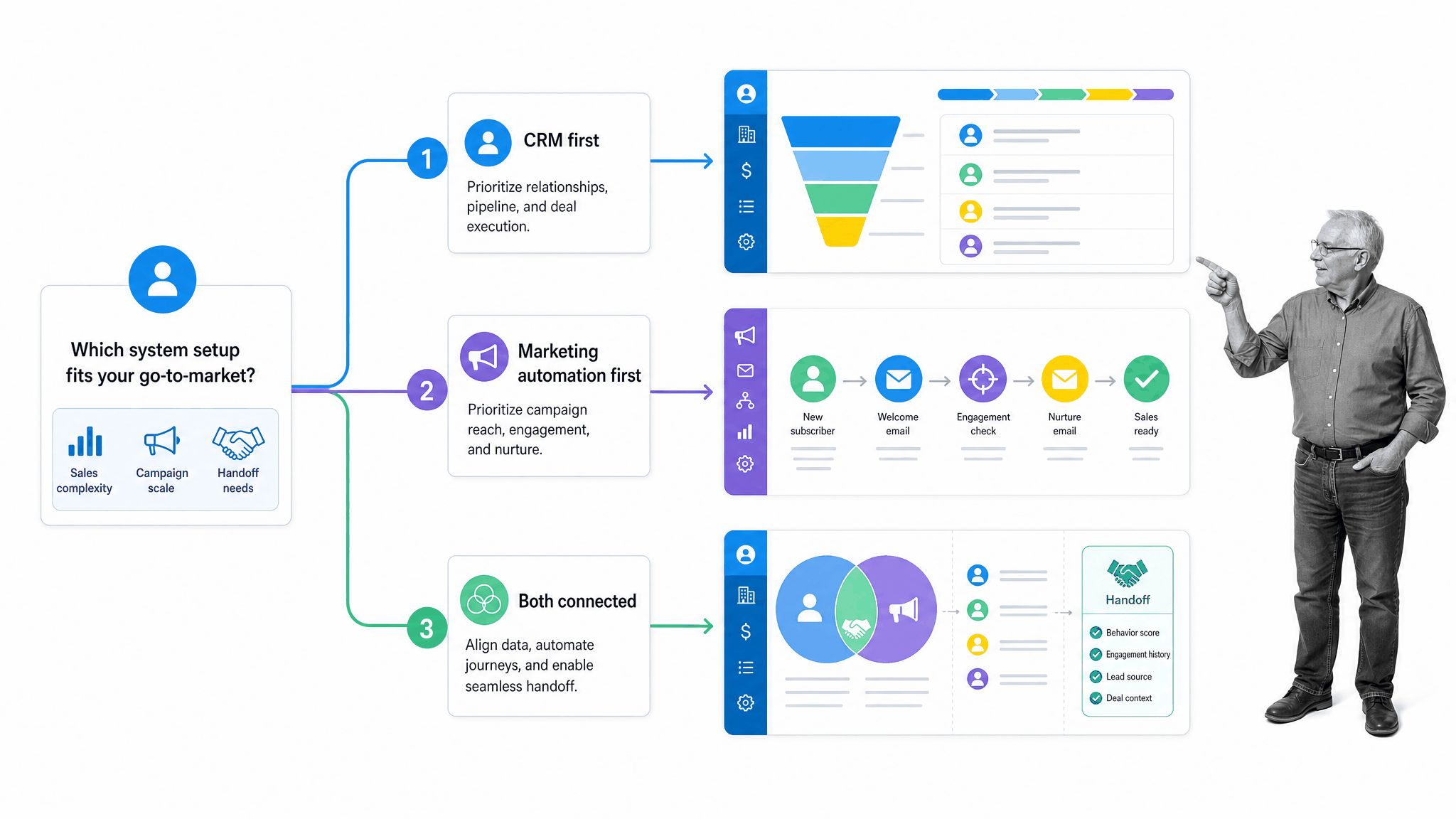
If the relationship record is already sound but the marketing team cannot segment audiences, manage campaign timing, respond to behavior, or nurture demand consistently, marketing automation is likely the more urgent investment. Confirm that it can exchange the necessary identity, consent, lifecycle, and engagement data with the CRM.
Choose both when sales complexity and marketing scale are already significant, and when the handoff between them affects revenue. Buying both at once also increases implementation work. Define the lifecycle, data owners, required fields, consent rules, integration paths, and success measures before migrating data or switching on journeys.
- Choose CRM first when relationship history, account ownership, opportunity management, follow-up, or forecasting is the main gap.
- Choose marketing automation first when campaign scale, audience segmentation, nurture, triggers, or engagement measurement is the main gap and a dependable contact record already exists.
- Choose both when marketing-to-sales handoffs are frequent, revenue work is complex, and the team can govern shared data and lifecycle rules.
During evaluation, test a real workflow rather than a polished demonstration. Use representative data to create a contact, capture consent, enter a campaign, respond to behavior, qualify the person, route the handoff, update the opportunity, and report the outcome. The test will expose missing ownership and integration assumptions that a feature checklist cannot.
The best system is the one that makes the next important piece of customer work more reliable. CRM, marketing automation, and the governed workflows around them should give people clear context, clear ownership, and a clear next action. Review those foundations as the business changes. When they are in place, automation can scale good decisions instead of multiplying confusion.