Have you considered that your marketing process could be broken?
Marketing is the engine of growth driving your business, and making sure this engine is well-oiled and optimized for maximum efficiency goes without saying.
Your marketing plan must be well-organized, robustly structured, and efficient. For this to be true, you need to begin with the process behind the vision and make sure that is working at 110%.
In the absence of a tried and tested process that is fine-tuned to the needs and goals of a particular company, the untamed beast of marketing will waste time, money, and resources, and will fail to deliver any meaningful return.
Why is it, then, that so many businesses leave the marketing process as an afterthought?
The following is a guest post from Ryan Gould, Vice President of Strategy and Marketing Services at Elevation Marketing. An expert search, social and content marketer, Ryan leads Elevation Marketing’s digital strategy department, helping brands achieve their business goals, such as improving sales and market share, by developing integrated marketing strategies distinguished by research, storytelling, engagement and conversion.
Without software, you’d be hand-writing purchase orders, using a Rolodex for a CRM, and doing your newsletters via smoke signal.
Alright, maybe that last one is a little far-fetched, but there’s no denying that in the business world, technology is absolutely necessary and enables amazing things.
…But not everyone on your team gets enthusiastic about the prospect of learning a new tool. Even if that tool will help them improve productivity, do a better job, and escape the white-collar equivalent of hard manual labor.
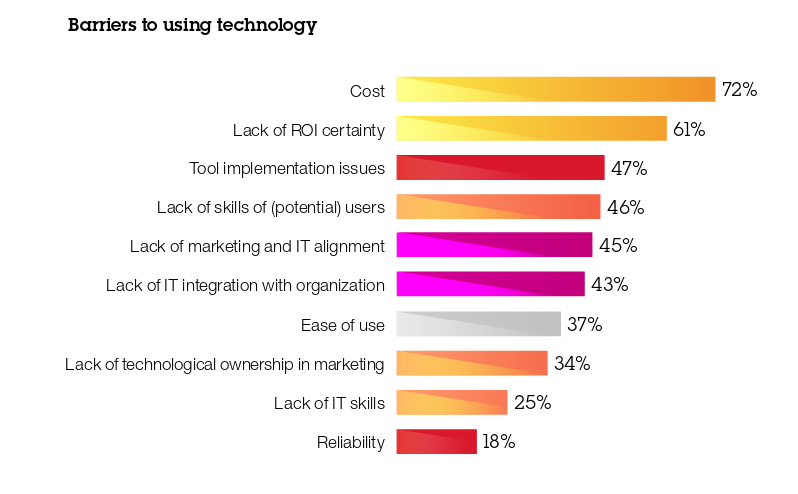
IBM research on the barriers to software adoption (Source)
Your goal when rolling out software is always the same: to help your business improve operations, boost efficiency, and enable sales. These days that means staying up to date on technological trends as well.
Deciding which tool is right for you will always hinge on fundamentals, like whether it can automate your vendor payments, purchase orders, employee onboarding, lead management, etc. However, there are other considerations, such as whether your solution integrates with cloud software and is responsive on mobile devices.
But, even after you’ve selected the solution perfect for your operation and your employees – after all the sales demos, comparison docs, and review reading – you’ll find it’s that the human element that trips you up.
Earlier this year we compared planner sisters Trello and Asana. But if you’re the owner of an Office 365 subscription, Microsoft has rolled out its own project management tool with kanban cards into your account for free.
It’s called Microsoft Planner and claims to “take the chaos out of teamwork.” Let’s see.
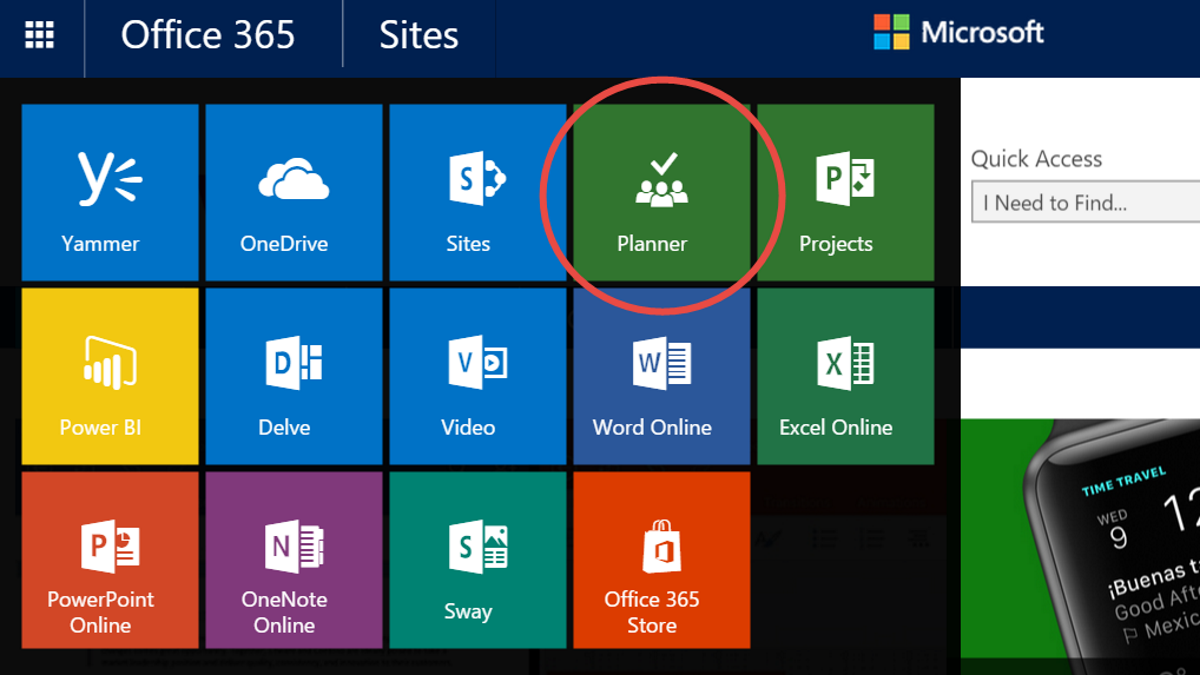
Sign in to Office 365 with your work or school email, and go to the app launcher by clicking on the Rubik’s cube menu in the top left corner. There you’ll see this friendly Planner logo:
Here’s our take on Microsoft Planner, including some tips and tricks for becoming a super user, and our take on how it differs from the other tools out there:
At Process Street, we’re always asked about the best ways to construct, track, and analyze processes.
There are loads of techniques in the school of business process management to help you with these three concerns but in this article, we’re going to give you an introduction to process mining; a data driven way to create, understand, and optimize your processes.
We’ll cover:
What is process mining?
9 process mining tools to automate your analysis
How to act on your mined results to optimize your processes
We cover solutions for enterprises all the way down to basic approaches for startups. Jump in!
In the last chapter, I showed you how to get tasks out of your head and into your notebook.
In this post I’m going to answer some questions you might be having about what to do next, and show you how to make a to-do list even when you’re short on time.
The following is a guest post from graphic designer and copywriter Erik Fessler.
What do you think is worse: sitting for 100 days because you didn’t know what direction to travel in, or going for 100 days down the wrong path?
Here’s the good news:
This question doesn’t matter if you have a reliable and logical process to find the right direction.
Brainstorming is the key to finding that direction, and it’s something you can implement for your team in a logical, structured way. With that in place, you can use that process as a reliable way to generate ideas, iterate upon them, and harness the power of your team’s combined creative energy to make real business change. That is, if you can build and optimize your brainstorming process…
Whether it’s Coke vs Pepsi, Ariel vs Persil or Hawaiian pizza vs everything good in the world, rivalries are everywhere. They make for fantastic spectator sports and can help improve our lives by showing the flaws in each side.
In our efforts to help you guys automate as much of the laborious shovel work in your lives as possible, we came across two main competitors; the great battle that is Zapier vs IFTTT.
Okay, so maybe “battle” is over-dramatizing things a little; it’s not as if they’re running massive smear campaigns. Still, the competition is real, as both Zapier and IFTTT have earned their spots on the map for being darned good pieces of kit. This got us thinking; which is better?
The following is a guest post by Darren Chait, Co-Founder at Hugo. Hugo is the meeting note platform that keeps your team connected with what your customers are thinking and saying. It enables fast-moving teams to make meeting insights shareable and actionable in their existing tools.
As a startup guy, my world is full of buzzwords. We’re disrupting a space, have pivoted, got our minimum valuable product (MVP) out to our total addressable market (TAM) and even had a ‘.ai’ domain name. Undoubtedly, one of my ‘favorites’ is ‘team alignment’.
While team alignment is not a new concept and certainly not unique to fast-growing technology businesses, I’m fascinated with my peers’ obsession with this utopian concept. It’s understandable. Why wouldn’t you want your team moving forward in unison with precise coordination and execution? Why wouldn’t you listen when experts warn that misalignment kills startups?
In this guest post, I’ll share our story and perspective on team alignment and some easy-to-implement solutions to achieve this ideal state with your team.
The Ford Production System paved the way for most modern lean manufacturing, and the best physical embodiment of it was the Willow Run B-24 bomber production facility in WWII.
After intervention from Ford, Willow Run was able to go from producing one bomber per day to one per hour. That’s 24x their original output.
At the heart of the facility stood the “pacing clock”. This monitored what we now call takt time.
Takt time is the pulse of your operations – the rhythm and rate by which tasks and products are completed. By monitoring and setting guidelines for this single figure, Ford (and company) was able to build a facility which could produce the same as half of the entire German aircraft industry.
That’s why today we’ll be breaking down what takt time is, how to calculate it, and how it can be used in almost any system to reliably track your progress and provide an early warning system for any problems you encounter.








 At
At 




 It’s an accepted reality of business that customers come and go.