All posts in Technology

What is the Best Email App for iPhone? 13 Apps Battle it Out

best email app for iphone

In our increasingly mobile-first world, we’ve come to rely on getting business done on the phone much more than ever before.

The difficulties of efficiently managing email on a smartphone has likely been a major factor for the rise in team communication software like Slack.

However, it doesn’t need to be this way. And we can’t let it be this way.

That’s why this Process Street article is dedicated to exploring the different email apps for iPhone in order to find which ones have which strengths, and to crown an overall winner.

The apps will be judged primarily on how well they achieve their intended aims, with depth of features and ease of use affecting their scores from that base. I’m going to try not to consider price while calculating a score, but I will mention pricing where relevant.

You can check out the quick overview of scores below and the full breakdowns app by app through the rest of the article.

Continue Reading

The 9 Best Organizational Tools to Bring Order to Chaos

Organizational Tools

Documented processes don’t just save you time, money, and give a consistent method for your team to follow. They make everything you do more reliable and efficient, even increasing project success rate by 70%.

Unfortunately, getting started is the hardest part. Whether you don’t feel like you have time to set up your management system or just don’t know what to use for your needs, it’s difficult to get over the initial learning curve.

That’s why I’m going to outline the 9 organizational tools you can use to get started right now.

From their pros and cons and best use guidelines to general tips on what to do with your organizational tools, this post will cover:

  • Process Street
  • Office 365 (Microsoft Word and Excel)
  • Trello
  • Airtable
  • Google Suite (Google Docs, Google Sheets, and Google Drive)
  • Zapier
  • …and 4 process management techniques to get you started

It’s time to learn what organizational tools you need to manage your processes, and how to use them.

Continue Reading

Production Systems: Why Tesla’s Gigafactory is Musk’s Most Ambitious Project Yet

production systems headerAfter Elon Musk’s successes sending Falcon Heavy into space with his Roadster attached, the fanfare around his achievements has reached new highs.

But not everything is rosy for Musk.

Tesla is struggling. It’s not hitting its production targets for the Model 3, and this is not for the first time.

The goal for Tesla has been to hit 5,000 units per week and though Musk is confident of reaching that figure the Model 3 production has been mired by continually failing to meet demand.

It’s not enough just to have a good product, you also need to have high performing production systems in place to take that product effectively to market.

In this Process Street article, we’ll tackle the machine which builds the machine and we’re going to look at:

  • What a production system is and what a good one looks like
  • The production system of the future and how Elon Musk wants to build it
  • Why a production system isn’t just for manufacturing
  • How you can build production systems for your business
  • Why Tesla’s Gigafactory is Musk’s most ambitious project yet

Continue Reading

Robotic Process Automation and the Death of Data Entry

In 2014 an employee at Xchanging named Amanda Barnes created a software robot she called “Poppy”.

Poppy’s job was to help automate the tedious task of validating insurance premiums — something which could be easily done by a computer if it was fed structured data.

Before Xchanging built Poppy the robot, they were processing 500 premiums every few days. With Poppy, the same 500 items take just 30 minutes to process.

Rather than kicking Poppy out of the office in case she starts taking jobs, the Xchanging team welcomed her warmly because she saved them from laborious, mechanical work.

Continue Reading

Free Small Business Software: 34 Powerful Tools to Try

The average business’ software spend has been on the rise for years now, with small and medium businesses spending a higher percentage of revenue on software than enterprises.

The average midsized company spends $13,100 per employee on IT. With some smart alternatives (and not relying on the same vendors as always), companies can cut this cost massively. In fact, in a 2017 post about the minimum viable software stack for a 10 person startup, I calculated an option that cost just $260/user/year.

That post touched on just some of the free tools small businesses need, but here I aim to cover the topic much more widely, and look at:

  • Office suites
  • Workflow tools
  • Internal email tools
  • Project management tools
  • Marketing automation tools
  • Team communication tools
  • Accounting software
  • Payroll tools
  • Cloud storage
  • CRMs
  • Database management tools
  • Software development tools

Let’s go!
Continue Reading

The Best Browsers, Compared with Data: Chrome, Firefox, Edge, Opera, Safari, and Vivaldi

As a gateways to the internet, browsers are one of the most popular types of software out there. Everyone needs one, but which is the best? The market changes so quickly, it can be hard to keep up with the facts.

Which is the fastest? Which has the best extensions? Which is the most secure? While many people use Chrome, or their default pre-installed browsers, this doesn’t necessarily indicate a ‘best’ browser.

If you’re reading this, you want to find the fastest, most capable, browser for your needs. Finding the most popular isn’t enough, because those stats aren’t always related to quality.

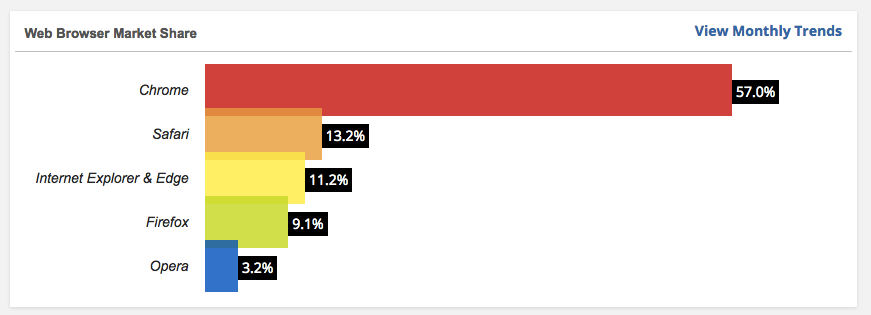
Browser popularity data from W3Counter, retrieved October 2017.

In this article, I’m going to use hard data to decide on the best browser on the market, looking at the most popular options: Chrome, Firefox, Edge, Safari, Opera, and Vivaldi.

I’ll compare speed, memory usage, range of extensions, privacy, and usability.

Looking for a new browser? Want to be sure you’re using the best technology on the market? Keep reading for a full data-driven comparison after a general overview.

Click here to skip down to the hard data and avoid the broad overviews

Continue Reading

The Best Payment Platforms: Stripe vs Paypal vs Square vs Braintree

stripe_vs_paypal_vs_square_vs_braintree best payment platformIn the first quarter of 2017, the AppStore and Playstore saw record revenues yet again with a whopping total of $15 billion worldwide, representing a year over year growth of 45%.

Add in other online sales and the amount of money being spent is astronomical.

But how do we process all these sales? And what means of processing is best for your company?

We’ve pondered the question at Process Street and decided to write up our findings. In this article, we’ll compare Stripe, Paypal, Square, and Braintree to see what each do and how they do it. We’ll analyze those findings and suggest which might be better for different kinds of businesses.

The key areas we’ll compare are:

  • Features – what do they offer and what can’t they do?
  • Pricing – where can we find those small gains which make a difference at scale?
  • Ease of use – can a regular person integrate it into their business, or is a developer needed?

But first, let’s look at some of the different use cases for these payment platforms to contextualize our investigation.

Continue Reading

The Ultimate Website Launch Checklist: Improve Design, SEO & Speed

Launching a website can be a huge undertaking. A successful launch requires managing many moving parts including content, design, marketing and the technical side. That’s why we have created this handy checklist for you to use on your next website launch or redesign.

And don’t forget, you can get this as an interactive checklist that you and your team can collaborate around. Just create a free account with Process Street and grab it from the examples section.

Continue Reading

How to Be GDPR Compliant: A Guide for SaaS and Beyond

Adam Henshall September 29, 2017

gdpr compliance header

A spectre is haunting Europe – the spectre of GDPR.

It seems to be the one thing everyone in the data security industry is talking about, Equifax aside…

Articles are being written, consultancy firms are popping up, and businesses are quietly panicking.

Yet, like so many grand legislative changes, many people are unsure what GDPR is, how it could affect their business, or whether they should even be worried about it at all.

In this article, we’ll be looking to clear up some of those misconceptions while presenting actionable steps for how companies can go about adjusting to the coming changes. We’ve scoured the available resources to find the answers to our concerns about GDPR and now we’re sharing it with you.

(Still employ a consultant though. As you’ll see, there’s too much at stake not to!)

We’ll explore not just the impact on European companies but also companies outside the European market who process or control data which could come under the scrutiny of these EU measures.  SaaS companies like Process Street will find themselves needing to adapt their services for their large European clients, and if you work within the SaaS field you might have to do so too.

Before we go further, let me give you a Too Long; Didn’t Read:

The best short summary of the ethos of GDPR I’ve read comes from Wired:

For companies that have more than 250 employees, there’s a need to have documentation of why people’s information is being collected and processed, descriptions of the information that’s held, how long it’s being kept for and descriptions of technical security measures in place

The GDPR broadly sets out:

  • You need to have a system in place to manage data and security.
  • You need to have that system fully documented.
  • You need to operate with the parameters of the GDPR, e.g.
    • Consent boxes cannot be auto-filled as “yes”.
    • Companies must respond to access requests from users within 1 month.
    • Requests for personal information must be processed free of charge.

At the end of this article, you’ll find a free Process Street checklist which uses ICO recommendations and Article 29 Working Party advice to guide you through assessing your company’s GDPR readiness!

Continue Reading

How to Build an MVP App Without Writing Code

mvp app how to build an mvp app without writing codeWhen you have a great idea for a startup or a service the first thing you desire to do is create it, talk about it, and see what people think.

In creating a minimum viable product, entrepreneurs choose between experiments that can validate or invalidate their assumptions about a business model. – N. Taylor Thompson

These experiments could be anything from interviews with potential customers, trying to build a client base on the promise of a future product, or building a basic version of your idea and testing it in the market.

That last one is what we’re going to focus on. How can you create software to make a product a reality?

For some people, this means sitting down and writing code. Line after line slowly pieces together the idea and shapes details until a version which works exists.

This is how we make software. It’s how we’ve always made software.

However, you wouldn’t think you needed years of coding experience to create a blog. You could just start a Medium account or a Tumblr, or whichever platform is trendy right now.

Because you’re not the only person who wanted to build a blog, other people with greater technical skill developed tools to help you build blogs without needing to code.

This makes it easier and faster for everyone. But it’s not just blogs which you can build without coding.

In this article, we’ll look at a number of different tools you can use to build a whole range of products by pointing and clicking and dragging and dropping.

If you want to make your product a reality, rapidly building a first working iteration is a very useful option to get started!

Continue Reading

Take control of your workflows today