All posts in Technology

Mobile App Marketing: How to Successfully Build & Execute Your Strategy

Mobile App Marketing

This is a guest post from Emma Lee. Emma Lee is an experienced sales manager and content editor at ProEssayWriter. She is a fan of current technological trends and passionately strives to learn as much as possible about all things SaaS.

As business trends shift from mobile-friendly to mobile-first, more and more businesses are understanding the importance of mobile app marketing. In fact, over 40% of SMEs have a mobile app.

Want to jump on the bandwagon yourself?

It’s definitely a good idea…

But you can’t create an app, publish it, and expect it to work wonders straight away. As a mobile app development company, without a proper mobile app marketing strategy, it will end up in the app graveyard along with thousands of other failed mobile apps!

That’s why, in this guest post for Process Street, I’ll explain what mobile app marketing is. Then, I’ll show you how to prepare a mobile app for launch and market it the right way.

Make your way through the following sections:

Let’s get started.

Continue Reading

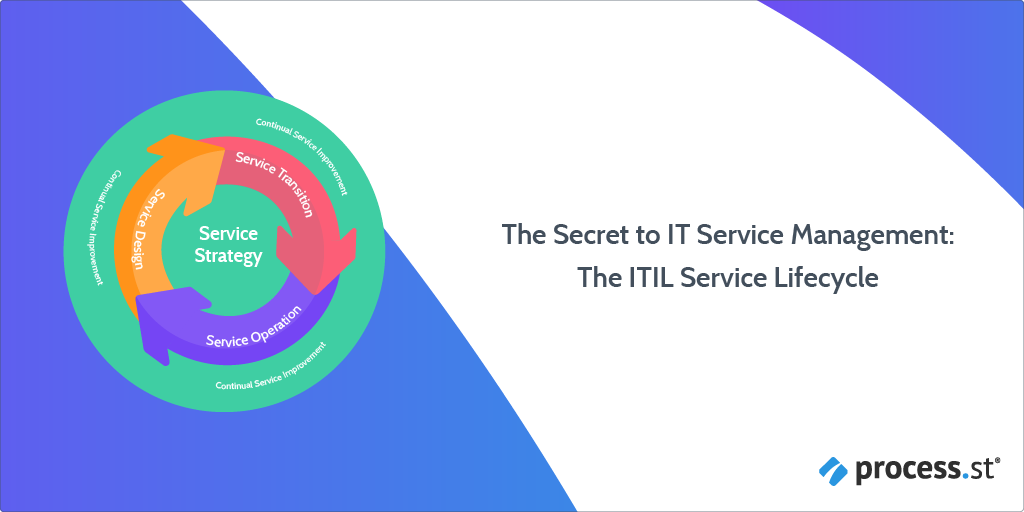
The Secret to IT Service Management: The ITIL Service Lifecycle

ITIL Service Lifecycle

What do Sony Ericsson, the UK Passport Agency, MT Gox, and Knights Capital all have in common?

They’ve all suffered massive financial and reputational losses following the mismanagement, or non-existent management, of their new and existing IT services.

  • Major mobile phone operator, Sony Ericsson failed to renew one of their certificates and left 32-million people unable to use their mobile phones for a WHOLE DAY.
  • The UK Passport Agency failed to test its new computer system and left half a million British people without a passport in the UK.
  • Japanese bitcoin exchange, Mt. Gox, failed to spot several weaknesses in their software systems which enabled hackers to STEAL over 850,000 bitcoins.
  • Knight Capital Group, one of America’s largest traders, failed to spot a major bug in their trading software which cost them $440 million.

What could they have done to avoid these embarrassing, not to mention financially crippling, technical disasters?

Implemented an IT service management system, like the ITIL Service Lifecycle.

Which, coincidentally, is what this post is all about.

By the time you’ve finished reading this Process Street article, you will have answers to the following questions:

Ready? Let’s make a start…

Continue Reading

How to Boost Workplace Productivity: 5 Tech Examples

workplace productivity

This is a guest post written by Jeff OxfordJeff is a tech enthusiast who follows new trends in technology and digital marketing. He had been a speaker at the 2013, 2017, and 2018 IRCE and has written contributions to Forbes.com, InternetRetailer.com, and Infusionsoft.

Staying on top of tasks amid distractions is not a problem exclusive to the 21st century, although today’s folks have to deal with social media. It is the rabbit hole where anyone can willingly spend at least 144 minutes every day.

You can expect this statistic to rise when the expected three billion people, or 40 percent of the world’s population in 2021, will join the social networking sites.

With that and other things in mind, it’s no wonder that productivity and efficiency are the main targets of a tireless quest to achieve a productive work life.

productivity search

According to Google Trends, the interest in productivity peaked in September 2018. While it has sustained some lows, the idea continues to gain attention as we speak.

efficiency search

Efficiency, like productivity, also enjoys high volume searches in the US.

Turning a blind eye on the impact of social media and relevant efficiency killers is counterproductive. Surely, limiting access to Facebook, Twitter, and other sites that compel browsing during office hours can help. Plus, smartphones have to go or be kept out of reach to avoid looking at it every 20 minutes.

It makes even more sense to face the battle head-on, combat technology with technology. Companies can focus their energies on speeding up, streamlining, sorting processes so that people have less time to wonder and wander about in the office.

That’s not to say that you’ll always be able to tell why your productivity plummets.

Every workplace is different, and so are the people that populate it. However, office culture and personal quirks aside, this article will count exemplary technologies and tools that harness, not hinder, workplace productivity.

If you’d like to skip ahead then feel free to use the links below:

Let’s dive in!
Continue Reading

What is an Enterprise Document Management (EDM) System? How to Implement Full Document Control

What is an Enterprise Document Management (EDM) System-01

82% of companies are still spending billions on remaining paper-based companies, with 1/3 upping their paper usage in recent years.

Why, oh why are businesses still relying on a technology that was invented around 100BC when we have entered an era of artificial intelligence, 3D printing, and digitized documentation?

If you want effective Enterprise Document Management (EDM) strategies, you need to scrap the paper and go paperless.

A bold statement, but a statement that is not unfounded.

  • Paper is costly – costing an average of ~$8 billion annually in management.
  • Paper is wasteful – paper usage does not support the global paradigm shift towards vital sustainability efforts.
  • Paper is difficult to manage – workers spend almost half their time looking for information stored in paper documents.

What you need are digitized methods to store important business information. What you need is an electronic way to manage this.

What you need is a digitized Enterprise Document Management system, and we at Process Street are here to help.

Find out what Enterprise Document Management is, and why Electronic Document Management Systems (EDMS’s) serve as good EDM tools. We present to you our top 5 EDMS tools which you can use alongside Process Street for ultimate document control.

Ready to terminate your paper towers? Click on the relevant subheaders below to jump to that section, alternatively scroll down to read all we at Process Street have to say about digital Enterprise Document Management systems.

Let’s get started!
Continue Reading

Organize Gmail: Top Expert Tips to Reach Inbox Zero

Organize-Gmail

This is a guest post by Sarabeth Lewis, a freelance SaaS copywriter and UX writer based in Austin, Texas. Lewis regularly writes for AppSumo, a team of amazing folks who run insane lifetime deals on the best software tools in the world… while eating an impressive number of tacos.

Email. What a blessing (and a curse).

If you’re anything like me, you’ve let your inbox get away with far too many shenanigans. You want to take back control and organize your Gmail. But how?

At Process Street we understand that email is ubiquitous for working professionals. Despite its ubiquitous use, many complain email has a central flaw: a tendency to become your to-do list.

Am I wrong?

This usually occurs passively, inadvertently causing you to lose control of your own time.

When your day is commandeered by your inbox, it means that other people are controlling your calendar.

In this article, you will find out how to take back control and organize your Gmail. Click on the links below to jump to the relevant section, or scroll down to keep reading.

Let’s get started.

Continue Reading

Looking for a Visio Alternative? Here Are 4 of Your Best Options

Looking for a Visio Alternative? Here are 4 of Your Best Options

Microsoft Visio is the industry standard for business process modeling, but you might want something different. Something a little more… agile. Just because it’s the most widely used, doesn’t mean it’s the best.

The main reason it’s so widely used is that it’s packaged with Office 365 and often comes pre-installed with enterprise tech suites.

If you’re tired of Visio’s lack of integration, lack of macOS compatibility, and sky-high price point, then you should consider investigating one of the many Visio alternatives out there (like Process Street!) and asking yourself what they can do for you.

There are a lot of options for different use cases; in this article, we’ll take a look at some of the best Visio alternatives and talk about why they might be a better choice.

Here’s a breakdown of the article:

You’re probably all-too-familiar with Microsoft Visio, but for the sake of clarity, let’s start with a quick overview.
Continue Reading

Robotic Process Automation Tool Kit: 5 RPA Tools and Best Practices To Help You Get Started

Robotic-Process-Automation-Tool-Kit-5-RPA-Tools-and-Best-Practices-to-Help-You-Get

This is a guest post by Rahul Varshneya, the co-founder and President of Arkenea. Rahul has been featured as a technology thought leader in numerous media channels such as Bloomberg TV, Forbes, HuffPost, Inc, among others.

Several organizations use a wide range of tools to execute and monitor their internal processes. These systems are interfaced by human agents who pass on the data output from one system as input to the next system in the pipeline.

Because of the non-automatic nature of manual execution, manual data entry work makes these processes slow and error-prone.

Wouldn’t it be nice if you had these interfaces taken care of automatically?

That’s right, we are talking about Robotic Process Automation (RPA) – a transformational paradigm that optimizes such processes by automating repetitive, rule-driven tasks.

According to Forrester Research, RPA market revenue is expected to gross $1 Billion USD in 2019.

With RPA and by using RPA tools, your internal processes can be finished faster and more efficiently. It would free your agents from trivial data entry and data exchange tasks so you could deploy them to do more strategic process initiatives.

In this article, we at Process Street will present 5 best practices for RPA. We will then introduce our favorite RPA tools, so you can walk away with actionable robotically automated processes.

This article has been structured as the following:

Let’s get started!

Note that RPA does not aim to eliminate jobs. It aims to reduce the burden of mundane and repetitive tasks of the existing staff so they can work on more strategic initiatives.
Continue Reading

How To Prevent Data Loss and Implement Data Recovery

How To Prevent Data Loss And Implement Data Recovery

Anastasia Stefanuk is a passionate writer and a marketing manager at Mobilunity. The company provides professional staffing services, so she is always aware of technology news and wants to share her experience to help tech startups and companies to be up-to-date. 

As a business person or a person who owns a computer, how prepared are you in protecting yourself against data loss?

If you lost all of your important files and memorable photos, do you think you would be able to run data recovery to reclaim them?

Data recovery is the process of salvaging lost data from either a secondary storage system, removable media or files.

In this digital era, data has been classified as the new “oil”. In the business world, data is the driving force behind innovation, competition, productivity, and improvement of core operations. Likewise, governments all over the world require data to make vital decisions that will affect their populace.

With that in mind, the convergence of data streaming from billions of mobile phones, digital platforms, virtual-reality applications, and wireless sensors, continue to pile up with each passing day. In fact, it is estimated that the amount of electronic data in existence today is 2.7 zettabytes. This number is expected to grow to 175 zettabytes by 2025.

This presents a humongous challenge in managing and ensuring that such a large amount of data is secure. In addition, the looming question in many people’s minds is; what would happen if all this data magically disappeared? Would the world come to a standstill or are there backup mechanisms where it can be retrieved later?

In this article, Process Street will expound on the main causes of data loss, the importance of backing it up, and tips on how you can successfully run data recovery processes.

This article has been broken down into the following sections.

Continue Reading

What Are Webhooks? How We Use Webhooks at Process Street

webhooksAutomation has been one of the key emerging trends of the late 2010s, and will likely be a defining characteristic of the 2020s.

It’s something we’ve covered extensively at Process Street, and something we’ve taken huge advantage of internally as well.

The move from companies only providing enterprise-level API access to their software over to commercially available Internet of Things style mass integration has been a dramatic shift in the marketplace. This has opened up huge potential for individuals and small businesses; you can integrate with thousands of services in just a few clicks.

Now, so many services, SaaS products in particular, provide a means to integrate with other platforms that there are very little restrictions on what you can and cannot automate.

Tools like Zapier, Flow, and IFTTT have made these integrations so easy that anyone can set them up.

But they’re not the only ones – new connectors and middlemen are cropping up all the time, helping people without tech skills connect with APIs or Webhooks of their choosing. The No-Code Movement has gone mainstream and it now has a full suite of tools at its disposal.

Even in 2015, according to Chui, Manyika, and Miremadi writing in the Harvard Business Review, not only could a marketing executive be automating activities which account for between 10-15% of their current time using existing technology, but for 60% of existing US jobs, 30% of their time could be reduced by automation.

For those interested in that kind of thing, you should check out Four Fundamentals of Workplace Automation by McKinsey. An illuminating text which is already somewhat out of date!

Here at Process Street, we integrate with thousands of other apps and platforms via our direct, agentic integration framework, we have large customers making use of our API, and we’ve now added webhooks to our array of automation options to try to cover the rest of the use cases our customers tell us about.

In this article, we’ll look at:

Continue Reading

How to Set your Favorite Webmail as a Default Mail Client

Set Default Mail Client

You click the ‘Contact Us’ page. Nothing happens. First, confusion, then familiar frustration. It was a mailto link. Your computer slows to a grinding halt as a huge, archaic desktop mail app rises from the depths of your hard drive. Checking that the date on your computer isn’t 15 years out, you wonder why mail integration isn’t standard… and what year is it exactly?

Continue Reading

Take control of your workflows today