Written by Andy Barnes, MotoCMS marketing manager and professional content creator.
You no longer need to understand HTML, CSS, or server administration to publish a credible website. A modern DIY website builder gives you visual controls, reusable page sections, hosting, and practical publishing tools in one place.
The easy part is getting a page online. The more important work is choosing a platform that suits your goal, planning useful content, checking how the site performs, and making sure you can maintain it after launch. This guide explains those decisions from the ground up.
If you have a problem, it’s in your best interest to ensure that trying to solve that problem doesn’t end up causing more problems. This is a good way to think about low-code development platforms.
Each business has its own set of tools for solving problems and getting things done, and for the most part, these problems can be solved by existing commercial apps.
But of course, there are certain needs that off-the-shelf solutions cannot meet, and for these needs a business could approach the problem a few different ways.
If a proprietary tool doesn’t exist, then the best option may be for the business to try and build a solution themselves. This is often done from scratch, and it’s called software development.
That’s fine, except it costs a lot of money, takes a long time, and is difficult to make changes once things are in motion. It also means everything gets more complex, because it’s not just the development team you’re bringing onboard, but designers, testers, data analysts and many others as well.
The simple truth is that it takes a small village to develop good software with conventional methods.
However, there are tools that are designed to give businesses the freedom to build their own solutions, without all of the excess baggage.
These tools are known as low-code development platforms.
The real estate market is known to require a significant level of human interaction, but to what extent is the human touch really necessary for delivering a high-quality service for each and every customer?
The human-intensive nature of real estate creates a large margin for human error. Poor lead management, documentation, appointment coordination, tenant screening, and maintenance supervision are just a few examples of tasks/processes that are difficult to execute consistently without the assistance of automation software working in the background.
Some of you property managers out there may claim that diving headfirst into the automation craze sweeping the business world is not such a good idea, as it undermines the face-to-face interactions that play such an important role in the field.
This is not entirely wrong, but all things considered, deciding to ignore new ways of streamlining processes will leave you in the dust as your competitors continue to find new ways of being more efficient.
Plus, some industry thought leaders believe that automation actually humanizes the property management experience even more:
“One of the most effective ways to humanize the property management experience is by providing better communication. Figuring out what residents want in order to improve service can be a complicated and daunting task. But today, a company can easily leverage automated surveys and other forms of real-time communication to glean real, useful feedback from residents.” – Doug Brien – How Technology And Automation Humanize The Property Management Experience
Recently, it was reported that total investment in real estate tech has ballooned from $33 million in 2010 to more than $5 billion in 2017. That is nothing short of astounding, especially when you consider the market’s volatility over the past decade.
Technology is driving the evolution of real estate, and market players need to keep up if they want any hope of leading the charge.
You have probably used Linux today — especially if you don’t have an iPhone. And if you browsed the web today, there’s a big chance that the website you visited was served by Linux, too.
Linux is an operating system, but unlike software like Microsoft Windows and macOS, Linux was developed by a self-organized community of volunteers.
Over time, with the effort of over 10,000 developers and evolving processes to manage the scale of work, the Linux kernel has grown to over 20,000,000 lines of code in total. It forms the stable foundation for…
Every Android phone and tablet on the planet
66% of the world’s servers
100% of the top 500 supercomputers
This technology didn’t come from an orchestrated team with a thick policy book and layers of management. It came from a few carefully-chosen and culturally-embedded policies, and a shared mission.
In this post, I look at how a technology so essential, complex and important could have been produced so effectively without traditional management structure. But first…
I used to give it no thought — wake up, lob a coffee down my throat, sit down and start typing.
Lately, my tasks are harder to define and I find myself having trouble with time management and prioritizing.
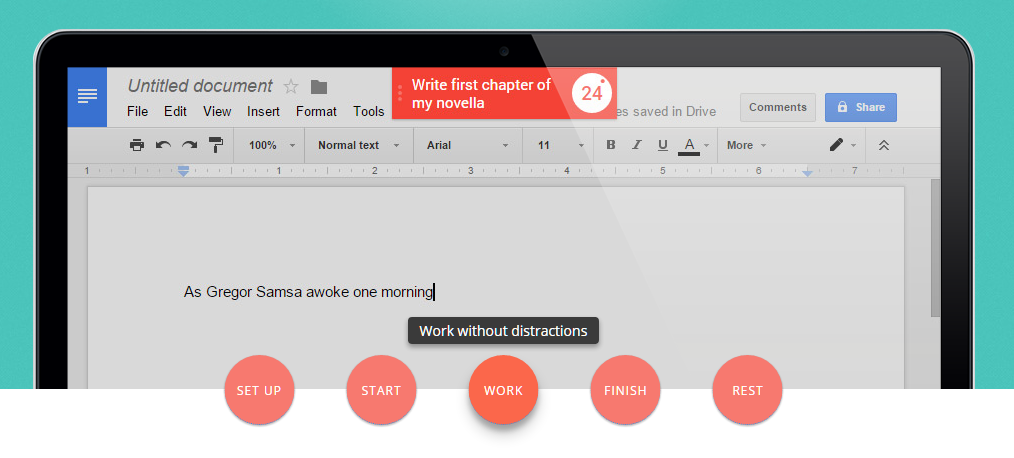
Right now I’m using Pomello, a Pomodoro timer that lives in Trello and times my work on each card. Click here to get it.
Tomorrow I’ll probably be sick of it and defiantly hammering on the keyboard until it’s time to sleep…
In my seemingly neverending quest to get shit done, I’ve seen a ton of strange methods and lists. And, let me tell you, working at Process Street — a task management system for businesses — I’m making myself practice what I preach.
Here are some of the task management techniques I’ve come across. Continue Reading
The following is a guest post from Ryan Gould, Vice President of Strategy and Marketing Services at Elevation Marketing. An expert search, social and content marketer, Ryan leads Elevation Marketing’s digital strategy department, helping brands achieve their business goals, such as improving sales and market share, by developing integrated marketing strategies distinguished by research, storytelling, engagement and conversion.
Without software, you’d be hand-writing purchase orders, using a Rolodex for a CRM, and doing your newsletters via smoke signal.
Alright, maybe that last one is a little far-fetched, but there’s no denying that in the business world, technology is absolutely necessary and enables amazing things.
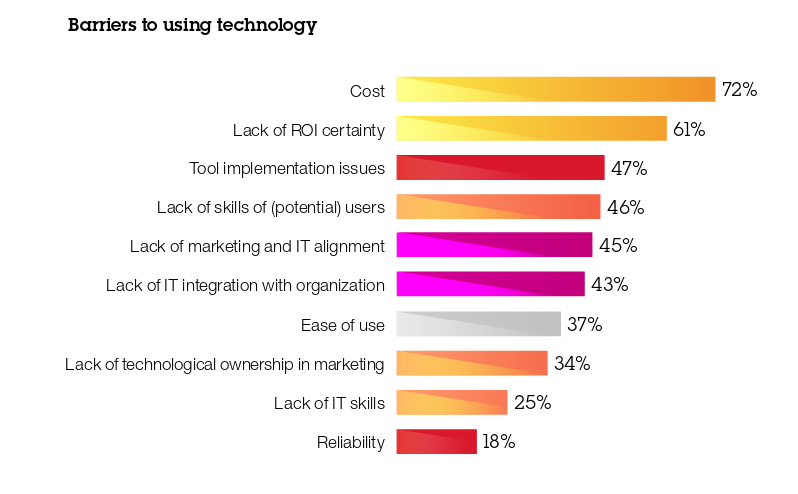
…But not everyone on your team gets enthusiastic about the prospect of learning a new tool. Even if that tool will help them improve productivity, do a better job, and escape the white-collar equivalent of hard manual labor.
IBM research on the barriers to software adoption (Source)
Your goal when rolling out software is always the same: to help your business improve operations, boost efficiency, and enable sales. These days that means staying up to date on technological trends as well.
Deciding which tool is right for you will always hinge on fundamentals, like whether it can automate your vendor payments, purchase orders, employee onboarding, lead management, etc. However, there are other considerations, such as whether your solution integrates with cloud software and is responsive on mobile devices.
But, even after you’ve selected the solution perfect for your operation and your employees – after all the sales demos, comparison docs, and review reading – you’ll find it’s that the human element that trips you up.
If you’re wondering how to host a website on Google Drive for free, well, I just did (and it took me 2 minutes!) so I’ll tell you all about it.
Even though the new Google Drive has made it harder to host websites, there’s still a pretty easy workaround I came across. It comes in the form of a Google Script written by an expert in the field, Amit Agarwal. First I’ll show you this way — the easy way — then I’ll explain how you can do it without the script.
There’s always something which can make your life easier. Whether you’re stuck watching infomercials at 2 am through lack of sleep or discovering the wonders of the gimmick section of your local supermarket, the idea of a faster and easier path saturates every part of our daily lives. Even the coffee sitting on my desk could be seen as part of this hunger for convenience; I didn’t grind the beans myself, after all.
‘Typing “how to get rich quick” then hitting the search button on your PC will give you different (and even ridiculous) ways of making a dishonest living’ – Charlene Sampilo
Now, here at Process Street, we know just as well as anyone that, more often than not, any offer of help we are given with a too-good-to-be-true scheme turns out to be flawed. The ads that you see on clickbait sites, running along the lines of “I made $570 in 6 hours, and so can you!”, or some such nonsense, prey on this desire to save some of the time and effort we put into earning our daily keep.
Despite all of this, finding easier methods and time-saving skips isn’t a bad thing. The desire for efficiency without extra effort can be incredibly useful in having a better day-to-day life, whether it takes the form of dodging traffic by taking the backstreets on the way to work or saving hundreds of dollars by going to a single price comparison website.
Well, now you can take full advantage of the power of programming even if you have no experience or technical skill with computers. This little application will allow you to automate your emails, manage your social media accounts and much, much more, with the bare minimum of setup time.
Earlier this year we compared planner sisters Trello and Asana. But if you’re the owner of an Office 365 subscription, Microsoft has rolled out its own project management tool with kanban cards into your account for free.
It’s called Microsoft Planner and claims to “take the chaos out of teamwork.” Let’s see.
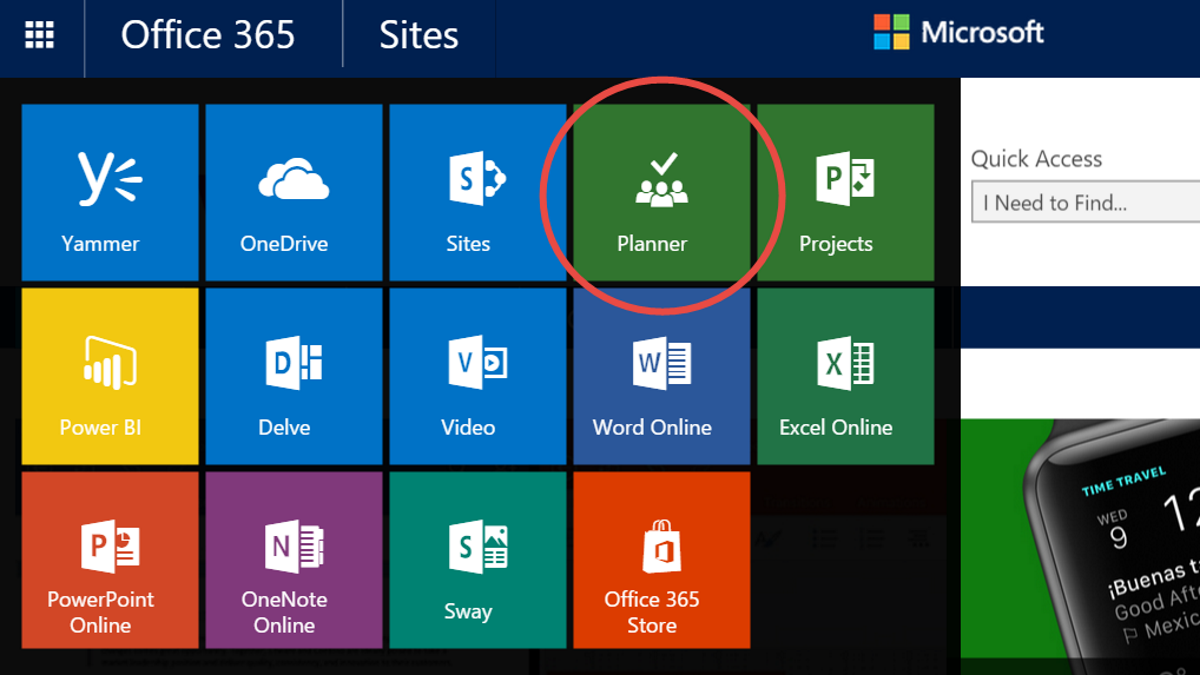
Sign in to Office 365 with your work or school email, and go to the app launcher by clicking on the Rubik’s cube menu in the top left corner. There you’ll see this friendly Planner logo:
Here’s our take on Microsoft Planner, including some tips and tricks for becoming a super user, and our take on how it differs from the other tools out there:
At Process Street, we’re always asked about the best ways to construct, track, and analyze processes.
There are loads of techniques in the school of business process management to help you with these three concerns but in this article, we’re going to give you an introduction to process mining; a data driven way to create, understand, and optimize your processes.
We’ll cover:
What is process mining?
9 process mining tools to automate your analysis
How to act on your mined results to optimize your processes
We cover solutions for enterprises all the way down to basic approaches for startups. Jump in!
Optional cookies and similar technologies support analytics, advertising and visitor identification, and embedded content. Change or withdraw consent in Cookie settings. Cookie policy.














 At
At